
Using one QR code for everything
Registration, directions, schedules and feedback usually need separate destinations so guests reach the right page immediately.
Event QR Solutions
QR codes for events help attendees open registration pages, tickets, venue maps, schedules, speaker pages, feedback forms, sponsor offers and post-event resources from signs, badges, flyers, programs and screens.
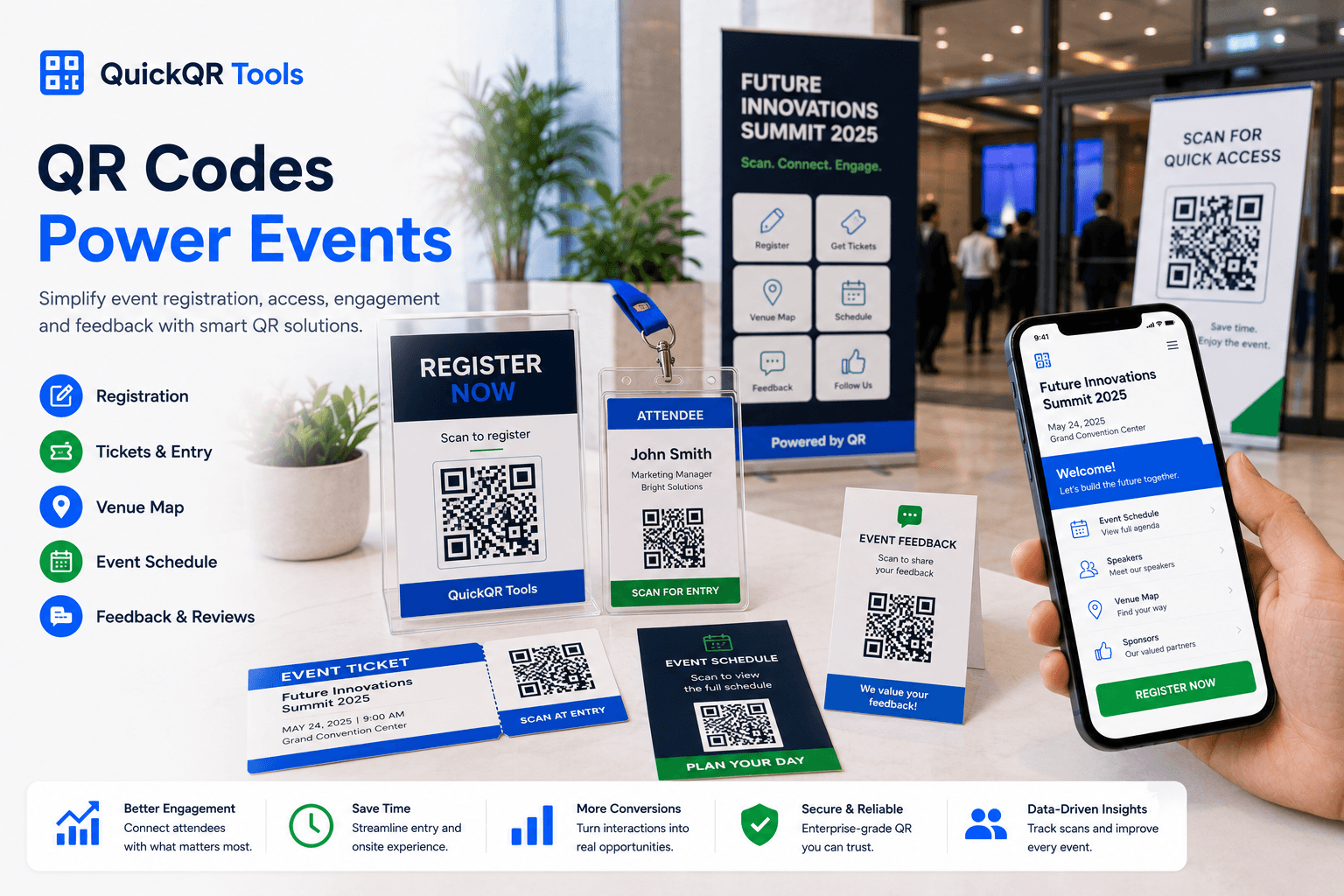
Event touchpoints
The best QR codes for events remove friction at important moments: before registration, at check-in, inside the venue and after the event ends.
Use event QR codes on posters, email graphics, badges and entry signs so attendees can register, save dates or open ticket information quickly.
Create event QRHelp guests open the right location, parking area, entrance, booth, room or meeting point from printed materials.
Create location QRShare agendas, speaker programs, workshop lists, floor plans and downloadable event documents without reprinting every update.
Create PDF QRSend attendees to a mobile event page with schedule changes, live links, sponsor details, resources and next steps.
Create website QRConnect event signs, photo walls and booths to Instagram, TikTok, YouTube, LinkedIn or a social landing page.
Create social QRPlace feedback QR codes on exit signs, thank-you cards and follow-up pages so guests can share their experience while it is still fresh.
Create review QRPlanning table
A QR code on an event poster has a different job than one on a badge, program or booth sign. The destination should match the attendee's next action.
| Event material | Best destination | Attendee benefit | Recommended tool |
|---|---|---|---|
| Poster or flyer | Registration page, ticket page or event landing page. | People can act immediately from printed promotion. | Event QR Code Generator |
| Badge or lanyard | Speaker profile, personal contact page, LinkedIn profile or schedule page. | Networking becomes faster and easier during the event. | vCard QR Code Generator |
| Program or handout | PDF agenda, downloadable resource, floor plan or session details. | Attendees can keep the latest information on their phone. | PDF QR Code Generator |
| Entrance sign | Check-in, directions, WiFi access, event rules or venue map. | Guests know exactly where to go and what to do next. | Location QR Code Generator |
| Booth or sponsor table | Product page, offer, brochure, contact form or social profile. | Visitors can continue the conversation after leaving the booth. | URL QR Code Generator |
Event checklist
QR codes for events often appear on signs, badges, tables, screens and printed programs. Test them where attendees will actually scan.
Simple workflow
Decide whether the QR code should open tickets, a map, a schedule, a resource or a feedback page.
Use the matching QuickQR tool and download PNG, SVG or PDF for print and screens.
Scan from the expected distance and confirm the destination loads quickly on phones.
Tell guests what they get after scanning so the QR code feels helpful, not random.
Avoid friction
Event QR codes should feel fast and obvious. Small print, weak labels and slow pages can make attendees ignore a useful code.
Registration, directions, schedules and feedback usually need separate destinations so guests reach the right page immediately.
Badges move, bend and reflect light. Test the final badge size before printing a full batch.
If the venue has weak mobile service, provide WiFi access and keep important pages lightweight.
Practical examples
A strong event QR system is built around moments where guests need information quickly. These examples keep the experience useful before, during and after the event.
Add QR codes to flyers, posters, email graphics and partner materials so people can register, add the date to their calendar or open the event landing page without typing a long URL.
Use QR codes for check-in instructions, venue rules, WiFi access, parking maps and the daily schedule. This reduces repeated questions and helps guests move faster.
Place QR codes near room doors, stage screens or printed agendas so attendees can open session notes, speaker profiles, slides, surveys or workshop resources.
Sponsors can use QR codes for product pages, brochures, demo bookings, giveaways, contact forms and post-event follow-up pages.
A social QR code near a photo wall can send visitors to the event hashtag, social profile, video recap or creator page.
Use QR codes on thank-you cards and follow-up materials for feedback, recordings, certificates, photo galleries, future event signups and downloadable resources.
Related tools
Start with the event action, then test print size, contrast and scan distance before guests arrive.
Create QR codes for dates, venues, event pages and attendee reminders.
Create event QRHelp guests open maps, parking areas and venue directions.
Create location QRChoose safer QR sizes for posters, badges, table signs and screens.
Calculate sizeTest event QR codes before printing or placing them around the venue.
Test scanUse accessibility guidance when planning signs, printed materials and digital destinations for event attendees.
When QR codes open offers, giveaways or promotions, keep claims clear and easy for attendees to understand.
Build a simple event QR workflow for registration, schedules, maps, resources, social sharing and feedback.
FAQ
Short answers for event organizers, venues, sponsors and teams using QR codes before, during and after an event.
The best QR codes for events usually include registration QR codes, location QR codes, PDF schedule QR codes, social media QR codes, WiFi QR codes and feedback QR codes.
Place event QR codes on posters, tickets, badges, programs, table signs, venue screens, booth displays, email graphics and follow-up materials.
Yes. QR codes can open ticket pages, registration forms, check-in instructions or event apps when the destination is mobile-friendly and easy to use.
Use SVG or PDF when the QR code will be printed large. PNG can work well for web graphics and smaller printed pieces when resolution is high enough.
Yes. Test them on the final material, from the expected distance and under the actual lighting conditions of the venue.
Yes. Place feedback QR codes near exits, on table cards, in programs or in follow-up materials so attendees can share comments after a session or event.
Yes. Sponsors can use QR codes on booth signs, brochures and giveaways to open product pages, demo bookings, offers, videos or contact forms.
Use a direct label such as Scan for tickets, Scan for schedule, Scan for map, Scan for slides or Scan to give feedback.