
Invitations
Add a calendar QR code to invitations, posters and RSVP materials.
Event Planning QR Tool
Event QR code generator for businesses, organizers, schools, venues and teams that want guests to scan invitations, flyers, tickets, badges or posters and save event details faster.
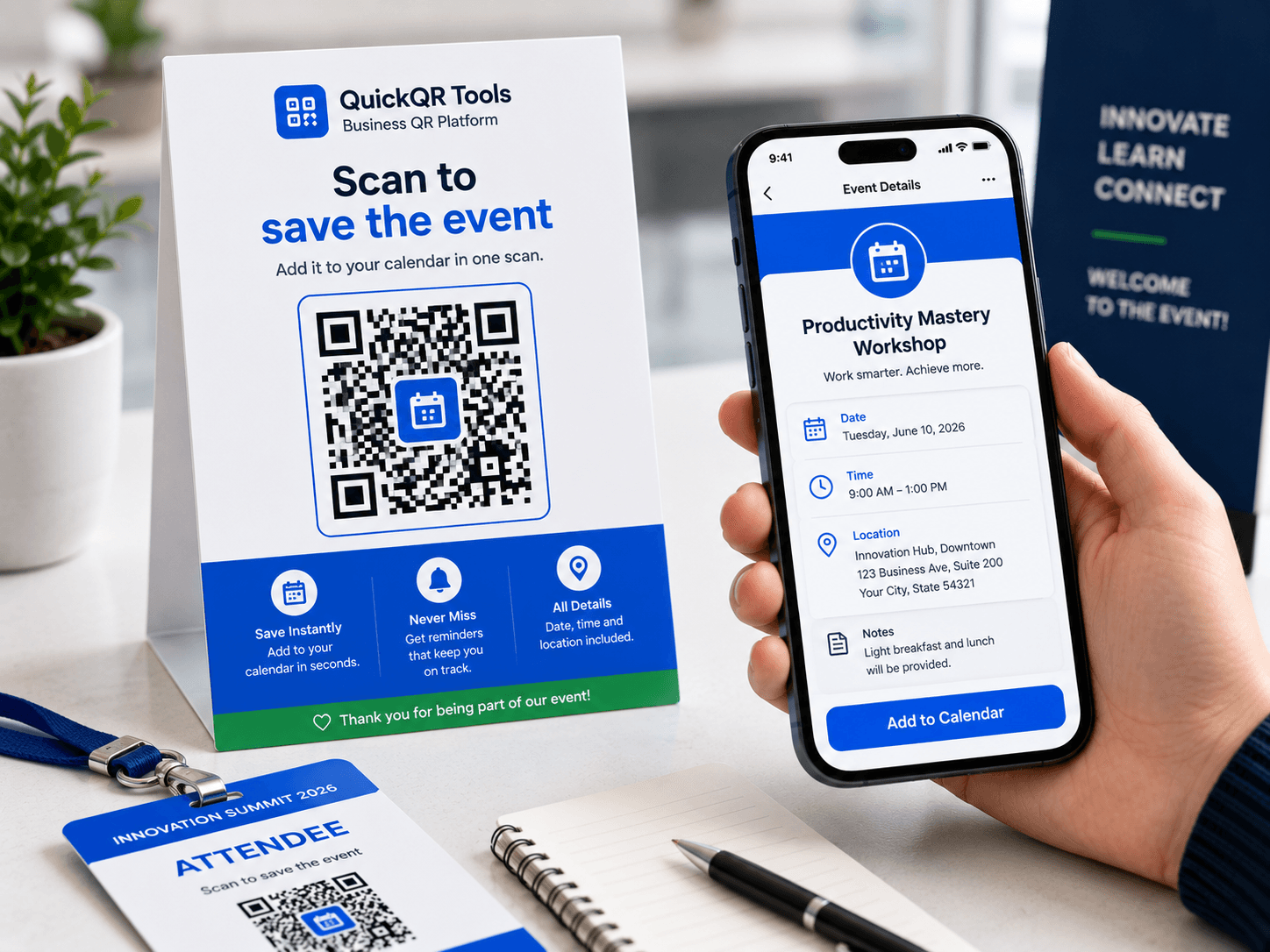
Add the event details that should be stored in the QR code.
Use it on invitations, tickets, flyers, posters, conference badges, agendas or appointment reminders.
Event QR codes make dates, times and places easier to save from printed or digital materials.
Add a calendar QR code to invitations, posters and RSVP materials.
Help clients save consultation, booking or demo times quickly.
Share class sessions, workshops, office hours or school activities.
Put event details on agendas, onboarding sheets or internal notices.
Create a QR code that stores event details in calendar format, then use the complete guide to prepare it for invitations, flyers, tickets and event reminders.
Enter the title, date, time, location and description.
Create a QR code with calendar data inside.
Export the QR code as PNG, SVG or PDF.
Read the step-by-step guide for calendar QR codes, invitations, flyers, tickets and reminders.
Add directions and venue details when your event has a physical location.
Choose the right QR code size before printing event QR codes on posters, flyers or invitations.
An event QR code generator creates a QR code that stores calendar event information. When someone scans the code, they can read or save details such as the event title, date, start time, end time, location and description. It is useful for invitations, appointment cards, tickets, flyers, posters, agendas, class schedules, workshops, webinars and business events.
This event QR code generator creates calendar data in a standard iCalendar-style format. That makes the QR code practical for people who need to keep the event details handy instead of typing a date, time and venue manually. The scan turns printed or digital event materials into an action: save the date, check the time, confirm the location and keep the note available.
Event QR codes are especially helpful when the event has a clear schedule. A flyer can promote the event, but the QR code helps the visitor remember it. An invitation can describe the occasion, but the QR code helps the guest save it. A conference badge can show the session name, but the QR code helps attendees keep the room, time and agenda details together.
iCalendar event reference
An event QR code generator is strongest when the scan should help people remember a specific date, time, place and agenda.
Use an event QR code on wedding invitations, birthday cards, community events, church programs, school activities and private gatherings. Guests can scan the code to keep the event details with them instead of retyping the date and address later.
Consultants, clinics, agencies, sales teams and service providers can add an event QR code to appointment cards, printed reminders or follow-up documents. It reduces missed appointments by making the date and time easier to save.
Teachers, trainers and workshop organizers can place event QR codes on syllabi, posters, handouts and internal schedules. Learners can scan a class session, office hour, webinar or workshop time and keep it in their calendar.
Conferences can use event QR codes for individual talks, breakout sessions, networking times and booth activities. A QR code on an agenda helps attendees save the session they do not want to miss.
A strong event QR code contains enough detail to be useful without turning the QR code into a crowded block of data.
| Field | Recommended content | Why it matters |
|---|---|---|
| Event title | Use a clear name, such as “Product Demo” or “Spring Workshop.” | The title becomes the main label people see in their calendar. |
| Date and time | Use the correct start and end time, then test the scan. | People scan event QR codes mainly to avoid manually entering schedule details. |
| Location | Add the venue, room, address or online meeting note. | The location helps attendees arrive or join without searching through the invitation again. |
| Description | Add a short agenda, access note, dress code, contact note or reminder. | The description gives context without requiring a separate page. |
| QR label | Write “Scan to save the event” near the QR code. | A visible label explains the action and increases scan trust. |
An event QR code generator is best for calendar details. Other QR tools can support directions, documents, registration pages and follow-up content.
Use this event QR code generator to share title, date, time, location and short notes.
Use a location QR code when the main action is opening a venue, parking area or meeting point.
Use a PDF QR code for programs, menus, brochures, schedules, maps or speaker sheets.
Use a URL QR code for registration pages, ticketing pages, RSVP forms and updateable event pages.
Use social media QR codes for event posts, launch videos, creator promotion and follow-up content.
Use an email QR code when attendees should contact the organizer with a prepared message.
A useful event QR code is accurate, scannable and clear about what happens after scanning.
Scan the QR code before publishing and confirm the date, start time and end time. If your audience is in multiple time zones, include a clear time zone note in the description or link to a full event page for complex scheduling.
The QR code should store the most important event details. If you need a full agenda, speaker bios, venue rules, maps or ticket details, use a PDF QR code or URL QR code alongside the event QR code.
Use copy like “Scan to save the event,” “Scan to add this workshop to your calendar” or “Scan for appointment details.” A clear label helps people understand that the scan is calendar-related.
Event QR codes often appear on invitations, flyers, tickets and posters. Use high contrast, enough white space and a size that fits the scanning distance. Test the final exported PNG, SVG or PDF before printing.
A QR code created with an event QR code generator is usually static because the event data is encoded directly inside the QR code. If the date, time, location or description changes, the printed QR code will still contain the old information. That is fine for confirmed events, but risky for schedules that may change.
For stable appointments, private invitations, fixed classes and confirmed sessions, a static event QR code is simple and useful. For events that may move, sell out, change speakers, change rooms or update agendas, link to a live event page instead. You can then update the page without replacing every printed QR code.
The practical rule is: use event QR for confirmed calendar details and URL QR for updateable event information. If both are useful, include both with clear labels.
The best event QR code copy depends on whether the scan supports a private invitation, public event, business appointment or learning session.
| Use case | Good title | Useful description | Best supporting QR tool |
|---|---|---|---|
| Workshop | Intro to Digital Marketing Workshop | Bring your laptop. Check in at room 204 ten minutes before start. | Location QR for venue directions. |
| Appointment | Consultation with Bright Dental | Please arrive 15 minutes early and bring your insurance card. | Phone QR or email QR for contact. |
| Wedding | Alex and Sam Wedding Ceremony | Ceremony starts at 4 PM. Reception follows in the main hall. | Location QR for parking and venue entrance. |
| Conference session | AI Tools for Small Business | Breakout room B. Seating opens 15 minutes before the session. | PDF QR for program details. |
| Webinar | Customer Review Strategy Webinar | Online session. Registration link and reminder email will be sent separately. | URL QR for registration page. |
Event QR codes are often scanned from printed materials, so placement matters. On invitations, place the QR code near the date and time. On flyers, place it near the call to action. On posters, place it where people can scan without standing too close or blocking foot traffic. On tickets and badges, keep the QR code away from folds, holes, lanyards and edges.
A QR code should never be the only place where the event information appears. Keep the visible date, time and venue on the design, then use the QR code to make saving those details easier. This helps people who cannot scan, people who want to confirm the information visually and visitors using accessibility tools.
Before printing, export the QR code as SVG or PDF when possible. These formats keep edges sharp in design tools and print workflows. PNG is convenient for quick digital use, but large print materials usually benefit from vector or print-ready formats.
Before publishing event QR codes on invitations, flyers, tickets, badges, posters or venue signs, use these QR utilities to check scan quality, print size, distance and contrast.
Test the event QR code from the final design before sharing it with attendees.
Choose a practical QR size for invitations, flyers, tickets, badges and printed schedules.
Estimate scan distance for posters, venue signs, registration tables and event displays.
Check whether event colors, backgrounds and sponsor layouts keep the QR code readable.
Review verified QR code statistics for scanning, business usage and print-to-digital event campaigns.
For businesses, an event QR code generator can reduce missed appointments, improve attendance and make printed promotions more actionable.
Clinics, salons, repair services, agencies and consultants can add event QR codes to appointment cards or confirmation handouts. The scan gives clients a quick way to keep the appointment time, address and preparation note in their calendar.
Stores can use event QR codes for product launches, tasting events, workshops, seasonal promotions and community activities. A flyer can generate interest, while the QR code helps customers remember the exact date and time.
Agents can use event QR codes on property flyers, yard signs and open house invitations. The QR code can store the open house window, property address and a short reminder to bring questions or contact the agent.
For webinars, use the event QR code for the schedule and a URL QR code for registration or join links. This avoids placing long access links directly inside the calendar note and keeps the event data easier to scan.
Most event QR problems come from publishing too early, using vague details or encoding too much information into one QR code.
If the time, room or access instructions may change, link to an updateable page instead of encoding final calendar data too early.
A calendar entry called “Meeting” is not useful later. Include the organizer, topic or location when needed.
Keep the event QR code focused on schedule details and use a PDF or URL QR code for long agendas or policies.
Scan the final printed or digital design and confirm the event title, date, time, location and note.
Add the room, entrance, booth, parking note or online access context when it helps attendees arrive prepared.
Support complex events with URL, PDF, location or email QR codes when those actions are better than calendar data.
A calendar QR code should help users, not hide essential information from people who cannot scan.
Always show the event title, date, time and location in readable text near the QR code. The QR code should be a convenience layer, not the only source of information. This improves accessibility and helps users confirm that they are saving the correct event.
Labels such as “Scan to save the date” or “Scan to add this event to your calendar” are better than generic labels like “Scan me.” Clear copy improves trust and tells users what action will happen after scanning.
Some people will scan the QR code, others will type the address, and others may call or email. For important events, provide visible contact details, a location link or a web page in addition to the calendar QR code.
Do not put private access codes, personal phone numbers, sensitive addresses or confidential meeting details in a public event QR code. Anyone who can scan the code can read or copy the calendar data.
An event QR code generator is easiest to use when the event happens in one local time zone. For local events, classes, appointments and in-person meetings, the visible time on the invitation usually matches what attendees expect. Still, you should test the QR code and confirm how the calendar app displays the time on your phone.
For webinars, online events and international audiences, time zones need more care. A calendar QR code can store date and time details, but visitors may use different devices, calendar apps and regional settings. If the event is important or global, include the time zone in the event description and link to a full event page where the schedule can be explained clearly.
Hybrid events often need both calendar and location support. The calendar entry can store the session time and a short description, while the event page can include the online meeting link, room details, speaker notes and updates. In that situation, use this event QR code generator for the save-the-date action and a URL QR code for the full event experience.
The event QR code generator works best when it is part of a simple promotion workflow, not an isolated design element.
| Promotion stage | Best QR action | Recommended tool |
|---|---|---|
| Awareness | Send people to an event page, registration page or announcement. | URL QR Code Generator |
| Planning | Help interested people save the date, time and short event note. | Event QR Code Generator |
| Arrival | Open the venue, parking entrance, booth or meeting point in Google Maps. | Location QR Code Generator |
| At the event | Share agendas, speaker sheets, menus, handouts or session documents. | PDF QR Code Generator |
| After the event | Send attendees to photos, social posts, feedback or follow-up pages. | Social Media, Email or URL QR tools |
Review the event from the attendee's point of view before putting the QR code on invitations, flyers, tickets or posters.
The design should still show title, date, time and location. The QR code adds convenience, not the only source of truth.
Use a label such as “Scan to save the event” so visitors know they are adding calendar details.
Confirm the QR code works from the final PNG, SVG or PDF before publishing or printing.
If time, room, agenda or venue may change, point a URL QR code to an updateable event page.
Do not place private access codes or confidential meeting details inside a public event QR code.
Use map, PDF or URL QR codes when attendees also need directions, programs, registration or updates.
Create a new QR code whenever the saved calendar details no longer match the real event. That includes a changed date, changed start time, changed end time, new room, new venue, revised access instructions or a new event title. A static QR code is dependable only when the encoded information stays correct.
For recurring events, decide whether each session needs its own QR code. A weekly class, monthly meetup or repeated workshop may need separate event QR codes if the date changes each time. If the schedule is published on a page that updates regularly, a URL QR code may be easier for long-term use than a date-specific event QR code generator workflow.
Use these guides to prepare event QR codes for tickets, schedules, registration pages and print materials.
Use event QR codes across invitations, posters, tickets, local campaigns and attendee journeys.
Print event QR codes at the right size for badges, signs, programs, posters and entry materials.
Plan event QR codes for registration, tickets, schedules, venue maps, resources and attendee feedback.
Review QR code best practices before publishing event materials that need to scan reliably.
Follow the tutorial for creating QR codes for event details, registration pages and calendar flows.
Answers to common questions about using an event QR code generator for calendar details, invitations, appointments, flyers and tickets.
Yes. This event QR code generator lets you create a free static QR code with calendar event data and download it as PNG, SVG or PDF.
The QR code contains calendar event information such as title, date, time, location and description.
Yes. Event QR codes are useful for invitations, tickets, flyers, posters, classes and appointments.
No. An event QR code stores calendar details. A location QR code opens a map destination. Use both if people need to save the date and find the venue.
Yes. Appointment cards, reminders and booking confirmations can use event QR codes to help clients save the date and time.
No. A static event QR code keeps the calendar data encoded when it was created. If the event changes, create and print a new QR code or use a URL QR code to an updateable page.
Keep the event QR code concise. For a long agenda, use a PDF QR code or URL QR code and keep the calendar QR code focused on title, date, time and location.
Yes. You can download the generated QR code as PNG, SVG or PDF directly from this event QR code generator.
Create QR codes for URLs, locations, PDFs, social posts, email and contact cards.
Create a QR code for any website link.
Open an address or GPS point in Google Maps.
Share event programs, schedules, menus or information sheets.
Send attendees to event posts, videos, profiles or updates.
Share livestreams, speaker videos, event recaps and playlist resources.
Help attendees download event, ticketing, loyalty or community apps from printed materials.
Store plain text directly in a QR code.
Open a ready-to-send email from a scan.
Explore the full Business QR Toolkit for events, marketing, contact and customer workflows.
The Business QR Toolkit
Add your event title, date, time, location and note, then download a clean QR code for invitations, tickets, flyers, posters, badges and appointment reminders.