
Use the distance rule
Start with a QR code at least one tenth of the scan distance. A 50 cm scan distance usually needs about a 5 cm QR code.
QR code size calculator helps you choose a practical print size for flyers, menus, business cards, posters, packaging, table tents and signs before you send anything to print.
Print size planning
Business ready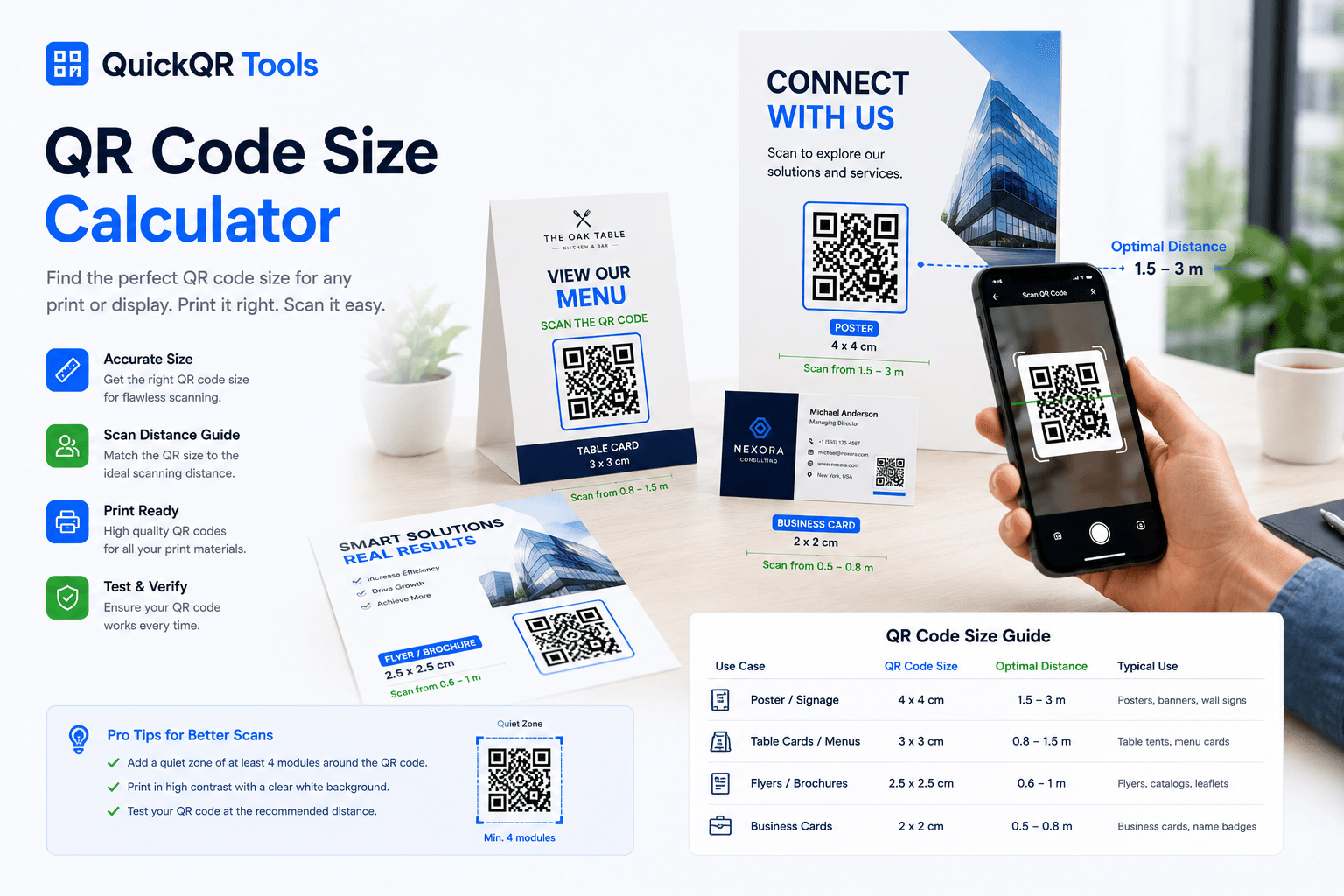
Enter the approximate distance people will scan from. This qr code size calculator uses a practical 10:1 distance rule, then adjusts for the print material.
Choose the real-world situation first. The estimate updates instantly.
Recommended starting point
For a 30 cm scan distance, start with a QR code around 3.0 cm wide before quiet zone.
A QR code size calculator gives a useful starting point, but the final result still depends on contrast, print quality, quiet zone and the real scanning environment.
Use this qr code size calculator whenever the scan distance changes, because a QR code for a table menu does not need the same print size as a QR code on a window sign.
Start with a QR code at least one tenth of the scan distance. A 50 cm scan distance usually needs about a 5 cm QR code.
Leave clear space around the QR code. Crowded designs, nearby text and tight borders can make scanning less reliable.
SVG or PDF is best for professional layouts. PNG can work, but use enough resolution for the final printed size.
Use this chart as a practical reference when preparing QR codes for common business materials. The qr code size calculator result should always be tested on the final printed layout.
| Material | Typical scan distance | Suggested QR size | Best use |
|---|---|---|---|
| Business card | 20 to 30 cm | 2 to 3 cm | vCard, LinkedIn, website or portfolio QR codes. |
| Flyer or brochure | 30 to 60 cm | 3 to 6 cm | Campaign pages, coupons, app downloads and event links. |
| Restaurant menu or table tent | 30 to 80 cm | 4 to 8 cm | Menu QR, WiFi QR, Google review QR and table ordering flows. |
| Poster or wall sign | 1 to 2 m | 10 to 20 cm | Events, retail, real estate, recruitment and public information. |
| Window sign or large display | 2 m or more | 20 cm or larger | Storefront campaigns, directions, offers and walk-by scans. |
Use this tool before printing QR codes that need to work in real environments, not only in a digital preview.
Use the calculator for menu QR codes, WiFi QR signs, review cards, table tents, hotel room cards and front desk materials.
Prepare QR codes for flyers, posters, coupons, packaging, trade show signs, product inserts and local campaigns.
Choose a QR size that fits the design while still scanning reliably from a natural hand-held distance.
Estimate larger QR sizes for badges, schedules, registration posters, venue directions and sponsor materials.
Go deeper with the guides that support QR size, print quality and business campaigns. For technical background, review the ISO/IEC 18004 QR code standard.
Learn size, distance, contrast, quiet zone and file format rules for print.
Understand QR code types, static codes, dynamic codes and scan best practices.
Use QR codes in campaigns, packaging, flyers, events and offline-to-online journeys.
Choose safer QR sizes for product packaging, shelf cards, receipts, window signs and store displays.
Size QR codes for event posters, tickets, table signs, badges, programs and venue displays.
Create a QR code after choosing the right print size for your material.
Review verified QR code statistics for mobile scanning, business adoption and print-to-digital planning.
Answers to common questions about QR code size, print distance and scannability. This qr code size calculator is built for practical business printing decisions.
A QR code size calculator estimates the printed width a QR code should have based on the expected scanning distance and print material.
The best QR code size depends on scan distance. For close-range materials, 2 to 4 cm can work. For posters, signs and windows, the QR code should be much larger.
For many close-range print materials, 2 x 2 cm is a practical minimum, but larger is safer when the scan distance, lighting or print quality is uncertain.
A practical starting rule is to make the QR code at least one tenth of the scan distance. For example, a 100 cm scan distance suggests a QR code around 10 cm wide.
Yes. A quiet zone is the clear space around the QR code. Without enough clear space, nearby design elements can make the code harder to scan.
SVG is usually better for professional print because it stays sharp at any size. PNG can work if it has enough resolution for the final printed dimensions.
A QR code can be larger than necessary, but that is usually better than being too small. The main issue is visual balance and making sure the scan action is clearly labeled.
Yes. Always test the final printed QR code from the real scan distance, under realistic lighting, with more than one phone if possible.
Calculate the print size, generate your QR code and test it before publishing your material.