
Appointment confirmations
Let visitors scan and send a confirmation text without typing the number.
Business Contact QR Tool
Use this SMS QR code generator to create a professional text message QR code that opens a ready-to-send SMS with a phone number and prefilled message. Help customers confirm appointments, request quotes, send RSVPs, ask for support or text a local business without typing your number.
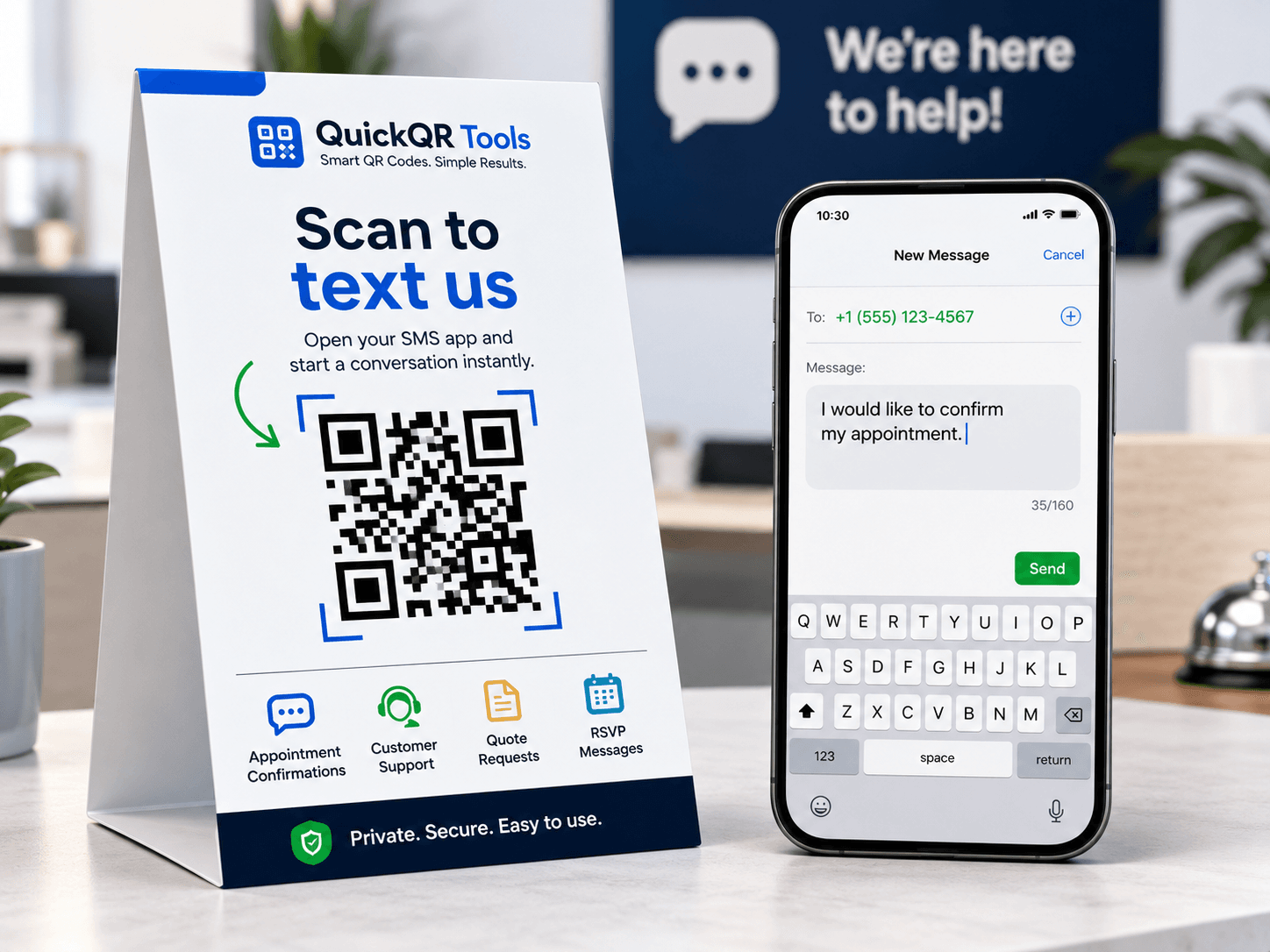
Enter the phone number and text message that should open after scanning. This SMS QR code generator turns a short reply workflow into a scannable QR code.
Use the SMS QR code generator output on appointment cards, posters, receipts, product packaging, event signs or service desks.
This SMS QR code generator reduces friction when people need to send a short message, confirm something, request help or start a simple conversation.
Let visitors scan and send a confirmation text without typing the number.
Place an SMS QR code on counters, flyers or equipment labels for fast support.
Collect simple RSVP, check-in or volunteer messages from printed materials.
Invite customers to send a keyword or request by scanning a code.
Use this SMS QR code generator to create a QR code that opens the user's messaging app with a phone number and optional message ready, then review the guide for message examples and print use cases.
Enter the destination number in international format when possible.
Write the text that should be prefilled after scanning.
Export the QR code as PNG, SVG or PDF.
Read the step-by-step guide for SMS QR codes, prefilled messages and mobile reply workflows.
Compare SMS with email QR codes for support, bookings and contact requests.
Use WhatsApp QR codes when chat is better than standard SMS replies.
An SMS QR code generator creates a scannable code that opens the messaging app with a phone number and optional text message already prepared.
An SMS QR code is useful when the next action should be a short text message. Instead of asking someone to type a phone number and message manually, you can place a QR code on a flyer, table card, ticket, receipt, product label, sign or printed instruction. After scanning, the person's messaging app opens with the number and message filled in.
This is different from a normal URL QR code. A URL QR code opens a web page. An SMS QR code prepares a mobile message action. It is useful for appointment confirmations, support requests, simple RSVPs, keyword campaigns, local service requests, pickup confirmations and quick customer replies.
The SMS QR code generator on this page builds an SMS link, converts it into a QR code and lets you download the result as PNG, SVG or PDF. You can also copy the generated SMS link for use in buttons, contact cards or mobile landing pages.
Official SMS URI referenceSMS QR code generator workflows work best when the message can be short, mobile-friendly and easy to send.
SMS QR code generator phone number formatting affects whether the generated SMS link opens correctly across devices and regions.
International phone format is usually the safest option for SMS QR codes. Include the country code and avoid extra spaces when possible. For example, a United States or Canada number may look like +15551234567. A United Kingdom number starts with +44, France starts with +33 and other countries use their own dialing codes.
The SMS QR code generator uses the phone number to build a link that mobile devices understand. If the number is incomplete, local-only or written with unusual punctuation, some devices may not open the correct message thread. Before printing, scan the QR code on a real phone and confirm that the number opens as expected.
If the SMS code is for a business, use the number your team actually monitors. If several people need to answer messages, make sure the destination number belongs to a shared workflow rather than a personal phone that may be unavailable.
SMS is best for short messages. A prefilled text should give the sender a quick starting point, not a long script. Examples include "I would like to confirm my appointment", "I need help with my order", "I would like a quote" or "I am interested in this event". The user can edit the message before sending.
Short messages also help keep the QR code easier to scan. Very long encoded text creates denser QR codes, especially when combined with a phone number. Dense QR codes can still work, but they need more size and better print quality.
If you need long details, multiple fields or file uploads, a URL QR code to a form may be better. Use SMS QR codes when speed and simplicity matter most.
Use these SMS QR code generator examples as a starting point, then adapt the message to your campaign, business or event.
| Goal | Suggested SMS message | Where to use it |
|---|---|---|
| Appointment confirmation | Hello, I would like to confirm my appointment. | Appointment cards, reminder slips, clinic counters and service desks. |
| Quote request | Hello, I would like to request a quote. | Flyers, business cards, van decals, service brochures and local ads. |
| Support request | Hello, I need help with my order. | Receipts, packaging inserts, product labels and help counters. |
| Event RSVP | Hello, I would like to RSVP for this event. | Invitations, posters, programs, school events and community boards. |
| Pickup update | Hello, I am here for my pickup order. | Curbside pickup signs, restaurant counters and order confirmation cards. |
An SMS QR code generator is useful for short mobile replies, but other contact QR codes may fit better depending on the conversation.
| QR code type | Best when | Recommended tool |
|---|---|---|
| SMS QR code | You want a short text message prepared on the user's phone. | Use this SMS QR Code Generator. |
| WhatsApp QR code | You want a chat conversation in WhatsApp with an optional prefilled message. | Use the WhatsApp QR Code Generator. |
| Email QR code | You want a written message with recipient, subject and body text. | Use the Email QR Code Generator. |
| Phone QR code | You want the scanner to call directly instead of sending a text. | Use the Phone QR Code Generator. |
| vCard QR code | You want people to save full contact details to their device. | Use the vCard QR Code Generator. |
A good SMS QR code generator workflow is short, clear, easy to scan and connected to a phone number that can receive replies.
SMS QR code generator placement should match the moment when a short text message is the easiest response.
SMS QR codes are useful on printed materials that ask for a quick reply. A local service flyer can invite people to request a quote. A clinic card can invite patients to confirm an appointment. A school poster can invite volunteers to send interest. A restaurant sign can let pickup customers text when they arrive.
Use a label near the QR code so the action is obvious. Examples include "Scan to text us", "Scan to confirm your appointment", "Scan to request a quote" or "Scan to RSVP by SMS". The label should explain the result before the person scans.
For print, SVG and PDF are useful because they keep the QR code sharp in design tools. PNG is fine for quick documents and web graphics. Always test the real printed size and scanning distance.
SMS QR codes can work well in physical locations where a visitor or customer may need help quickly. A counter sign can send a support text. An equipment label can help someone report an issue. A pickup sign can prepare a message that includes "I am here for pickup".
Keep the message connected to the location. If the QR code appears on a specific machine, product, room or counter, the message can mention that context. This reduces back-and-forth and helps the team understand why the text was sent.
If the request needs photos, long explanations or account details, consider using WhatsApp or a web form instead. SMS is best for quick, lightweight communication.
SMS QR code generator links are practical, but behavior can vary slightly by phone, operating system and messaging app.
When someone scans an SMS QR code, the phone decides how to open the messaging app. Most modern phones can prepare the number and message, but the exact screen may vary. Some devices open the draft immediately. Others may ask for confirmation or show the default messaging app first.
The user still chooses whether to send the message. The QR code prepares the draft, but it does not send a text automatically. This is good for trust because people can review the message before sending it.
Because device behavior can vary, test the code on more than one phone before printing large quantities. Check that the number is correct, the message appears and the scan works from the expected distance.
SMS messages are designed for short text. Long messages may be split by carriers or handled differently by messaging apps. The QR code itself can encode a longer message, but that does not mean the user experience will be better. Shorter is usually stronger.
Also remember that standard SMS may involve carrier charges depending on the user's plan and country. For international audiences, WhatsApp, email or a web form may be more appropriate. For local, simple and fast replies, SMS can be excellent.
If the campaign is sensitive, regulated or requires personal data, avoid collecting too much through SMS. A secure web form may be safer and easier to manage.
Avoid these SMS QR code generator issues before adding an SMS QR code to print materials, signs or customer workflows.
A vague SMS message makes the reply harder to understand. If the message only says "Hello", your team may not know whether the person needs support, a quote, a booking or a pickup update. Use the prefilled message to identify the intent.
The destination number also matters. If the SMS QR code sends messages to a number no one monitors, the user experience fails. Use a business number, support line or shared workflow when possible. Test the number before publishing.
For printed materials, check the phone number carefully. A single wrong digit means the QR code may send texts to the wrong place.
QR codes need enough size, contrast and quiet space to scan reliably. If the code is printed too small, placed over a busy image or squeezed into a crowded design, some people may not be able to scan it. This is especially important for posters, counters, labels and signs.
Context matters too. A QR code without a label does not tell people what will happen. Add a short call to action that explains the SMS action. The more specific the label, the better: "Scan to text support" is stronger than "Scan here".
Scan the printed version in real conditions before distribution. Test lighting, distance and phone camera behavior, not only the digital preview.
Most SMS QR code generator outputs are static because they encode the destination number and message directly in the QR code.
A static SMS QR code is enough when the phone number and message will stay the same. This works well for appointment confirmations, basic support requests, local service inquiries, event RSVPs and simple pickup messages. The QR code can keep working as long as the destination number remains active.
Static QR codes are practical because they do not require an account, dashboard or redirect service. They are fast to create and easy to download. If the workflow is stable and the printed material has a short or medium lifespan, a static SMS QR code can be the cleanest option.
The limitation is that the encoded number and message cannot be edited after printing. If the phone number changes, the old printed QR code will still point to the old number. For long-term materials, think carefully before printing large quantities.
If you expect the phone number, message or contact process to change, a URL QR code may be better. You can create a contact page on your website and place an SMS button, WhatsApp button, email button or form on that page. The QR code points to the page, and the page can be updated later.
This adds one step for the user, but it gives you more control. It also helps when you need tracking, multiple contact methods, privacy information or campaign details. A direct SMS QR code is best for speed. A URL QR code to a controlled page is best for flexibility.
For local campaigns, many businesses use both approaches. They use SMS QR codes for quick replies on short-term materials and URL QR codes for long-term signs, brochures and pages that may need updates.
An SMS QR code generator prepares a message from the user's phone, so the purpose should be obvious before they scan.
People are more likely to scan when they understand where the message goes. A QR code beside a clear brand name, phone label or support message feels safer than a code without context. If the QR code sends a text to customer support, say that. If it sends a booking confirmation, say that. If it sends a keyword for a promotion, say that.
Use plain calls to action such as "Scan to text support", "Scan to confirm your appointment" or "Scan to request a quote by SMS". This helps the scanner make an informed choice and reduces accidental messages from people who expected a website or menu.
Do not use SMS QR codes to collect sensitive information unless the user clearly understands what they are sending. For private, regulated or detailed workflows, a secure web form may be more appropriate.
SMS behavior and costs can vary by country, carrier and phone plan. Some users may pay for text messages, especially for international numbers. If your audience is international, WhatsApp, email or a web form may be more comfortable for some visitors.
For local audiences, SMS remains useful because the messaging app is already available on most phones. It does not require the user to install a specific chat app or log in to a website. That makes it a strong choice for short, local, practical replies.
Set expectations clearly. The QR code should not surprise the user with a message they did not intend to send. The phone will normally show a draft first, but your surrounding text should still explain the action.
Direct SMS QR code generator outputs do not automatically provide full analytics, but smart message planning can still show which materials generate replies.
A simple tracking method is to create a different prefilled message for each material. A flyer can say "I saw your flyer and would like a quote." A counter sign can say "I am at the counter and need help." A pickup sign can say "I am here for my pickup order." When texts arrive, the wording tells you where the scan likely came from.
This method is not advanced analytics, but it is useful for small businesses, events and local campaigns. It helps you understand which signs, flyers or cards are producing useful messages. You can then improve the call to action or placement based on real replies.
If your team receives many messages, agree on a simple way to tag or note the source. Even a short note in a shared spreadsheet can help you see which QR code placements work best.
If you need stronger reporting, use a URL QR code that points to a landing page. The page can include analytics, UTM parameters, an SMS button, a phone button, a WhatsApp link and a form. This creates more data than a direct SMS link.
The tradeoff is speed. A direct SMS QR code opens the message app quickly. A landing page gives more control but adds one step. Choose the path based on the campaign: simple local reply or measurable multi-channel campaign.
For important campaigns, a landing page can also explain privacy, response time and contact options before the user sends a message.
An SMS QR code generator result should be easy to understand before scanning and easy to scan in the real environment where it appears.
Do not place an SMS QR code without a label. A visible explanation helps users understand the action and improves trust. "Scan to text us" is clear. "Scan to confirm by SMS" is stronger. "Scan to request a quote by text" is even more specific.
If the material includes several QR codes, label each one carefully. A WiFi QR code, menu QR code, SMS QR code and review QR code should not look identical. The user should know which scan opens a message app and which scan opens a website or another action.
Good labeling also helps with accessibility. People should not have to guess what a code does or scan it just to discover the purpose.
SMS QR codes may be scanned from counters, walls, vehicles, flyers, product labels, tickets or signs. The code needs enough size, strong contrast and quiet space around it. Avoid low contrast colors, busy backgrounds and small placements where phone cameras struggle.
Test the printed version, not only the digital preview. A QR code that scans on a bright laptop screen may be harder to scan on a glossy flyer or a small label. Check distance, lighting and angle before you publish.
The best SMS QR code feels simple: scan, review the message, send. The design should support that path instead of adding friction.
Use these guides to connect SMS QR codes with customer communication, print materials and local campaigns.
Use SMS QR codes for lead capture, appointment replies, quote requests, event follow-up and local campaigns.
Prepare SMS QR codes for flyers, storefronts, cards, receipts, labels and printed support materials.
Understand static QR codes, scan reliability, print rules and business QR workflows.
Compare SMS follow-up with review QR workflows for local businesses and service teams.
Before printing an SMS QR code on flyers, pickup signs, appointment cards, product labels or support materials, use these QR utilities to check scan quality, print size, distance and contrast.
Test the SMS QR code on real phones and confirm the draft opens with the right number and message.
Choose a practical QR size for flyers, receipts, pickup signs, appointment cards and product labels.
Estimate scan distance for counters, storefronts, posters, event signs and service desk displays.
Check whether branded SMS cards, dark backgrounds and printed designs keep the QR code readable.
Review verified QR code statistics for mobile scanning, business usage and print-to-digital customer replies.
Answers to common questions about SMS QR codes.
Yes. You can create a free static SMS QR code with a phone number and optional message.
The QR code opens the user's messaging app with the phone number and message prefilled.
Yes. You can download the generated QR code as PNG, SVG or PDF.
Yes. Using international format, such as +15551234567, helps the QR code work more reliably across devices.
No. The QR code opens a prepared SMS draft, but the user reviews and sends the message manually.
Use SMS for simple text replies through the phone's messaging app. Use WhatsApp when you want a chat experience inside WhatsApp.
Use PNG for simple sharing, SVG for scalable design work and PDF when you want a print-ready file.
Not inside a static SMS QR code. If the number may change, use a URL QR code that points to a contact page you control.
Create QR codes for URLs, WiFi, WhatsApp, email, phone numbers and contact cards.
Explore the full QuickQR Tools business QR toolkit for contact, marketing, restaurant and social QR codes.
Create a QR code for any website link.
Let visitors connect to WiFi by scanning a code.
Open a WhatsApp chat with a prefilled message.
Open a ready-to-send email from a scan.
Let visitors call a number after scanning.
Share contact details and business information.
The Business QR Toolkit
Create a professional SMS QR code for appointment confirmations, quote requests, event replies, pickup updates and customer support. Generate it free, test the message draft and download a clean file for print or digital use.