
What is a crypto payment QR code?
A crypto payment QR code is a scannable code that contains a public wallet address and, when supported, optional payment details such as an amount, label or note. Instead of copying a long address manually, the payer can scan the QR code with a wallet app.
This is useful because crypto addresses are long and mistakes can be costly. A QR code can reduce typing errors on invoices, donation pages, checkout screens, event booths, printed signs and payment instruction sheets. It does not remove the need to verify the destination, but it can make the payment flow easier.
This guide is about creating QR codes for payment instructions. It is not financial advice, investment advice or a recommendation to use any specific coin, wallet or network. Crypto payments can be irreversible, so the address, network and amount must be checked carefully before use.
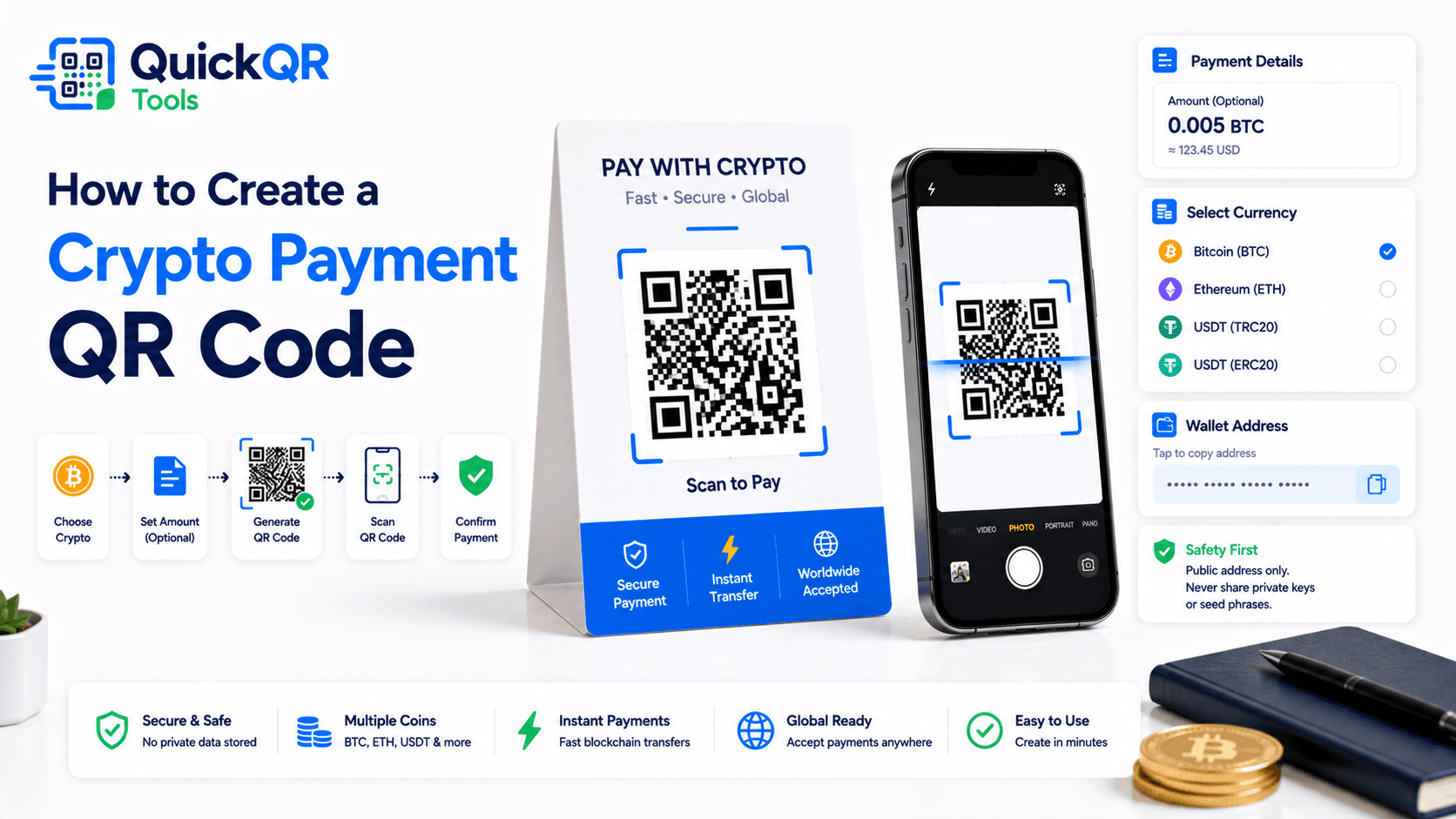
How to create a crypto payment QR code in 5 safe steps
- Open the generator. Use the Crypto Payment QR Code Generator to create a QR code for a public wallet address.
- Select the coin or network. Choose Bitcoin, Ethereum, Litecoin, Dogecoin, USDT or a custom wallet format when appropriate.
- Paste the public wallet address. Use only the receiving address you want people to pay. Never use a private key, recovery phrase or seed phrase.
- Add optional details carefully. Add an amount, label or message only if it helps the payer understand the request.
- Generate, scan-test and download. Scan the QR code with the correct wallet app, confirm the address and network, then download PNG, SVG or PDF.
The most important step in how to create a crypto payment QR code is testing. A QR code can scan perfectly and still contain the wrong address, network or payment amount. Always verify the result inside a wallet app before sharing or printing.
What information should a crypto payment QR code include?
For most crypto payment use cases, the wallet address is the core information. Optional fields can make the payment clearer, but they should be used carefully because wallet apps may handle payment formats differently.
| Field | Use it for | Best practice |
|---|---|---|
| Wallet address | The destination where payment should be sent. | Required. Check every character before generating the QR code. |
| Coin or network | Bitcoin, Ethereum, USDT or another wallet type. | Make sure the network matches the address and payment instructions. |
| Amount | A suggested or fixed payment amount. | Use only when the amount should be clear before scanning. |
| Label | A readable name for the payment request. | Useful for invoices, donations or business payment pages. |
| Message | A note, invoice number or payment reference. | Keep it short and do not include private information. |
The FTC warns consumers to be careful with crypto because transactions can be hard to reverse and scammers often ask for cryptocurrency payments. The FTC's crypto scam guidance is a useful safety reference before publishing any crypto payment instructions: What To Know About Cryptocurrency and Scams.
Public wallet address vs private key
This distinction is critical. A public wallet address can be shared so people can send funds to it. A private key, seed phrase or recovery phrase controls access to funds and must never be shared. Do not encode private wallet secrets into a QR code.
When you create a crypto payment QR code, you are normally encoding the receiving address. That address can appear on an invoice, donation page, payment sign or checkout screen. It should not include wallet backup words, private keys or account login information.
If you are not sure whether a string is a public address or a private secret, stop and verify inside your wallet documentation before creating the QR code. This article can help with QR code structure, but it cannot validate ownership, security or suitability of a wallet address.
How to create a crypto payment QR code for invoices and donations
Invoices and donation pages are common use cases. A crypto payment QR code can sit next to the public wallet address so the payer can scan instead of copying the address manually. This can reduce friction, especially for long addresses.
For invoices, include a clear invoice number or reference outside the QR code and, if useful, in the optional message field. For donations, include a readable label such as the project name, campaign name or organization name. Keep the payment instructions simple and transparent.
How to create a crypto payment QR code for invoices depends on the workflow. If each invoice has a unique amount or reference, generate a QR code for that specific request. If all donations go to the same wallet, a reusable QR code can work, but the surrounding page should explain the coin, network and intended use clearly.
How to create a crypto payment QR code for checkout pages and signs
Checkout pages and physical signs need extra clarity because the payer may be acting quickly. A QR code should be placed near plain text that names the coin, network, address type and any payment instructions. Do not rely on the QR code alone to explain the payment.
For a digital checkout page, show the wallet address as text next to the QR code so the payer can compare. For a printed sign, include the coin and network in large readable text. If the QR code is for USDT, for example, be clear about which network the address expects.
When planning how to create a crypto payment QR code for signs, test the printed version from the expected scan distance. Use strong contrast, a clean quiet zone and a size that works in real lighting. For print planning, use Best QR Code Size for Print Materials.
Network and coin matching matters
A common crypto payment problem is sending funds on the wrong network or to an incompatible address. A payer might see a wallet address and assume it works for a different token, chain or payment path. The QR code should not make that ambiguity worse.
Use labels that match the intended payment. If the address is for Bitcoin, say Bitcoin. If the payment is Ethereum, say Ethereum. If the payment is a token on a particular network, make that network visible in the payment instructions. Do not let the payer guess.
How to create a crypto payment QR code safely means pairing the QR code with human-readable instructions. The QR code helps the wallet receive data, but the surrounding text helps the payer understand what they are scanning.
Crypto QR code vs URL QR code
A crypto payment QR code is best when the main action is sending funds to a public wallet address. A URL QR code is better when the payer needs a full payment page, instructions, terms, invoice details or support information.
| QR code type | Best for | Use this tool |
|---|---|---|
| Crypto payment QR code | Encoding a public wallet address and optional payment details. | Crypto Payment QR Code Generator |
| URL QR code | Opening a payment page, checkout page, donation page or instructions. | URL QR Code Generator |
| PDF QR code | Sharing an invoice, receipt, payment guide or printed instruction sheet. | PDF QR Code Generator |
| Text QR code | Showing a short non-sensitive payment note after scanning. | Text QR Code Generator |
If the payment instructions are complex, a single wallet QR code may not be enough. Use a URL or PDF QR code to explain the process, then show the crypto payment QR code where the payer is ready to scan.
How to create a crypto payment QR code for Bitcoin
Bitcoin addresses are long enough that manual typing is risky. A Bitcoin payment QR code can make the receiving address easier to scan from an invoice, checkout screen, donation card or payment instruction sheet. The QR code should still be tested with a Bitcoin wallet before publication.
When you decide how to create a crypto payment QR code for Bitcoin, start with the public receiving address from your wallet. Copy it carefully, paste it into the generator and compare the address after scanning. If the wallet app displays a payment amount or label, verify those fields too.
For printed Bitcoin payment instructions, show the word Bitcoin near the QR code. If the payer is choosing among several payment options, do not make them guess. Clear labels help reduce wrong-network confusion and make the payment flow feel more trustworthy.
How to create a crypto payment QR code for Ethereum and tokens
Ethereum and token payments need careful network clarity. A payer may see a familiar address format and still choose the wrong network or asset inside a wallet. The QR code should be paired with visible instructions that name the intended coin, token and network.
How to create a crypto payment QR code for Ethereum starts with the receiving address, but it should not end there. Add surrounding text that explains the expected payment type. If the request is for a token such as USDT, make the network visible in the payment instructions and test with the wallet app you expect people to use.
Do not assume every wallet app handles optional fields the same way. Some may show the amount, some may ignore labels, and some may format the request differently. The safest workflow is to scan, review what the wallet displays and confirm that the address and payment details match your intent.
How to create a crypto payment QR code for printed invoices
Printed invoices need more than a QR code. They should show the wallet address in readable text, the expected coin or network, the invoice reference and any payment timing notes. This gives the payer a way to compare what the wallet app shows after scanning.
When planning how to create a crypto payment QR code for an invoice, decide whether each invoice needs a unique QR code. If every invoice has a different amount or reference, a unique QR code can reduce confusion. If the same receiving address is used for all payments, the invoice number should still appear clearly outside the QR code.
Before sending the invoice, scan the final PDF or printed copy. Do not test only the preview inside the generator. Exported files, compression and print settings can affect scan quality. If the invoice will be printed, use a high-quality download format and keep enough white space around the QR code.
How to create a crypto payment QR code for public donation pages
Donation pages need transparency. A visitor should understand what wallet they are sending to, what coin or network is expected and what the donation supports. The QR code can help with convenience, but the page should still explain the payment destination in plain language.
How to create a crypto payment QR code for donations starts with a public receiving address and a clear label. The label can name the project, campaign, creator, community or organization. Avoid vague labels that make the QR code look untrustworthy.
If donations may be made from mobile devices, remember that scanning a QR code displayed on the same phone can be awkward. Provide a copyable wallet address near the QR code. This gives users another way to complete the payment if they cannot scan from a second device.
How to create a crypto payment QR code that is easy to verify
A payment QR code should never ask users to trust a black-and-white pattern blindly. People should be able to compare the QR code result with readable information on the page, invoice or sign. This is especially important for crypto payments because a transaction may be difficult or impossible to reverse after it is sent.
When you decide how to create a crypto payment QR code for public use, place the readable wallet address near the QR code. You can also show the expected coin, network, amount and payment reference in normal text. This gives the payer a way to compare what appears in the wallet app after scanning.
For long addresses, it may be helpful to show the first and last characters in a larger style, but do not hide the full address entirely. A payer may want to copy it, compare it or use another device. The QR code should make payment easier, while the readable text helps verification.
This verification habit is one of the safest parts of how to create a crypto payment QR code. The QR code carries the data, the wallet app displays the data, and the visible instructions help the payer confirm that the data matches the intended request.
How to create a crypto payment QR code for mobile users
Mobile users may not be able to scan a QR code that appears on the same phone screen. If someone opens your invoice, donation page or checkout page on a phone, they may need a copyable address, a deep link or another manual payment option. Do not make the QR code the only path.
How to create a crypto payment QR code for mobile users means thinking about the device they are using. If the QR code is on desktop, scanning from a phone is easy. If the QR code is on mobile, provide the wallet address as selectable text nearby. A clear copy button or visible address can prevent frustration.
For printed materials, mobile scanning is usually natural. For web pages, the page should support both scanning and copying. This makes the payment flow more accessible and reduces the risk that users abandon the process because they cannot scan the QR code from the same device.
How to create a crypto payment QR code for recurring payment instructions
Some crypto payment QR codes are used repeatedly. A donation card, community tip page, creator support page or printed business sign may use the same public address for a long period. In that case, the address should be stable, the instructions should be clear and the QR code should be stored safely as a source file.
If the wallet address may change, avoid printing a static crypto payment QR code on long-term materials. A URL QR code that opens an updateable payment page can be safer because the page can be changed later. A static wallet QR code cannot update after printing.
When planning how to create a crypto payment QR code for recurring use, decide whether stability is realistic. If you are confident the receiving address and network will stay the same, a static QR code can work. If there is any chance the address, payment policy or network instructions will change, use a payment page and link to it instead.
For recurring use, save the source file, the readable wallet address, the coin or network note and the publication location in one internal record. This makes future checks easier. If you later review a printed sign, invoice template or donation page, you can confirm that the QR code still matches the intended public wallet address.
Safety checklist before using a crypto QR code
- Use only a public wallet address, never a private key or seed phrase.
- Confirm that the wallet address belongs to the correct coin and network.
- Scan the QR code with the wallet app your visitors are likely to use.
- Check that the address shown in the wallet app matches your intended address.
- Check optional amount, label and message fields before publishing.
- Print one test copy before printing a large batch.
- Keep the QR code clear, high contrast and large enough to scan.
- Show human-readable payment instructions near the QR code.
This checklist is part of how to create a crypto payment QR code responsibly. A payment QR code should be convenient, but it should never encourage rushed or unclear payments.
Common crypto payment QR code mistakes
- Using the wrong network. The coin, token and network must match the wallet address and payment instructions.
- Encoding private information. Never encode a private key, seed phrase, recovery phrase or wallet login detail.
- Skipping wallet tests. Scan the QR code with a real wallet app before sharing it.
- No readable address nearby. Show the wallet address as text so people can compare if needed.
- Unclear payment amount. If the amount matters, make it visible and test that the wallet reads it as expected.
- Printing too small. Dense QR codes can fail if they are printed too small or with weak contrast.
- Using crypto QR codes for complex instructions. Use a URL or PDF when the payer needs more context.
Crypto payment QR code FAQ
Can I create a Bitcoin QR code?
Yes. Add a Bitcoin public address in the crypto payment QR code generator, then download the generated QR code and test it with a compatible wallet.
Can I create an Ethereum or USDT QR code?
Yes. You can choose Ethereum, USDT or custom wallet data depending on the payment information you want to encode. Make sure the network matches the receiving address.
Can a crypto QR code include an amount?
Yes, an amount can be added as an optional field. Some wallet apps can read payment amounts from supported formats, but you should test before using it.
Is it safe to share a wallet QR code?
It is generally safe to share a QR code that contains only a public wallet address. It is not safe to share private keys, seed phrases or recovery phrases.
Can I edit a crypto payment QR code after printing?
No. A static QR code cannot be changed after printing. If the wallet address or payment instructions may change, use a URL QR code that opens an updateable payment page.
Should I show the wallet address next to the QR code?
Yes. Showing the readable address, coin and network near the QR code helps people verify what they are scanning.
Create your crypto payment QR code
Use QuickQR Tools to generate a crypto payment QR code for a public wallet address, optional amount and payment note.
Open Crypto QR Generator