
Quick answer: static vs dynamic QR codes
A static QR code is best when the destination is stable, simple and unlikely to change. It is a strong choice for a permanent website URL, a WiFi login, a plain text code, a phone number, an email action or a contact card that will not need editing after it is downloaded or printed.
A dynamic QR code is best when you need flexibility. It usually sends scanners through a redirect URL, which means the final destination can often be changed later. Dynamic QR codes are commonly used for marketing campaigns, printed materials that are expensive to replace, seasonal offers, analytics, A/B testing and business workflows where scan data matters.
The practical choice is not about which type sounds more advanced. It is about risk. If the QR code destination will stay the same, static can be simple and reliable. If the destination may change after printing, dynamic can protect you from reprinting costs and broken campaigns.
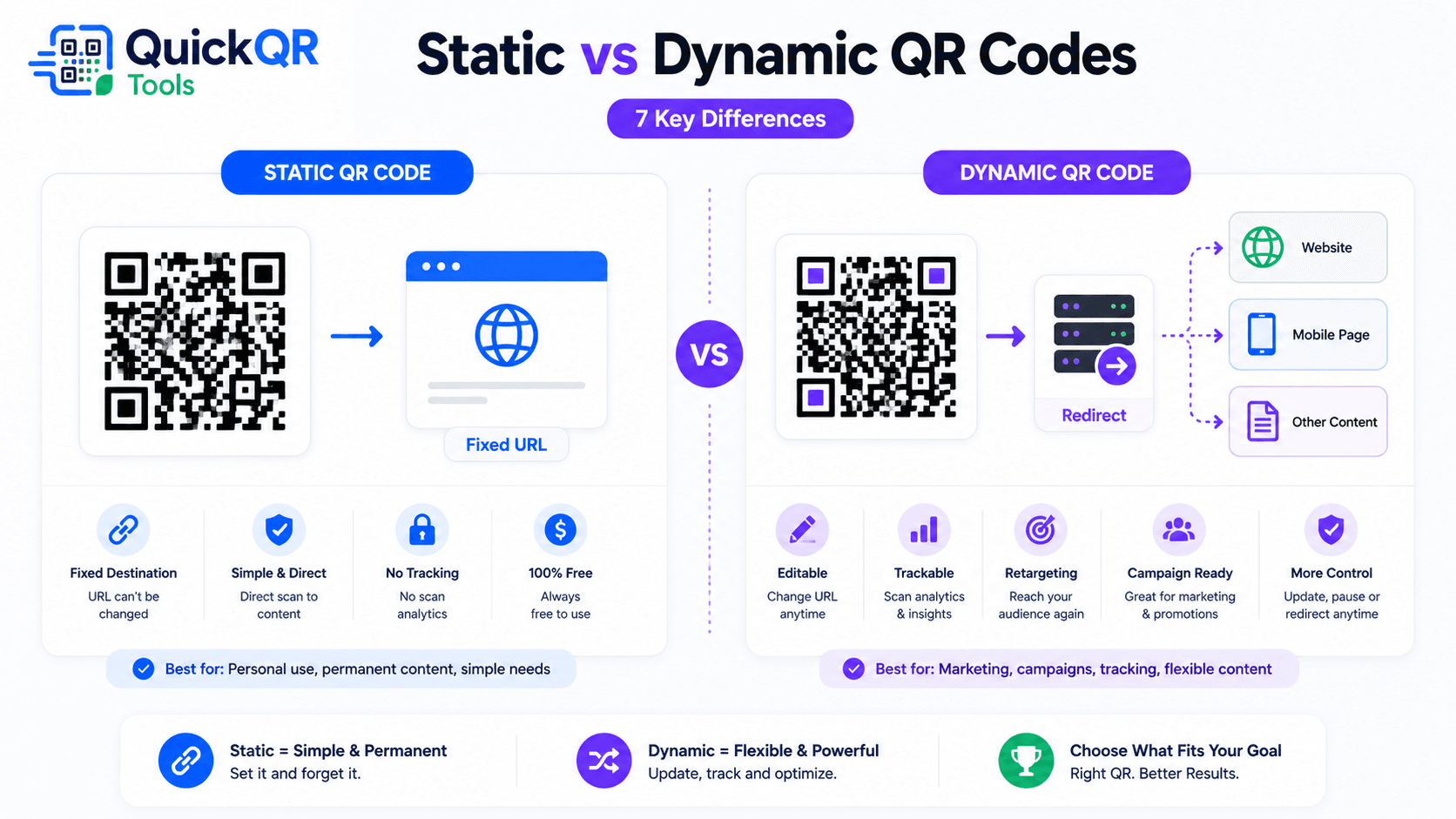
What is a static QR code?
A static QR code stores the destination or content directly inside the QR code pattern. If you create a website QR code, the final URL is encoded into the code. If you create a WiFi QR code, the network name and password details are encoded into the code. If you create a text QR code, the text is encoded directly.
Once a static QR code is generated, the encoded information cannot be changed inside that image. If the URL changes, the WiFi password changes or the contact details become outdated, the original static QR code still contains the old information. You would need to create a new QR code and replace the old one wherever it appears.
This sounds limiting, but it is also the reason static QR codes are simple. They do not depend on a separate redirect platform. They do not need a dashboard to keep working. A static website QR code will continue to work as long as the destination URL remains online and the printed code remains readable.
Static QR codes are useful for everyday tasks where the destination is clear and stable. Examples include linking to a homepage, saving contact details, sharing guest WiFi, opening a phone number, preparing an email message, displaying plain text or sending users to an evergreen resource.
For many small business needs, a static QR code is enough. If you are creating a code for a menu page that will keep the same URL, a business card that links to your main website, or a WiFi card that will stay in one location, a static code is a clean and practical choice.
What is a dynamic QR code?
A dynamic QR code usually stores a short redirect URL inside the QR pattern. When someone scans the code, that redirect URL sends the visitor to the final destination. The QR code itself points to the redirect, not directly to the final page.
This redirect layer creates flexibility. In many dynamic QR platforms, you can update the final destination later without changing the printed QR code. If a campaign landing page changes, the printed code can continue to work because the redirect can be updated behind the scenes.
Dynamic QR codes are often used when businesses need scan analytics. A dynamic platform may record scan counts, approximate location, device type, scan time or campaign performance. The exact data depends on the platform, privacy settings and local regulations.
Dynamic QR codes are especially useful when print materials are expensive or difficult to replace. If you print thousands of brochures, product packages, signs or event badges, the ability to update the destination later can be valuable.
The tradeoff is dependency. A dynamic QR code relies on the redirect service staying active. If the service stops, the subscription ends or the redirect is misconfigured, the QR code may stop sending visitors to the intended destination. That is why dynamic QR codes should be managed carefully.
Static vs dynamic QR codes comparison
The table below compares the most important practical differences. Use it to decide which type fits your use case before you print or publish a code.
| Feature | Static QR code | Dynamic QR code |
|---|---|---|
| Editable after creation | No. The encoded information is fixed. | Usually yes. The redirect destination can often be changed. |
| Needs a redirect service | No. The code points directly to the content or URL. | Yes. The code usually depends on a redirect URL. |
| Best for | Permanent links, WiFi, text, phone, email and contact details. | Campaigns, analytics, changing destinations and large print runs. |
| Tracking | Not built into the QR code itself. | Often available depending on the platform. |
| Cost | Often free and simple. | Often tied to a paid platform or account. |
| Risk if service stops | Low, if the destination remains online. | Depends on the redirect platform and account status. |
| Print risk | Higher if the destination changes after printing. | Lower if the destination can be edited after printing. |
When should you use a static QR code?
Static QR codes are ideal when the code has one clear job and the destination will not change. A restaurant can use one for a stable menu URL. A consultant can use one for a contact page. A shop can use one for a product care page. A venue can use one for guest WiFi.
The best static QR code use cases are simple, durable and easy to test. You create the code, download it, scan it, and use it where people need that exact information. There is no extra platform layer to manage.
Static QR codes are also useful when privacy and simplicity matter. Since the code itself does not include tracking, it can be a cleaner choice for basic utility experiences where the visitor only needs to reach a page or open an action.
When should you use a dynamic QR code?
Dynamic QR codes make sense when the printed code needs to stay useful even if the destination changes. That flexibility can matter for campaigns, events, seasonal promotions, menus, product packaging and large print runs.
- You need to change the destination later without reprinting the code.
- You want analytics, scan counts or performance insights.
- You are running marketing campaigns with changing landing pages.
- You are printing large volumes and want more control after distribution.
- You need different destinations over time, such as seasonal menus or offers.
- You want to test different landing pages or update a campaign after launch.
For example, a restaurant may print one QR code on table tents but change the destination from a lunch menu to a holiday menu later. A retailer may print QR codes on packaging but update the destination when a product support page changes. An event team may update the code from a registration page to a schedule page after ticket sales close.
Dynamic QR codes are useful when the cost of reprinting is higher than the cost of using a managed redirect. They are less necessary when the destination is stable and the QR code is easy to replace.
Can you edit a QR code after printing?
You can only edit the destination after printing if the QR code was created with an editable redirect system. A static QR code cannot be edited because the final information is already encoded inside the pattern. If a static code points to an old URL, the pattern still points to that old URL.
There is one practical workaround for static website QR codes: use a stable URL that you control, then redirect that URL on your own website if needed. For example, if your printed QR code points to yourdomain.com/menu, you may be able to update that page or redirect it later. The QR code remains static, but the page behind your own URL can evolve.
This is not the same as a full dynamic QR platform with scan analytics and dashboard editing, but it can solve many small business problems. It is especially useful for printed materials where you own the domain and can keep the URL stable.
Before printing, ask yourself: “Will this URL still make sense in six months?” If the answer is uncertain, either use a redirect you control or consider a dynamic QR code platform.
Costs, control and long-term maintenance
Static vs dynamic QR codes also differ in long-term maintenance. A static QR code is usually easier to keep because there is no separate QR account to manage. Once the code is generated, the main maintenance task is keeping the destination valid. If the code points to your own website, keep that URL online or redirect it properly if the page changes.
Dynamic QR codes can add a monthly or yearly cost because the redirect, editing tools and analytics often belong to a platform. That cost may be worth it for campaigns, large print runs and analytics, but it can be unnecessary for simple permanent use cases.
Control matters too. With a static QR code pointing to your own domain, you control the destination page. With a dynamic QR code, you may depend on a third-party redirect domain. If that platform changes its rules, pricing or service quality, your printed QR codes may depend on decisions outside your website.
This does not mean dynamic QR codes are bad. It means they should be chosen intentionally. Dynamic codes can be powerful when the business value is clear: avoiding reprints, measuring campaign performance, updating destinations or managing many codes in one place.
For small projects, static codes often win because they are simple. For campaigns with real budget, dynamic codes may win because flexibility protects the investment. The right answer depends on how much risk sits behind the QR code.
How to choose the right QR code type in 5 questions
If you are comparing static vs dynamic QR codes for a real project, answer these questions before generating the final file. They turn a vague choice into a practical decision.
- Will the destination change? If yes, dynamic or a redirect you control may be safer.
- Will the code be expensive to replace? If yes, flexibility becomes more valuable.
- Do you need scan analytics? If yes, dynamic QR codes or trackable landing pages may help.
- Is the QR code for a permanent utility? If yes, static is often enough.
- Do you control the destination URL? If yes, a static QR code can still be managed through your own website.
For example, a QR code on a business card that links to your homepage can be static. A QR code on 10,000 product packages may need more flexibility. A QR code for guest WiFi is usually static. A QR code for a seasonal promotion may be dynamic or point to a page you can update.
This decision process keeps the visitor experience at the center. The goal is not to choose the most advanced option. The goal is to make sure the QR code still works when a real person scans it.
Examples for small businesses
A cafe may use a static QR code for guest WiFi because the network details are stable most of the time. It may also use a menu QR code. If the menu URL stays the same while the content on the page changes, a static code can still work well. If the cafe changes menu platforms often, a dynamic or controlled redirect can reduce future headaches.
A salon may use a static QR code on business cards that links to a booking page. If the booking platform URL might change, the salon can point the code to a stable page on its own website, then update the booking button on that page later. This gives some flexibility without needing a full dynamic QR system.
A local retailer may use QR codes on packaging to link to product instructions. If the product line is stable, static can be enough. If instructions, videos or warranties change frequently, dynamic QR codes or stable product pages can help keep printed materials useful.
An event organizer may prefer dynamic QR codes for signs and badges because event information changes quickly. Before the event, the code may point to registration. During the event, it may point to the schedule. After the event, it may point to photos, feedback or a replay page.
These scenarios show that the same business may use both types. Static vs dynamic QR codes is not a one-time brand decision. It is a decision for each QR code based on destination stability, print risk and measurement needs.
Static QR codes and redirects you control
A useful middle option is a static QR code that points to a stable URL on your own website. The QR code itself remains static, but the page at that URL can be updated. This gives you some practical flexibility without relying on a third-party dynamic QR platform.
For example, you can create a static QR code that points to quickqrtools.com/menu or yourdomain.com/offer. If the menu or offer changes, you update the page content. If you move the page, you add a redirect on your website. The printed QR code still points to the same stable URL.
This approach is especially useful for small businesses that own their website and want simple control. It will not give the same scan analytics as a dynamic QR dashboard, but it can reduce the risk of broken printed materials.
The key is to avoid using temporary URLs. Do not print QR codes that point to preview links, file storage links that may change or campaign URLs you do not control. A stable URL is often the difference between a static code that lasts and a static code that becomes a problem.
Tracking and privacy considerations
Static QR codes do not track scans by themselves. They simply contain data or a destination. If you want to measure traffic from a static website QR code, you can use a dedicated landing page or campaign URL and measure visits on your website analytics tool.
Dynamic QR codes often include scan analytics. This can help businesses understand how many people scanned a code, when scans happened and which materials performed best. That can be useful for marketing, events, retail promotions and printed campaigns.
Analytics should be handled responsibly. If you collect visitor data, make sure your privacy policy explains how data is used. If you operate in regions with privacy rules, review the requirements that apply to your business. The Federal Trade Commission shares business guidance on privacy and security that can help teams think about responsible data practices.
For utility codes like guest WiFi, contact details, phone numbers or plain text, tracking may not be necessary. For advertising campaigns, scan measurement can be useful, but the visitor experience should still be clear and trustworthy.
Static vs dynamic QR codes for print materials
Print makes the decision more important because a printed QR code cannot be replaced as easily as a web button. If you make a mistake on a webpage, you can update it quickly. If you print 5,000 flyers with a static QR code that points to the wrong URL, the fix is more painful.
Use static QR codes for print when the destination is permanent and easy to test. A business card that links to your main website, a WiFi card in a guest room, a product label that links to a stable care page or a poster that links to a permanent contact page can all work well as static codes.
Use dynamic QR codes for print when the destination may change or the campaign needs measurement. Large poster campaigns, seasonal menus, product packaging, event signage and promotional flyers may benefit from a dynamic option.
Whichever type you choose, print size still matters. Use the best QR code size for print guide before ordering materials so the code is large enough for the scan distance and surface.
Static vs dynamic QR codes by use case
Website QR codes
For a stable website page, a static code is usually enough. If the campaign destination may change, consider a dynamic code or a stable redirect URL you control. The website QR code guide explains how to choose the right destination.
WiFi QR codes
WiFi QR codes are usually static because the network details can be encoded directly. If the WiFi password changes, you create a new code. For guest networks, use the WiFi QR Code Generator.
vCard QR codes
vCard QR codes can be static because contact details can be stored in the code. If your phone number, email or company changes often, use a website profile page instead. You can create contact codes with the vCard QR Code Generator.
PDF QR codes
If the PDF URL will remain stable, static can work. If the document changes often, use a stable page or managed redirect. The PDF QR Code Generator helps create document access codes.
Coupons and seasonal offers
Coupons often change, so dynamic redirects can be helpful. If you use a static code, point it to a stable offer page that can be updated. The Coupon QR Code Generator is useful for focused promotions.
Common mistakes when choosing QR code type
- Using static for a changing campaign. If the destination will change after printing, static may create reprint costs.
- Using dynamic when static is enough. A simple permanent WiFi or contact code may not need a managed redirect.
- Forgetting platform dependency. Dynamic QR codes depend on the redirect service remaining active.
- Ignoring privacy expectations. If tracking is used, handle data responsibly and keep the visitor experience trustworthy.
- Printing before testing. Both static and dynamic QR codes should be tested on real phones before distribution.
- Using unstable URLs. Even a static code can be safer when it points to a stable URL on your own domain.
Final recommendation
If you need a dependable QR code for a stable destination, choose static. It is simple, fast and often free. Use it for stable website URLs, WiFi access, contact details, phone actions, email actions, plain text, locations and many everyday printed materials.
If you need editing, tracking or campaign control, choose dynamic. It is better for changing offers, large print runs, event workflows, seasonal campaigns and situations where scan data is part of the business goal.
If you are between both options, use a stable URL that you control. A static QR code pointing to your own evergreen page can be a practical compromise. It keeps the QR code simple while giving you control over the page behind it.
Most users do not need to overthink the first QR code. Start with the real use case, choose the destination carefully, test the code on multiple phones, and print only after the scan experience feels reliable. That simple discipline matters more than choosing a fancy setup that does not fit the job.
Which option is best for most beginners?
For most simple use cases, a static QR code is enough. If you are linking to a stable website, sharing WiFi access, creating a business card QR code or printing a small batch of flyers, a free static QR code is a good starting point.
Choose a dynamic QR code when the destination may change, when analytics matter, or when the printed QR code will be expensive to replace. The more money, time or visibility is attached to the printed code, the more important flexibility becomes.
If you are unsure, start by asking three questions. Will the destination change? Do you need scan analytics? Would reprinting be expensive or difficult? If the answer to all three is no, static is probably fine. If one or more answers are yes, dynamic may be worth considering.
QuickQR Tools focuses on fast, useful QR code creation for common static use cases. You can browse the All QR Code Tools page to choose the right generator for URLs, WiFi, vCards, PDFs, menus, coupons and other everyday QR code needs.
FAQ
Can I edit a static QR code after printing?
No. A static QR code contains the final information directly, so it cannot be edited after it is generated. You need a new QR code if the encoded destination changes.
Are dynamic QR codes better than static QR codes?
Not always. Dynamic QR codes are better for editing and tracking, while static QR codes are simpler and often enough for permanent destinations, WiFi access, contact details and stable website links.
Do static QR codes expire?
Static QR codes do not expire by themselves. They keep working as long as the destination URL, network details or encoded information remains valid.
Can static QR codes track scans?
Static QR codes do not include tracking by default. Tracking usually requires a dynamic QR code, a trackable redirect URL or analytics on the destination page.
When should I choose a dynamic QR code?
Choose a dynamic QR code when you may need to edit the destination later, measure scans, manage a campaign or protect printed materials from becoming outdated.
Are static QR codes free?
Static QR codes are often free because they do not require a managed redirect service. Some advanced design, hosting or campaign features may still depend on the tool you use.