
Table menus
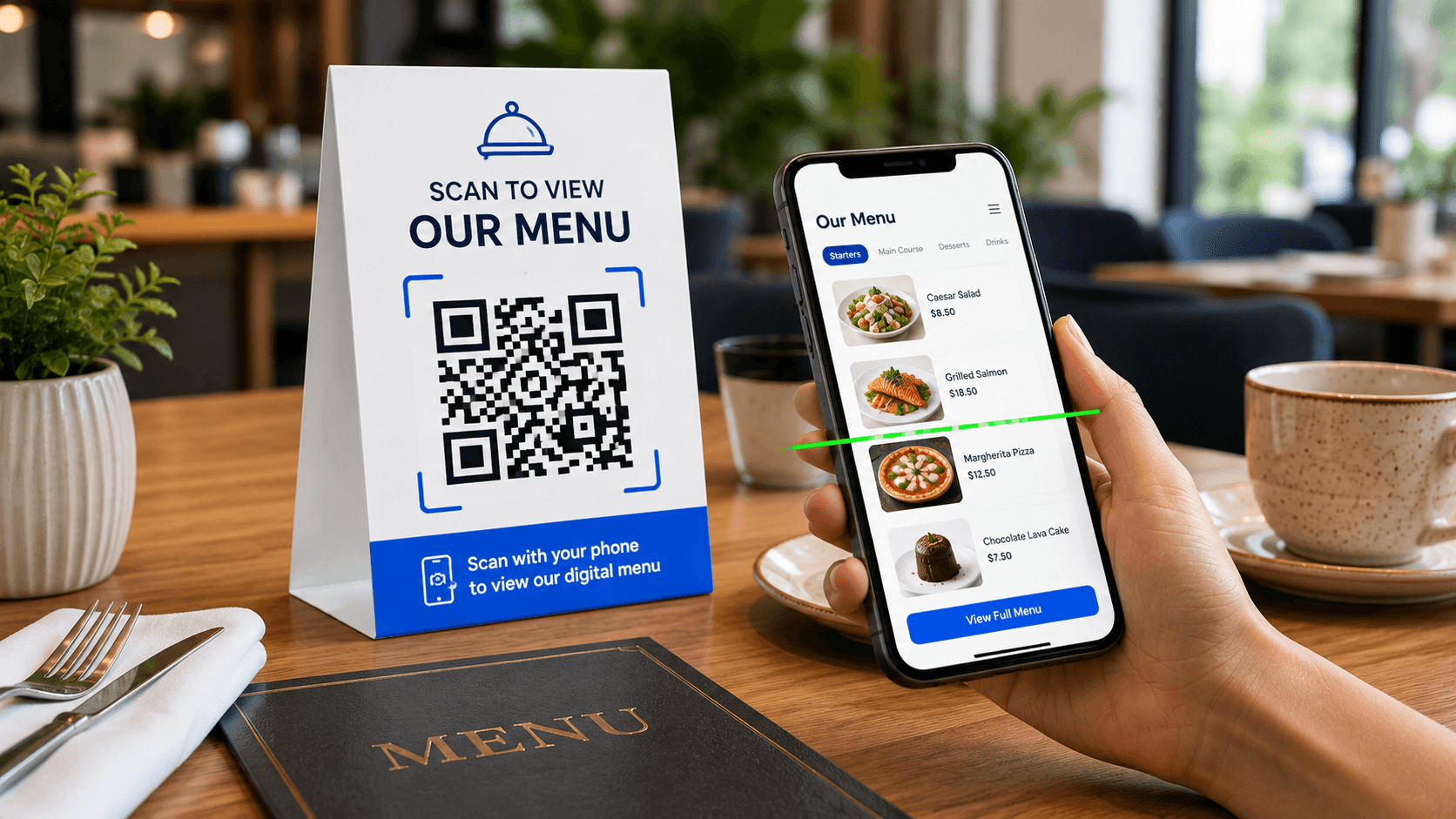
Place a scannable QR code on table tents, placemats or reservation cards.
Restaurant QR Solution
Menu QR code generator built for restaurants, cafes, bars and food trucks. Turn a PDF menu, digital menu page or online ordering link into a professional QR code guests can scan from tables, windows, counters and takeaway materials.
Paste a public menu URL, generate a clean QR code and download it for table tents, counter signs, front windows, flyers and takeaway packaging. The workspace keeps the action simple while the page gives restaurants the guidance needed for reliable printing and guest experience.
Paste the public URL of your menu. It can be a PDF menu file, a WordPress menu page or an online ordering page.
Use it on table cards, counter signs, front windows, takeaway flyers, business cards, hotel rooms and delivery packaging.
A menu QR code lets guests open your latest menu without typing a link or touching shared printed menus.
Place a scannable QR code on table tents, placemats or reservation cards.
Help guests view drinks, pastries, specials and seasonal menus from their phone.
Share cocktail menus, wine lists and happy hour offers from a clean QR code.
Print the QR code on windows, flyers, packaging and pickup signs.
Start with a menu link, generate the QR code and test it on a phone before printing.
Use a PDF menu URL, a website menu page or an online ordering page.
Paste the menu URL, add a clear label and choose a simple restaurant-ready color.
Create the QR code and export PNG, SVG or PDF for your print workflow.
Scan it from the real table, counter, window or flyer before guests use it.
A menu QR code generator creates a QR code that opens a restaurant menu, cafe menu, bar menu, hotel menu or food truck menu when guests scan it. The QR code usually stores a public menu URL, such as a PDF menu file, a WordPress menu page, an online ordering page or a hosted digital menu.
This menu QR code generator is built for restaurants and hospitality businesses that need a fast way to connect printed materials to a menu guests can open on their phones. Paste the menu link, generate the QR code, download PNG, SVG or PDF, then place it on table tents, windows, takeaway bags, flyers, receipts, hotel room cards or counter signs.
The QR code is only one part of the guest experience. The menu itself should load quickly, be easy to read on mobile and stay current. A beautiful QR code cannot fix an outdated menu, broken link or file that is difficult to read on a phone. The best result comes from a clear menu URL, strong print placement and a simple label such as “Scan to view our menu.”
Accessibility principles reference Google Business Profile menu referenceA strong menu QR code connects the physical table to a mobile-friendly menu, clear prices, specials and ordering actions.
A menu QR code generator is most useful when guests need instant access to food, drink, specials or ordering information from a physical touchpoint.
Place a QR code on table tents, placemats or small cards so guests can open the latest menu from their seat. This is useful for dine-in restaurants that update specials, drinks or seasonal items.
Cafes can add menu QR codes near the counter, on loyalty cards, receipts or takeaway bags. Guests can review drinks, pastries, breakfast items and seasonal offers while waiting.
Bars can link guests to cocktail menus, wine lists, beer rotations and happy hour specials. A digital menu can be easier to update than reprinting a large drink list every time items change.
Food trucks, markets and pop-up restaurants can print the QR code on windows, banners, order signs and flyers. Customers can scan while standing in line and decide faster.
The best menu QR code depends on how often your menu changes and how guests will read it on mobile.
Best for readability, frequent updates, dish sections, descriptions, dietary notes and ordering actions. This is usually the strongest destination for a restaurant menu QR code.
Works well for designed menus, catering menus and short menus. Compress the file and confirm it is readable without excessive zooming.
Best for takeout, delivery and pickup. Label the QR code clearly so guests know they are opening an ordering flow.
Use a stable URL for daily menus, limited items, allergens and seasonal offers so printed QR codes can stay useful.
A menu QR code generator is best when the scan should open a guest-facing menu experience. If the menu is a PDF file, the PDF QR code generator can also work, but the menu QR page keeps the use case focused on restaurants, cafes and food service. If the scan should reveal a discount, use a coupon QR code. If the scan should ask for feedback after the meal, use a Google Review QR code.
Restaurants often need several QR codes across the customer journey. A menu QR code helps guests decide what to order. A WiFi QR code helps them connect. A coupon QR code can promote a lunch offer. A Google Review QR code can collect feedback after the visit. A WhatsApp QR code can support direct questions or catering requests.
The key is to label each code clearly. Guests should know whether they are scanning for menu, WiFi, ordering, discount, review or contact. Clear labels reduce friction and make the restaurant experience feel more professional.
A menu QR code works best when the scan is fast, the label is clear and the menu is easy to read on mobile.
If the QR code points to a URL that changes every time you update the menu, old printed materials may break. Use a stable page or replace the PDF at the same URL when possible.
Guests scan on phones, often in restaurant lighting. Use readable text, clear sections, enough contrast and file sizes that load quickly on mobile data.
Use specific text such as “Scan for menu,” “Scan for drinks,” “Scan for specials” or “Scan to order.” Avoid vague labels that do not tell guests what will open.
Scan the QR code from the table, counter, window or flyer where guests will see it. Test under normal lighting and from the expected distance.
Placement should match the guest journey: before ordering, while seated, at pickup or during takeaway.
Best for dine-in restaurants, bars and cafes. Use the label “Scan to view our menu.”
Best for passersby, tourists and guests waiting outside. Use “Scan for menu and specials.”
Best for cafes, bakeries, food trucks and quick service restaurants. Use “Scan before ordering.”
Best for repeat orders, catering menus and reordering. Use “Scan for our latest menu.”
Best for room service, restaurant menus and local dining guides. Use “Scan for dining options.”
Best for events, seasonal menus and local promotions. Keep the QR code large enough for the viewing distance.
A menu QR code is usually static when it points directly to your menu URL. If that URL stays the same, you can update the menu behind the link without changing the printed QR code. If the URL changes, the old QR code will keep sending guests to the old location.
For restaurants, this matters a lot. Prices, items, seasonal specials, allergens and availability can change quickly. Before printing table cards or window signs, decide how updates will work. A stable menu page is usually easier to maintain than a new PDF link every time the menu changes.
If you use a PDF menu, try to replace the file at the same URL or keep a permanent menu page that links to the latest PDF. That gives you more control and avoids reprinting every time a file name changes.
A menu QR code generator can create the QR code quickly, but the restaurant experience depends on the menu link, design and testing.
Test the menu URL outside your private editing session. Guests should not see a login screen, permission warning or missing file. If the menu is hosted on your website, open the link in a private browser window before printing.
Table cards can be small, but the QR code still needs enough size and quiet space. If guests struggle to scan from their seat, the design is working against the experience.
Restaurants often have menus on tables, doors, flyers, pickup bags and hotel cards. When a URL changes, all old printed QR codes can become outdated. Track where the QR code is used.
A large PDF with tiny text can frustrate guests. If your menu is complex, consider a mobile-friendly menu page with sections, prices, dietary tags and ordering links.
A QR code without a label can feel unclear. Use direct wording so guests know they are opening a menu, not a payment page or unrelated promotion.
Some guests may not be able to scan or read a phone menu easily. Keep printed options available when needed and make the digital menu readable, high contrast and organized.
A menu QR code should improve convenience, not create a barrier. Some guests may have low battery, limited data, accessibility needs or a preference for printed menus. A strong restaurant workflow offers a QR menu while still helping guests who cannot scan comfortably.
For digital menus, use readable fonts, clear categories, strong contrast and simple navigation. Avoid image-only menus when possible, because text-based content is easier to read, translate and access with assistive technology. If you use a PDF menu, make it as mobile-readable as possible.
The QR code itself should have a visible label and enough contrast. Place it where guests can scan without awkward movement or blocking service. A guest should understand the action in seconds.
Different food businesses need different menu links, labels and placements.
Use a mobile menu page or sectioned PDF on table tents, then connect the guest journey to the Google Review QR Code Generator.
Link drinks, pastry lists or seasonal specials from counter signs, loyalty cards and takeaway bags, supported by a WiFi QR code.
Share cocktail lists, wine menus and happy hour pages from bar tops, table cards and flyers, supported by an Event QR code.
Use a short mobile menu or order page on truck windows, order signs, packaging and flyers, supported by a Location QR code.
Open dining guides, room service menus or restaurant directories from room cards, lobby signs and welcome packets.
Use one stable menu page for markets, events and seasonal kitchens so printed materials stay simple and easy to replace.
A menu QR code supports the guest journey after someone discovers the restaurant. Guests often want to see menu items, prices, photos, hours, location and reviews before they decide where to eat. A strong restaurant website should make that information easy to find.
If your menu is only a PDF, it can still work well for print-style menus, catering menus and downloadable documents. A mobile menu page is often easier for guests because it can include sections, dish names, descriptions, dietary notes, location links and ordering or reservation buttons.
Use the menu QR code generator to connect physical materials to the menu experience, then strengthen the website around it. Link from the menu page to location, contact, reservation, reviews, WiFi, coupons and ordering pages when relevant.
A restaurant may use more than one QR code, but each one should have a clear purpose. A menu QR code helps guests read the menu. A WiFi QR code helps them connect. A Google Review QR code asks for feedback after the experience. A coupon QR code promotes a special offer. A location QR code helps new guests find the restaurant.
Do not place too many QR codes in the same spot without labels. Guests should not have to guess which code opens the menu and which code opens a review page. If multiple QR codes appear on a table card, use a clean hierarchy: menu first, then WiFi or review as secondary actions.
The menu QR code generator should be part of a guest-friendly layout, not a cluttered collection of boxes. Clear labels, consistent styling and stable links make the experience feel intentional.
The design should feel polished, but scanning reliability is more important than decoration.
Dark QR code modules on a light background are the safest choice. Avoid low-contrast colors, busy textures and decorative overlays that cover the QR pattern.
Give the QR code enough empty space around the edges. Crowding it with text, borders or images can make scanning less reliable.
Restaurants often have dim lighting, glare, movement and small tables. Test the final design in the real room, not only on a computer screen.
If the label says “Scan for menu,” the scan should open the menu directly. Avoid sending guests through extra pages unless those pages are useful.
Before placing a QR code on tables or signs, walk through the full guest experience. Scan the code, open the menu, read the menu in normal lighting and confirm that the most important categories are easy to find. If the menu takes too long to load or requires too much zooming, improve the menu before printing.
Also decide who will update the menu. Restaurants move quickly, and a QR code that points to outdated pricing or unavailable items can frustrate guests and staff. Keep a simple process for updates, testing and replacing old printed materials when needed.
A menu QR code generator handles the technical QR step, but the real value comes from keeping the menu accurate, readable and easy to access every day.
A menu QR code generator is the right tool when guests need fast access to a menu from a physical location. It is especially useful when the restaurant already has a public menu URL, a readable PDF menu, an online ordering page or a mobile-friendly menu page. The QR code turns that link into something guests can scan from a table, window, counter, flyer or takeaway bag.
Use a menu QR code generator when the scan should answer a simple question: what can I order? If the scan should do something else, choose the right QR tool for that action. Use a coupon QR code for a discount, a Google Review QR code for feedback, a WiFi QR code for internet access and a location QR code for directions.
The strongest menu QR code generator workflow is simple: prepare the menu, choose the right URL, generate the code, test it in the restaurant environment, print it clearly and keep the menu updated. That makes the QR code useful for guests and manageable for the team.
Menu QR codes should be checked whenever prices, items, hours, ordering links or seasonal offers change. A quick weekly scan can prevent old menus from staying live on tables, flyers or pickup bags. This is especially important for restaurants with daily specials, rotating drinks or changing supply costs.
Keep a list of every place where the QR code appears. When you redesign the table card, replace window signs or update takeaway packaging, scan again. A small menu QR code generator maintenance habit keeps the digital menu experience reliable.
Before printing table cards, window signs, flyers or takeaway materials, use these QR utilities to check scan quality, print size, distance and contrast.
Check the menu QR code on real phones before placing it on tables, counters or printed signs.
Choose a practical QR code size for table tents, menus, flyers, posters and front windows.
Estimate how large the QR code should be when guests scan from a table, line or window.
Review color contrast before using branded menu cards, dark backgrounds or printed designs.
Use verified QR code statistics to understand mobile scanning, business adoption and print-to-digital behavior.
Use these guides to plan menu QR codes, restaurant scan flows and print-ready table materials.
Plan menu, WiFi, review, offer and table QR workflows for restaurants and cafes.
Plan table tent QR codes for menus, WiFi, reviews, offers and print-ready restaurant table cards.
Plan QR codes for menus, WiFi, Google reviews, offers, takeout and guest experiences.
Choose the right QR size, contrast, scan distance and format for table cards, menus and signs.
Learn how restaurants can request customer reviews professionally after a visit.
Use QR codes for seasonal offers, local campaigns, flyers, packaging and restaurant promotions.
Answers to common questions about using a menu QR code generator for restaurants, cafes, bars, hotels and food trucks.
Yes. This menu QR code generator lets you create a free static QR code from a public menu URL and download it as PNG, SVG or PDF.
Yes. Upload the PDF menu to WordPress Media Library or another public host, then paste the PDF URL.
Yes. Menu QR codes work well on table cards, flyers, posters, windows, packaging and business cards.
A static QR code points to the same URL. To update the menu, keep the same URL or create a new QR code if the URL changes.
A PDF menu is fast if you already have a designed file. An online menu page is usually better for mobile readability, ordering actions and frequent updates.
Use it on table tents, counter signs, front windows, takeaway bags, flyers, hotel room cards and posters where guests naturally look for menu information.
Yes. Paste the URL of your online ordering page if you want guests to scan and order directly.
Use SVG or PDF for sharp print layouts. PNG is convenient for quick digital use and simple documents.
Create QR codes for WiFi, reviews, coupons, PDF documents, WhatsApp chats and more restaurant workflows.
Let guests connect to WiFi without typing a password.
Help happy customers open your review page faster.
Create QR codes for discounts, promo codes and seasonal restaurant offers.
Let customers open a ready-to-send message for orders or questions.
Browse every active QuickQR Tools generator.
Create a restaurant-ready QR code for table cards, counter signs, front windows, pickup bags, hotel rooms and printed menu materials.