
What is a text QR code?
A text QR code is a static QR code that stores plain text directly inside the QR code pattern. When someone scans it, the message appears on the phone. It can be a short instruction, product note, visitor message, label, serial reference, maintenance step, event note or offline announcement.
The main difference from a URL QR code is that a text QR code does not need to send the scanner to a web page. The message is already encoded in the QR code. That makes it useful when the information is short, stable and does not need tracking, editing or a landing page.
Learning how to create a text QR code is especially useful for packaging, offices, warehouses, events, classrooms, equipment labels, printed instructions and places where internet access may be limited. It is a simple tool, but it works best when the message is clear and short.
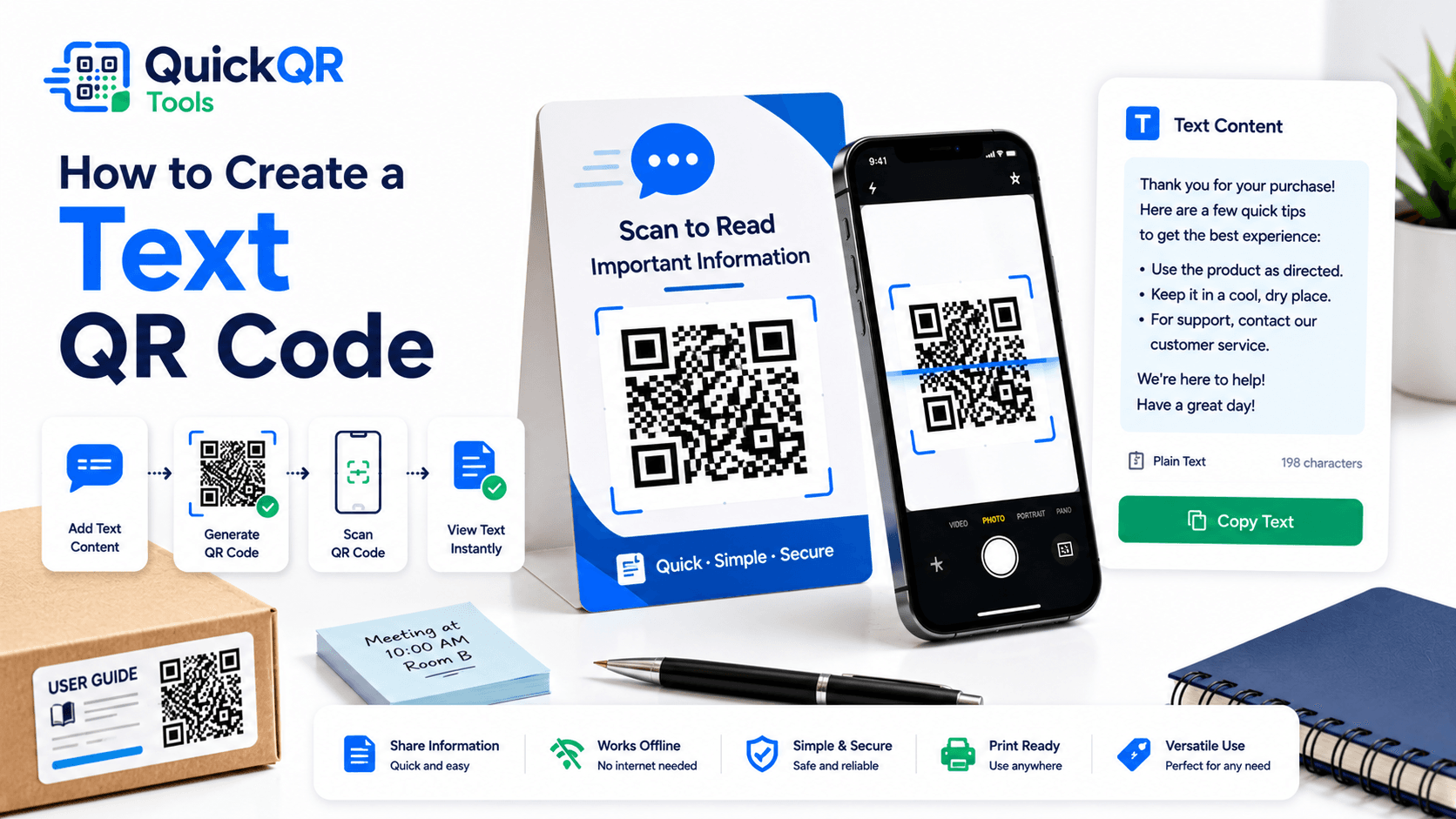
How to create a text QR code in 5 steps
- Open the text generator. Use the Text QR Code Generator to create a QR code that stores a plain message.
- Write the message. Type or paste the exact text you want people to see after scanning.
- Keep it short. Shorter text creates a simpler QR pattern and is easier to scan on small labels or printed materials.
- Generate and preview. Check the QR code and review the message before downloading.
- Scan-test and download. Scan with a phone, confirm the text is correct, then download PNG, SVG or PDF.
The best way to create a text QR code is to write the message like a label, not like a long article. The scanner should understand the message immediately. If the text needs several paragraphs, a URL QR code that opens a web page will usually be better.
When should you use a text QR code?
Use a text QR code when the information is simple, stable and useful without a website. It is a good fit for short notes, offline instructions, product labels, team references and quick visitor messages.
| Use case | Best for | Example text |
|---|---|---|
| Instructions | Packaging, equipment, offices and storage rooms. | Turn off the main switch before cleaning. |
| Labels | Inventory, boxes, shelves and team references. | Batch A-204, checked May 25, 2026. |
| Announcements | Temporary signs, event notes and visitor information. | Check-in starts at 8:30 AM near the front desk. |
| Offline notes | Places where internet access may be limited. | Emergency contact: front office extension 204. |
| Simple IDs | Asset tags, job packets and workplace workflows. | Asset ID: HVAC-Unit-03, Roof Level. |
Plain text QR codes are part of the broader QR code standard. The ISO overview of QR code symbology explains that QR codes are designed to encode data in a two-dimensional symbol. You can read more from the official ISO/IEC 18004 QR code standard page.
How to create a text QR code for labels and packaging
Labels and packaging are common places for text QR codes because space is limited. A small product box, equipment label, storage bin or shelf tag may not have room for detailed instructions, but a QR code can reveal a short note after scanning.
For packaging, keep the message focused. It might be a care instruction, batch note, warning, storage direction, assembly hint or short product reference. Avoid stuffing a full manual into a text QR code. If the user needs a complete guide, use a PDF QR Code Generator or a URL QR code that opens a support page.
When deciding how to create a text QR code for packaging, test the final printed size. Packaging can be curved, glossy, textured or folded. The QR code needs contrast, white space and enough size to scan from a normal phone distance. Use the Best QR Code Size for Print Materials guide if the code will appear on product labels, boxes or inserts.
How to create a text QR code for offices, classrooms and operations
Text QR codes are useful inside offices, schools, warehouses, workshops and team environments. They can share short instructions where people need them: on a printer, storage cabinet, classroom door, tool station, inventory shelf, meeting room sign or safety notice.
For workplace use, the best text QR codes remove small repeated questions. A QR code on a printer can show refill instructions. A code on a storage shelf can show what belongs there. A code near equipment can show a short startup or shutdown note. A code on a classroom door can show a visitor instruction.
How to create a text QR code for operations depends on clarity. Write the message in plain language. Use one idea per QR code. Avoid private passwords, confidential procedures or sensitive personal information. Anyone with a scanner can read the text, so treat the QR code like a visible label.
Text QR code vs URL, SMS and email QR codes
A text QR code is best when the scanner only needs to read a message. Other QR code types are better when the scanner should open a web page, send a message or start a communication flow.
| QR code type | Best for | Use this tool |
|---|---|---|
| Text QR code | Showing a short plain text message after scanning. | Text QR Code Generator |
| URL QR code | Opening a website, guide, form, menu, landing page or updateable content. | URL QR Code Generator |
| SMS QR code | Opening a ready-to-send text message to a phone number. | SMS QR Code Generator |
| Email QR code | Opening a pre-filled email with recipient, subject and message. | Email QR Code Generator |
If the information needs updates, use a URL QR code. If the user should send a message, use SMS or email. If the user only needs to read a short note, a text QR code is simple and direct.
How to create a text QR code that scans reliably
Text length affects QR code density. The more characters you encode, the more complex the QR pattern can become. Dense QR codes can still work, but they need better print quality, larger size and stronger contrast. This is why short messages are usually better.
Use dark QR modules on a light background. Keep a clean quiet zone around the QR code. Do not stretch, blur or compress the image. If the QR code appears on a small label, scan it at the final size before printing a full batch.
When planning how to create a text QR code for print, choose the download format carefully. PNG can work for simple use. SVG is better for design layouts because it scales cleanly. PDF can be convenient for print workflows. Always scan the exported version, not only the preview inside the generator.
How to create a text QR code without exposing sensitive information
A text QR code is easy to scan, which means it is also easy for anyone nearby to read. Do not put passwords, private customer data, medical details, payment information, access codes or confidential business instructions inside a public text QR code.
For public labels, write messages that are safe to display. For workplace use, still assume that the QR code may be scanned by someone outside the intended team. If the information is sensitive, use a secure protected system, a private web page or another controlled workflow instead of plain text.
How to create a text QR code responsibly starts with a simple question: would this message be safe if printed in normal text on the same label? If the answer is no, do not encode it as a text QR code.
How to create a text QR code when the message may become too long
A text QR code is strongest when the message is short. If you need to include several paragraphs, a full policy, a product manual, a long disclaimer, a changing schedule or a detailed guide, the QR code may become dense and the user experience may become awkward.
In that case, split the decision into two parts. If the reader only needs one short instruction, create a text QR code. If the reader needs a full document, create a PDF QR code. If the content may change, create a URL QR code that points to a web page you can update later. This keeps the QR code easier to scan and the content easier to maintain.
How to create a text QR code for a longer message usually means editing the message down to the most important line. A label that says "Scan for safety note" should reveal a short safety note, not a long manual. A product package that says "Scan for care instructions" should show the main care rule or point people to a fuller guide.
The practical rule is simple: use a text QR code for stable, short, readable messages. Use a URL or PDF QR code when the content needs more space, formatting, images, updates or a better reading experience.
Quick examples for common text QR code situations
These examples show how to create a text QR code for practical everyday uses. The message should stay short enough to scan easily and read quickly.
- Equipment label. How to create a text QR code for equipment: write one short instruction such as "Clean filter every Monday before opening."
- Storage box. How to create a text QR code for storage: encode a short inventory note such as "Holiday display cables and clips, shelf B4."
- Event sign. How to create a text QR code for an event: use a quick message such as "Speaker check-in is at desk 2 near the main entrance."
- Classroom note. How to create a text QR code for a classroom: share a simple instruction such as "Visitors, please wait outside until the session ends."
- Product insert. How to create a text QR code for packaging: add a care note such as "Hand wash only. Do not use bleach."
- Team workflow. How to create a text QR code for teams: encode a short non-sensitive process note that helps people follow the same step.
How to create a text QR code for product care and safety notes
Product care notes are a strong use case for text QR codes because the message can be short and stable. A label might show a washing instruction, storage note, cleaning warning, assembly reminder or basic safety direction. The scanner does not need a full website if the answer is only one or two lines.
For product care, write the message in the same way you would write a printed label. Use clear verbs, avoid long explanations and remove anything that is not essential. A simple instruction such as "Store upright in a cool dry place" is better than a long paragraph that people will not read on a phone.
How to create a text QR code for product care starts with deciding what the customer needs at the moment of use. If the customer is holding the product, they may need a care note, warning, batch note or quick instruction. If they need a full guide, troubleshooting steps or warranty details, a URL QR code or PDF QR code will give a better experience.
Always test the printed label after download. Product packaging can be glossy, curved, folded or small. A message that works in a large preview may need a bigger QR code on the real label. Keep the design clean, with enough white space around the code.
How to create a text QR code for maintenance and asset labels
Maintenance teams can use text QR codes on equipment, shelves, storage areas, tools and service points. A QR code can show a short team note such as an asset ID, inspection reminder, cleaning interval, startup step or location reference. This can reduce repeated questions and make simple instructions available exactly where the work happens.
For asset labels, keep the message factual. Include only non-sensitive information that helps the person scanning. Examples include "Filter size: 20x25x1", "Inspect every Friday", "Use blue bin for returns" or "Asset ID: Pump-02". Avoid passwords, alarm codes, private customer details or restricted procedures.
How to create a text QR code for maintenance is different from creating a QR code for marketing. The design should be functional. The label should survive the environment, the QR code should scan under normal lighting and the message should be short enough to read while someone is working.
If the maintenance information changes often, do not use a static text QR code for the full procedure. Use a URL QR code that points to a controlled document or private page. A static text QR code is best for stable notes that will remain correct after printing.
How to create a text QR code for events and visitor instructions
Events often need small instructions in specific places. A text QR code can show check-in notes, room instructions, badge pickup details, queue directions, booth information, WiFi reminder text or short attendee guidance. This is helpful when a sign has limited space but visitors may need one clear message.
For visitor instructions, keep the wording polite and direct. A scan should not reveal a confusing block of text. It should answer the immediate question. Examples include "Speaker check-in is at desk 2", "Please keep this badge visible", "Workshop materials are available at the back table" or "Doors open at 6:30 PM".
How to create a text QR code for events depends on whether the information is temporary or permanent. A one-day event note can be static because it will not need updates after the event. A changing schedule should use an event page, PDF or URL QR code instead.
Pair the QR code with a visible label. "Scan for check-in note" is clearer than an unlabeled QR code. People scan more confidently when they understand what the scan will show.
How to create a text QR code for offline environments
One advantage of a text QR code is that the message can be read without opening a web page. This can help in warehouses, basements, remote work areas, event venues, storage rooms, classrooms, parking areas or places where mobile signal may be weak.
Offline usefulness does not mean unlimited content. The message still needs to be short, readable and safe. If the user needs a long guide, consider printing the most important instruction near the QR code and using a PDF or URL QR code for the full guide when internet access is available.
How to create a text QR code for offline use starts with choosing the right message. Ask what the scanner must know in that exact location. If the answer is one clear sentence, a text QR code is a good fit. If the answer requires a detailed explanation, use another format.
Test offline behavior with a real phone. Scan the QR code in airplane mode or with mobile data disabled to confirm that the message appears without needing a network connection. This simple test can prevent surprises after printing.
For public spaces, add a visible label near the code so people understand why they should scan it. A clear label such as "Scan to read note" improves trust and makes the short message feel intentional.
Common text QR code mistakes
- Adding too much text. Long messages create denser QR codes and can be awkward to read on a phone.
- Using text when a web page is better. If content needs updates, use a URL QR code.
- Storing sensitive data. A plain text QR code is not a secure place for private information.
- Printing too small. Small labels need careful scan testing.
- No context near the QR code. Add a label such as "Scan for instructions" or "Scan to read note."
- Skipping proofreading. A typo inside a static text QR code cannot be corrected after printing.
- Using weak contrast. Low contrast can make the QR code hard to scan.
Most mistakes are easy to prevent. Keep the message short, proofread carefully, test the QR code and choose a URL QR code when the information needs to change.
Text QR code checklist before publishing
- The message is short, clear and useful.
- The text has been proofread.
- The QR code does not contain private or sensitive information.
- The final QR code scans on at least two phones.
- The printed size, contrast and quiet zone are reliable.
- The surrounding label explains what the QR code does.
- A URL QR code has been chosen instead if updates are needed.
- The download format matches the final use: PNG, SVG or PDF.
This checklist is the practical answer to how to create a text QR code that people can scan and understand. The best text QR code is simple, readable and safe to share.
Text QR code FAQ
Can a QR code contain plain text?
Yes. A text QR code can store plain text directly inside the QR code, so the message appears after scanning.
Does a text QR code need the internet?
No. Because the message is stored inside the QR code, it can be scanned without opening a website or using a landing page.
How much text can I put in a QR code?
A QR code can store many characters, but shorter text scans faster and is easier to use on printed materials.
Can I edit a text QR code after downloading it?
No. A static text QR code cannot be changed after it is created. If you need editable content, use a web page and create a URL QR code.
Is a text QR code good for passwords?
No. Do not store passwords, private data, access codes or sensitive information in a public plain text QR code.
What should I write near a text QR code?
Use a clear label such as "Scan for instructions", "Scan to read note" or "Scan for product information" so people know what will happen.
Create your text QR code
Use QuickQR Tools to generate a QR code for plain text, notes, labels, instructions and offline messages.
Open Text QR Generator