
Setup notes
Share short setup steps on products, equipment or printed guides.
Business Utility QR Tool
Use this text QR code generator to create a professional plain text QR code for labels, product instructions, classroom prompts, team notes, event signs and offline information. Store short text directly inside the QR code without needing a website link.
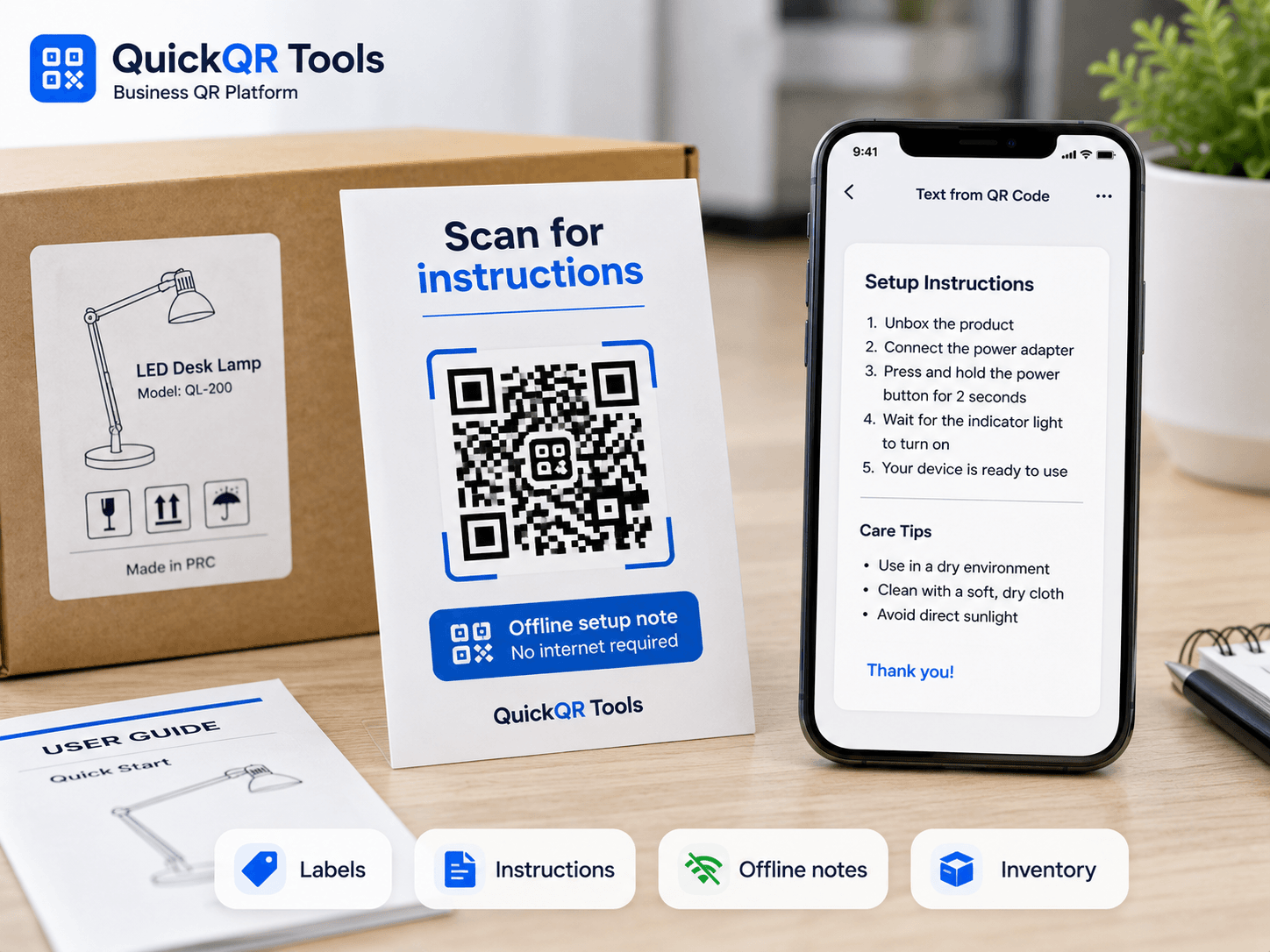
Enter the plain text that should appear when someone scans the QR code. This text QR code generator stores the message directly in the code for offline notes, labels and short business instructions.
Use it on labels, packaging, event signs, manuals, classrooms, inventory tags or private instructions.
Text QR codes are simple, fast and practical when the information can live directly inside the code. This text QR code generator works best for short, stable information that users need to read immediately.
Share short setup steps on products, equipment or printed guides.
Display event details, meeting notes or room instructions without a web page.
Store team notes, product codes, serial numbers or handling reminders.
Give learners a short prompt, clue or instruction by scanning a QR code.
Create a QR code that stores plain text directly inside the QR data, then use the complete guide to prepare it for notes, labels, instructions and offline messages.
Write the note, message or instructions you want to store.
Create the QR code instantly and preview it on the page.
Export the QR code as PNG, SVG or PDF.
Read the step-by-step guide for plain text QR codes, notes, labels, instructions and offline messages.
Understand why text QR codes are static and when a dynamic QR code may be a better fit.
Choose the right QR code size before printing text QR codes on labels, signs or packaging.
A text QR code generator creates a QR code that stores plain text directly inside the code. When someone scans it, the scanner displays the message, note, instruction or reference text without opening a website first. That makes a text QR code useful when the information is short, stable and does not need a landing page.
Most QR tools are built around links, but plain text QR codes solve a different problem. They are helpful when you need the scan to reveal a message immediately: a setup note on equipment, a classroom prompt, a product handling reminder, a locker instruction, a serial number explanation, a printed clue, a visitor note or a short team message. The QR code becomes a compact container for the text itself.
This text QR code generator is designed for practical use. You can write the message, choose a color, generate the QR code, test it on the page and download PNG, SVG or PDF. The best results come from concise text, high contrast and a print size that matches the scanning distance.
QR code standard reference
A text QR code generator is strongest when the scan should reveal a short message instantly. Use it for stable information that does not require forms, tracking, payments or a full web page.
Add short setup instructions, safety notes, care guidance or packaging reminders directly to a label. This is useful for products that need a quick explanation but do not need a full manual.
Teachers, trainers and workshop leaders can place a question, clue, exercise step or short instruction behind a scan. Learners get the information immediately and can continue without typing a link.
Use a text QR code for storage reminders, item codes, shelf notes, batch details or handling instructions. For workplace workflows, keep the content short and avoid sensitive personal data.
Place a short room note, queue instruction, booth message, WiFi reminder or staff direction on signs. For full dates and calendar details, the event QR code generator may be a better match.
The best text QR codes are clear, short and written for the person scanning. A QR code can hold a lot of text, but scan reliability gets better when the message stays focused.
| Goal | Good text example | Why it works |
|---|---|---|
| Simple instruction | Turn the dial to position 2 before starting the machine. | The message is short, action-oriented and easy to read on a phone screen. |
| Product label | Wash cold. Air dry only. Do not bleach. | The scan gives the user exactly what they need without a separate page. |
| Classroom prompt | Write three examples of renewable energy, then compare your answers with a partner. | The QR code supports an activity and keeps the instruction available offline. |
| Event direction | Check in at desk B. Bring your ticket and photo ID. | The note reduces confusion in a high-traffic location. |
| Team inventory | Spare filters for unit A. Replace every 90 days. | The text is practical for staff and does not expose private customer information. |
A text QR code generator is not always the right tool. It is ideal when the code should display plain text, but other QR formats are better when the scanner needs to perform an action. A URL QR code opens a web page. An SMS QR code prepares a message. An email QR code opens an email draft. A PDF QR code usually points to a hosted document.
Choose a plain text QR code when the message is complete by itself. Choose a URL QR code when you need a page that can be updated, indexed, measured or expanded. Choose an SMS QR code when the scan should help the user send a text message. Choose an email QR code when the scan should prepare a recipient, subject and message. Choose a vCard QR code when the purpose is contact sharing.
The important user experience rule is simple: match the QR format to the action. If the scan should read, use text. If the scan should visit, use URL. If the scan should contact, use phone, SMS, WhatsApp, email or vCard. This keeps the experience predictable and reduces failed scans, confusion and wasted print materials.
A text QR code generator can create the code quickly, but the final result depends on the message, contrast, size and placement.
Plain text can become dense inside a QR code. The longer the message, the more modules the QR code needs, and the harder it can be to scan from a distance or after printing. Keep the content direct. If the text is several paragraphs long, consider a URL QR code that points to a page instead.
Dark QR code modules on a light background are the safest choice. Brand colors can work, but avoid pale colors, low contrast and busy backgrounds. Test the QR code with more than one phone before printing a large batch.
The person scanning may be standing in a store, classroom, warehouse, venue or public place. Use plain language, short sentences and a clear first line. A good text QR code removes friction instead of creating another puzzle.
Use PNG for quick digital use, SVG for designs that need scaling and PDF for print-ready documents. When the QR code will appear on packaging, signs or labels, SVG and PDF usually preserve sharper edges.
A QR code created with a text QR code generator is static because the text is encoded directly into the QR code. Once you download and print it, the message cannot be changed unless you create a new QR code. This is excellent for information that will not change, but it is not ideal for prices, schedules, policies or time-sensitive details.
The advantage is reliability. A plain text QR code can show its message even when the scanner has limited internet access, because the phone is reading the encoded content. Some scanner apps may still display the result inside their own interface, but the content itself does not depend on a website being online.
If you expect to update the content later, use a URL QR code and publish the information on a page you control. That gives you the flexibility to update the page without reprinting the QR code. If the content is fixed, a text QR code is simple, direct and durable.
Before publishing or printing a QR code, make sure the content is safe to expose, readable after scanning and clear in context.
Do not place passwords, private customer records, medical information, payment details or sensitive business data in a plain text QR code. Anyone who can scan the printed code can read the message. For private workflows, use neutral labels and keep confidential content in controlled systems.
Add a visible label near the QR code so people know what they will receive after scanning. For example, write “Scan for setup instructions” or “Scan for care notes.” This helps users decide whether the scan is relevant and improves trust.
Small labels need short text and high contrast. Posters, signs and menus need larger QR codes. If people will scan while walking, standing in line or holding an item, make the code large enough and leave quiet space around it.
Scan the QR code from the final file, not only from the preview. Test the PNG, SVG or PDF after exporting. If you print it, scan the printed sample under normal lighting before using it publicly.
A text QR code generator is simple, but small mistakes can still make the final code hard to scan or unclear for users.
The most common mistake is treating a plain text QR code like a full article, policy page or manual. A QR code can technically hold a lot of characters, but the visual pattern becomes more complex as the amount of data increases. More complexity means smaller modules, and smaller modules are harder for cameras to read after printing, resizing or placing the code on textured surfaces.
If the message needs several paragraphs, images, links, updates or formatting, a URL QR code is usually better. Publish the long content on a page, then create a QR code for the link. Use this text QR code generator when the content is compact enough to be useful on a phone screen immediately after scanning.
A scan should answer a clear question. Instead of writing “Important information,” write the actual instruction: “Check in at desk B before entering the workshop.” Instead of writing “Product care,” write “Wash cold, air dry, do not bleach.” Direct copy creates a better experience because the visitor does not have to guess what the code means.
A QR code without context often gets ignored. Add a short visible label beside it, such as “Scan for setup steps,” “Scan for classroom prompt,” “Scan for storage note” or “Scan for care instructions.” This label is not only helpful for accessibility; it also increases engagement because people understand the value before they scan.
Some brand styling is fine, but scan reliability comes first. Avoid low contrast, very small codes, distorted proportions, heavy shadows, transparent backgrounds and decorative overlays that cover the QR pattern. A clean code with enough quiet space will usually outperform a more decorative code that looks interesting but scans poorly.
Always test the exact exported file. If the code will be printed, test a printed sample at real size. Scan it with at least two phones, from the expected distance, under normal lighting. This final check is faster than reprinting labels, flyers or packaging after discovering that the QR code is too small or the message is too long.
For businesses, a text QR code generator is useful when teams need fast, printable information that does not justify a new landing page.
Retail teams can add short care notes, product handling reminders, return instructions or shelf messages. For example, a QR code on packaging can say, “Keep refrigerated after opening” or “Scan before assembly: check all parts before tightening screws.” This works well when the message is stable and easy to understand without extra media.
If the business needs richer content, like warranty registration, product videos or seasonal promotions, a URL QR code is better. Use plain text for fixed instructions and links for expandable content.
A restaurant can use a text QR code for staff notes, pickup instructions, table reminders or event-specific messages. For example, a code near a catering station can show a prep note, allergen reminder or closing checklist. Customer-facing menu content should usually use a menu QR code or URL QR code because menus change and need a better visual layout.
The advantage of text is speed. Staff scan, read and act. There is no page load, no login and no extra navigation.
Operations teams can use text QR codes for aisle notes, maintenance reminders, equipment warnings, bin instructions and storage rules. A code on a shelf could say, “Store upright only. Inspect seal before moving.” A code on equipment could say, “Use protective gloves before replacing filter.” Keep safety-critical information visible too; a QR code should support instructions, not hide essential warnings.
Property managers, cleaners, installers and local service providers can use a text QR code generator for simple job notes, access reminders, parking instructions or handoff messages. If the scan should collect a review, open a booking page or show a service portfolio, use a dedicated QR type instead. The plain text format is best for immediate instruction, not conversion tracking.
Before you place the QR code on a public page, label, poster or product, run through a simple quality checklist. First, confirm that the message is final. A text QR code is static, so printed content cannot be edited later. Second, confirm that the message is appropriate for anyone who may scan it. If the code will be visible in a public space, do not include private names, passwords, hidden pricing, customer records or sensitive operational details.
Third, check readability on a phone screen. The message should begin with the most important information. If the scanner only reads the first line, they should still understand the purpose. Fourth, test scan speed. If your phone struggles to read the code from the expected distance, shorten the text, increase the physical size or improve the contrast.
Finally, decide whether the text format is still the best fit. This text QR code generator is excellent for stable notes and offline information. If you need analytics, updates, rich design, multiple links or search visibility, publish a web page and create a URL QR code instead.
Strong text QR content is specific, useful and short enough to read in the moment. These examples show how to shape the message before using the text QR code generator.
| Use case | Weak message | Better message | Reason |
|---|---|---|---|
| Equipment | Instructions | Before use: check the water level, lock the lid and press Start for 3 seconds. | The improved version gives the user the actual next step. |
| Classroom | Question | What changed between paragraph 1 and paragraph 3? Write one sentence explaining the difference. | The prompt is specific and can be completed immediately. |
| Packaging | Care info | Clean with a dry cloth. Do not use alcohol or abrasive cleaners. | The customer gets clear care guidance without opening a page. |
| Venue | Go here | Check-in is upstairs in room 204. Keep your badge visible after entry. | The scan reduces confusion and improves flow inside the venue. |
| Storage | Team note | Store sealed boxes only. Open boxes go to shelf C for same-day processing. | The instruction helps staff act consistently. |
A text QR code generator creates a static result, so the code should be replaced whenever the message changes. This matters for instructions, safety notes, classroom activities, event details and operational labels. If the printed code says the wrong thing, the scanner will keep seeing the wrong message until the QR code is removed or replaced.
Review printed text QR codes when a product changes, a process changes, a room assignment changes, a policy changes or a team finds a clearer instruction. For workplace use, create a simple review habit: add the creation date near the QR code file name, keep the source message in your records and remove old files when you publish a corrected version.
If updates are frequent, the better strategy is to move the content to a web page and use a URL QR code. Use this text QR code generator for stable messages, then use the other QuickQR Tools generators when the scan should lead to a page, map, calendar event, email, SMS, WhatsApp chat or contact card.
Use these guides to decide when plain text QR codes are enough and when a business QR workflow needs a better format.
Understand QR code types, static data, scan behavior and when to use text, URL or contact QR codes.
Print text QR codes clearly for labels, instructions, product tags, classroom prompts and signs.
Use QR codes in business campaigns when the scan should lead to a page, offer, form or contact action.
Learn why plain text QR codes are static and when a URL-based workflow gives more flexibility.
Before printing a text QR code on product labels, classroom prompts, event signs, storage tags or instruction cards, use these QR utilities to check scan quality, print size, distance and contrast.
Test the text QR code on real phones and confirm the message opens clearly before printing.
Choose a practical QR size for labels, cards, signs, product tags and printed instruction sheets.
Estimate scan distance for posters, classroom walls, warehouse signs and larger instruction displays.
Check whether label colors, dark backgrounds and printed layouts keep the QR code readable.
Review verified QR code statistics for mobile scanning, business usage and print-to-digital information sharing.
Answers to common questions about using a text QR code generator for notes, labels, instructions and offline information.
Yes. This text QR code generator lets you create a free static QR code that stores plain text and download it as PNG, SVG or PDF.
No. The text is stored directly inside the QR code data, so the scan can display the message without opening a web page.
You can add notes, instructions, serial numbers, short messages, classroom prompts, labels or offline information. Keep the message concise for better scanning.
Yes. Because the message is encoded directly in the QR code, the user can often read the text even without an active internet connection.
QR codes can store a large amount of text, but shorter content scans better. For long content, use a URL QR code that links to a full page.
Use a text QR code when the scan should display a short fixed message. Use a URL QR code when the content is long, needs updates or should lead to a website.
PNG is convenient for quick use, SVG is best for scalable design work, and PDF is practical for print-ready documents.
Yes. You can download the generated QR code as PNG, SVG or PDF directly from this text QR code generator.
Create QR codes for URLs, WiFi, WhatsApp, email, SMS, events, locations, phone numbers and contact cards.
Explore the full QuickQR Tools business QR toolkit for contact, marketing, restaurant, utility and social QR codes.
Create a QR code for any website link.
Let visitors connect to WiFi by scanning a code.
Open a WhatsApp chat with a prefilled message.
Open a ready-to-send email from a scan.
Share event date, time and venue details.
Open an address or map location after scanning.
Prepare a text message for instant sending.
Share contact details and business information.
The Business QR Toolkit
Create a professional text QR code for product labels, setup notes, classroom prompts, event instructions, inventory tags and offline business information. Generate it free, test the scan and download a clean PNG, SVG or PDF file.