QR code use cases for businesses, restaurants, events and creators
QR code use cases help businesses turn physical moments into useful digital actions. Use QuickQR Tools to connect menus, reviews, WiFi access, social profiles, product packaging, event materials and printed campaigns to destinations customers can open from their phone.
Choose the QR code use case first: menu access, reviews, social follows, file downloads, appointments, directions, coupons or event details.
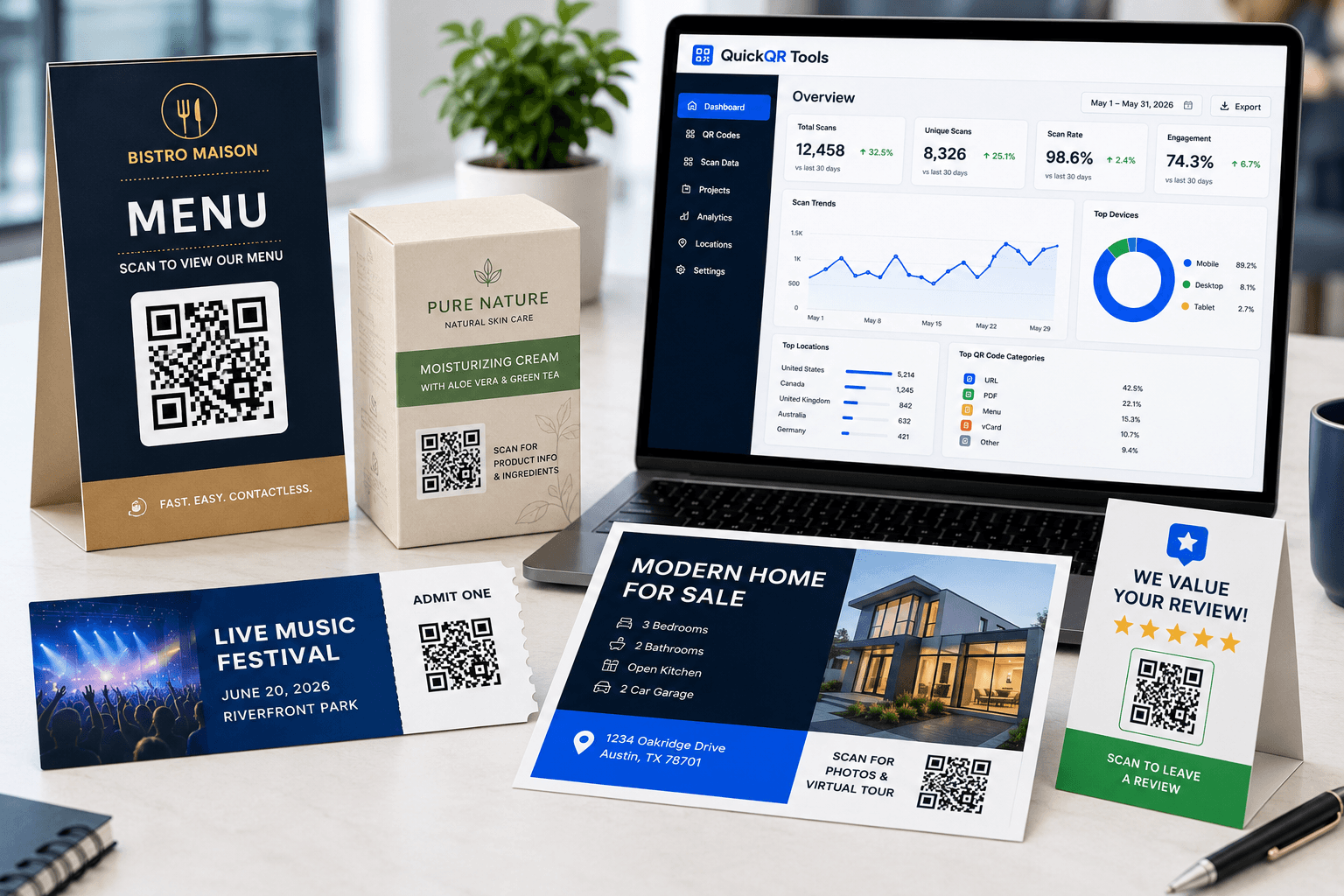
A strong QR code use case connects one printed moment to one useful digital next step.
Start with the business goal
The best QR code use cases are simple: a customer sees something offline, scans it and lands on the exact digital action they need.
Restaurants
Restaurant QR code use cases include table menus, guest WiFi, receipts and window signs that help guests open menus, connect quickly and leave reviews.
- Digital menu access
- Guest WiFi connection
- Google review requests
Local businesses
Local business QR code use cases work well on counters, invoices, business cards and signs so customers can review, contact or revisit your business.
- Review collection
- Contact sharing
- Local promotions
Creators and social profiles
Social QR code use cases connect posters, packaging, merch and event displays to Instagram, TikTok, YouTube, Facebook, LinkedIn or a social landing page.
- Profile discovery
- Follower growth
- Campaign landing pages
Events
Event QR code use cases include tickets, posters, badges and schedules that share event details, registration pages and location information.
- Event registration
- Calendar details
- Venue directions
Retail and product packaging
Retail QR code use cases turn labels, inserts and shelf cards into digital product pages, PDFs, coupons, instructions and customer support links.
- Product information
- PDF instructions
- Coupons and offers
Real estate and locations
Real estate QR code use cases add scannable links to signs, flyers and open house materials so people can open maps, listings, documents or contact details quickly.
- Map directions
- Listing pages
- Agent contact details
Marketing campaigns
Marketing QR code use cases connect flyers, posters, packaging, coupons, events and social campaigns to the right digital action.
- Campaign landing pages
- Coupons and offers
- Print-to-digital actions
Flyers and handouts
Flyer QR code use cases connect printed handouts, mailers and local promotions to coupons, menus, event pages, booking forms and product pages.
- Local promotions
- Event flyers
- Printed offers
Posters and signs
Poster QR code use cases connect window signs, wall posters, event displays and retail promotions to mobile actions people can scan from a distance.
- Window signs
- Event posters
- Scan distance
Store signs
Store sign QR code use cases connect window signs, counter cards, shelf displays and pickup signs to offers, reviews, product details and loyalty actions.
- Window offers
- Counter reviews
- Shelf product details
Table tents and table cards
Table tent QR code use cases connect restaurant tables, cafe counters and local business desks to menus, WiFi, reviews, offers and customer actions.
- Digital menus
- Guest WiFi
- Review prompts
Product packaging
Product packaging QR code use cases connect boxes, labels and inserts to guides, videos, coupons, reviews and support pages.
- Product guides
- Support and warranty
- Reorder links
Product labels
Product label QR code use cases make stickers, bottles, boxes and tags more useful with product details, instructions, videos and support links.
- Ingredients and details
- Care instructions
- Scan testing
Product inserts
Product insert QR code use cases connect thank-you cards, warranty cards and instruction inserts to setup guides, support, reviews, videos and reorder offers.
- Setup guides
- Warranty registration
- Support and reorders
Packaging inserts
Packaging insert QR code use cases help brands turn unboxing cards into setup guides, warranty registration, support, reviews, product videos and reorder offers.
- Unboxing cards
- Support and warranty
- Review and reorder offers
Customer reviews
Customer review QR code use cases help businesses collect honest feedback from receipts, counters, table cards, packaging and service materials.
- Google reviews
- Feedback forms
- Review cards
Business cards and networking
Business card QR code use cases help professionals share contact details, LinkedIn profiles, portfolios, phone numbers, emails and booking pages.
- vCard contact sharing
- LinkedIn follow-up
- Portfolio and booking links
Match the QR type to the customer action
A QR code use case works best when the destination is specific. Avoid sending every scan to a generic homepage when a menu, review page, PDF, coupon, map or social profile would be more useful.
These QR codes are useful for product pages, instructions, menus, guides and printed materials.
These QR codes reduce typing and make it easier for customers to start a conversation.
These QR codes are built for reviews, offers, registration, schedules and campaign responses.
Use QR utilities before printing menus, flyers, product labels, posters or signs.
Popular tools for common QR code use cases
Use these generators and utilities to build practical QR code use cases for business, marketing, printing and customer service.
Website QR Code Generator
Create a QR code for a landing page, website, form, booking page or campaign URL.
WiFi QR Code Generator
Help guests connect to WiFi without typing the network name and password manually.
Google Review QR Code Generator
Make it easier for customers to open your review page from receipts, cards and signs.
QR Codes For Small Business
Plan review, contact, offer, document, flyer and business card QR workflows.
Menu QR Code Generator
Connect table cards, counter signs and windows to a digital menu.
QR Codes For Restaurants
Plan menu, WiFi, Google review, offer and table QR workflows for restaurants and cafes.
QR Scan Tester
Check whether a QR code is easy to scan before printing or sharing it.
QR Code Size Calculator
Choose a better print size for flyers, business cards, menus, labels and posters.
QR Codes For Business Cards
Plan contact, LinkedIn, phone, email, portfolio and booking QR codes for printed cards.
Create a QR code use case in four steps
Keep each QR code use case simple so every scan has a clear purpose and a useful destination.
Choose the outcome
Decide what the person should do after scanning: read, connect, review, contact, download, follow or register.
Select the QR type
Pick the generator that matches the job: URL, WiFi, menu, review, PDF, event, social media, vCard or coupon.
Generate and test
Create the QR code, scan it with real phones and check that the destination opens quickly and clearly.
Print or share
Place the QR code where people naturally need it: tables, receipts, signs, packaging, flyers, badges or cards.
Helpful resources for better QR code results
Learn how to plan, print and test QR codes before using them in business materials.
Ultimate QR Code Guide
Understand QR code types, static codes, dynamic codes, printing, testing and common business uses.
Read the guideQR Code Marketing Guide
Plan QR campaigns for flyers, packaging, events, promotions and offline-to-online customer journeys.
Explore marketing ideasQR Code Printing Guide
Use better size, contrast, spacing and placement decisions before printing QR codes on physical materials.
Improve print qualityQR Code Benchmarks
Compare scan, size, contrast, distance and placement checks before using QR codes in customer-facing materials.
Review QR benchmarksQR Industry Report
Understand QR adoption, retail packaging, mobile scanning and print-to-digital trends across business categories.
Read the reportTrusted references for QR code planning
Use these external resources alongside QuickQR tools when planning QR code use cases for reviews, accessibility, printing and product information.
Google Business Profile review guidance
Helpful when planning QR code use cases that ask customers to open a review page after a visit or purchase.
AccessibilityW3C contrast guidance
Useful for making printed QR destinations, landing pages and calls to action easier to read and use.
QR StandardISO/IEC QR code standard reference
Useful context for businesses that care about QR code quality, print reliability and scan performance.
QR code use cases FAQ
Short answers for businesses choosing the right QR code for print, marketing, service and customer experience.
What are the best QR code use cases for small businesses?
Useful QR code use cases for small businesses include website links, Google reviews, menus, WiFi access, business cards, coupons, PDF downloads, event details, social profiles and location directions.
Which QR code should a restaurant use first?
Most restaurants should start with a menu QR code, WiFi QR code and Google Review QR code. These use cases help guests view menus, connect easily and leave feedback after a visit.
Are QR codes useful for printed marketing?
Yes. QR codes are useful on flyers, posters, brochures, packaging, receipts and business cards when the scan opens a clear destination such as a landing page, offer, product guide or booking page.
How do I choose the right QR code type?
Choose the QR type based on the action you want after the scan. Use URL for websites, WiFi for access, Google Review for feedback, PDF for documents, event QR for schedules and social media QR for profiles.
Should every QR code point to my homepage?
No. A QR code usually performs better when it points to the most relevant destination for the printed context. A table card should open a menu, a receipt can open reviews and a product label can open instructions or product details.
How can I make printed QR codes easier to scan?
Use enough size, strong contrast, quiet space around the code and a clear call to action. Test the QR code on multiple phones before printing a large batch.
Ready to create your QR code?
Choose the QR code use case, generate a business-ready QR code and test it before adding it to menus, signs, packaging, cards, events or campaigns.