No clear scan promise
A QR code should say what happens next: follow, watch, book, buy, save or contact.
Creator QR Solutions
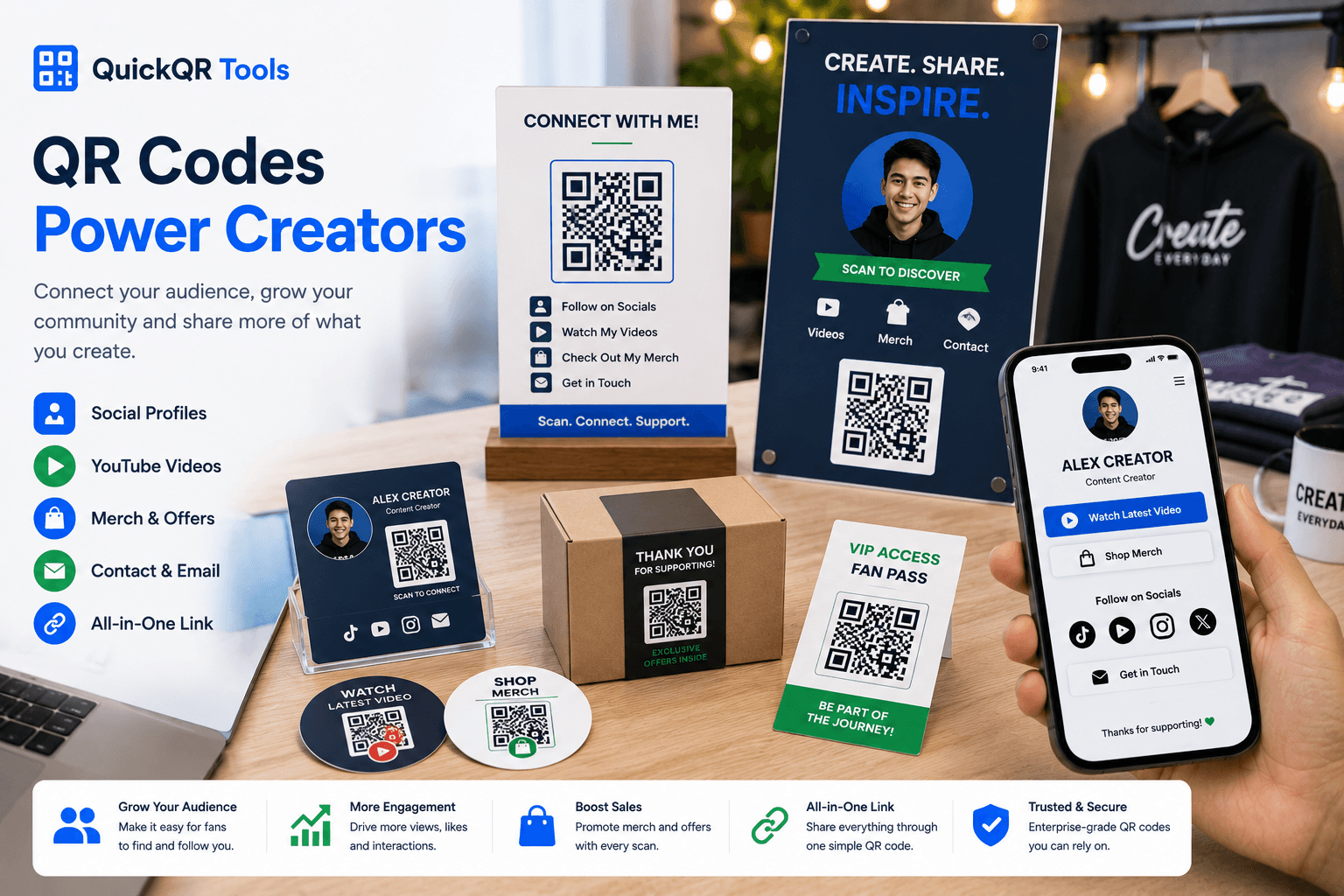
QR codes for creators help audiences open social profiles, videos, link pages, products, newsletters, bookings, event pages and contact options from business cards, packaging, posters, merch, booths and printed content.
Creator touchpoints
The best QR codes for creators make offline moments instantly useful: someone sees a card, sticker, package or sign and can follow, watch, buy or contact from a phone.
Connect posters, cards, stickers, booths and packaging to Instagram, TikTok, YouTube, Facebook, LinkedIn or a social hub.
Create social QRSend people from printed materials to a YouTube channel, launch video, tutorial, trailer, podcast episode or product demo.
Create YouTube QRUse Instagram QR codes on business cards, pop-up displays, lookbooks, packaging and creator media kits.
Create Instagram QROpen a creator landing page, product collection, newsletter signup, booking form, course page or portfolio site.
Create website QRMake it easy for partners, brands, clients and event organizers to save creator contact details.
Create vCard QRAdd coupon QR codes to merch inserts, packaging, event cards and print campaigns so audiences can claim offers.
Create coupon QRPlacement guide
A QR code on merch, a business card or a booth sign should have a clear job. Match each placement to the action the audience is most likely to take.
| Placement | Best destination | Audience benefit | Recommended tool |
|---|---|---|---|
| Business card | Social hub, portfolio, booking page or contact card. | People can follow, save contact details or review work immediately. | Social Media QR Code Generator |
| Merch or packaging | Thank-you page, offer, product guide, video or community link. | Fans get a useful follow-up after purchase. | Coupon QR Code Generator |
| Poster or booth sign | Social profile, video, event page or newsletter signup. | Passersby can connect without typing a username. | URL QR Code Generator |
| Media kit | Portfolio, case studies, press page, PDF or contact form. | Brands can review creator details faster. | PDF QR Code Generator |
Audience experience
QR codes for creators work best when the scan promise is specific. Tell people exactly what they will get after scanning.
Simple workflow
Decide whether the scan should open a social profile, video, shop, booking page, contact card or offer.
Use the generator that matches the action and download the best format for print or screen.
Scan the final mockup on a phone, especially if the QR code appears on merch or packaging.
Add the QR code where people are ready to follow, watch, buy, book or contact.
Avoid friction
Creator QR codes should feel like a natural next step, not a random graphic. Strong labels and clean destinations matter.
A QR code should say what happens next: follow, watch, book, buy, save or contact.
If everything matters equally, the visitor may do nothing. Use focused destinations for important materials.
Creator designs can be colorful, but QR codes still need strong contrast and enough quiet space.
Practical examples
Creators often meet audiences in physical moments: events, packaging, classes, markets, concerts, stores and printed collaborations. QR codes make those moments easier to continue online.
Add a QR code to cards for portfolios, social profiles, booking pages, media kits or contact details so people can connect after a meeting.
Use QR codes on packaging inserts, thank-you cards, stickers and merch tags to open care notes, discounts, videos or community links.
Place QR codes on booth signs, stage screens, flyers and posters so attendees can follow, subscribe, watch a recap or claim an event offer.
Teachers and educators can use QR codes for worksheets, resources, course pages, payment links, feedback forms and follow-up materials.
A QR code can send shoppers to product details, online stores, limited drops, mailing lists, sizing guides or payment instructions.
Use QR codes in pitch decks, printed media kits and collaboration materials to open a portfolio, rate card, case study or contact page.
Related tools
Use these QuickQR tools to connect printed creator materials to social profiles, videos, shops, offers and contact options.
Create a QR code for your main social profile or social landing page.
Create social QRPlan creator cards that open portfolios, media kits, booking pages, contact details or social profiles.
Plan business card QRSend people to a channel, video, playlist or launch content.
Create YouTube QRConnect cards, posters and merch to Instagram content.
Create Instagram QRChoose safer sizes for stickers, cards, posters, packaging and event displays.
Calculate sizeCheck whether branded QR colors are readable enough for scanning.
Check contrastTest creator QR codes before printing merch, cards or packaging.
Test scanWhen linking to social platforms, use accurate, non-misleading labels and keep destinations aligned with the printed promise.
Creator landing pages opened from QR codes should be readable, fast and easy to navigate on mobile devices.
Connect your audience to social profiles, videos, offers, shops, events and contact options from every printed touchpoint.
FAQ
Short answers for creators, influencers, artists, educators, podcasters and independent businesses using QR codes in printed materials.
The best QR codes for creators include social media QR codes, YouTube QR codes, Instagram QR codes, URL QR codes, vCard QR codes and coupon QR codes.
Creators can place QR codes on business cards, stickers, posters, merch, product packaging, media kits, event booths, flyers and thank-you cards.
Yes. A clear social media QR code can make it easier for people to follow, watch or subscribe from offline materials.
They can, but the QR code still needs enough contrast and quiet space to scan reliably.
Yes. Test the final printed material on multiple phones before ordering stickers, cards, packaging or merch.
Yes. QR codes can be used on merch tags, packaging inserts, stickers and thank-you cards when the print size and contrast are tested.
Yes. Use a social landing page or link page when you want one QR code to open several profiles, videos, shops or contact options.
Use a simple label such as Scan to follow, Scan to watch, Scan for merch, Scan to book or Scan to contact.