
Product instructions
Send customers to setup steps, care guides, safety details, installation videos or printable instruction sheets.
QR Codes For Product Packaging
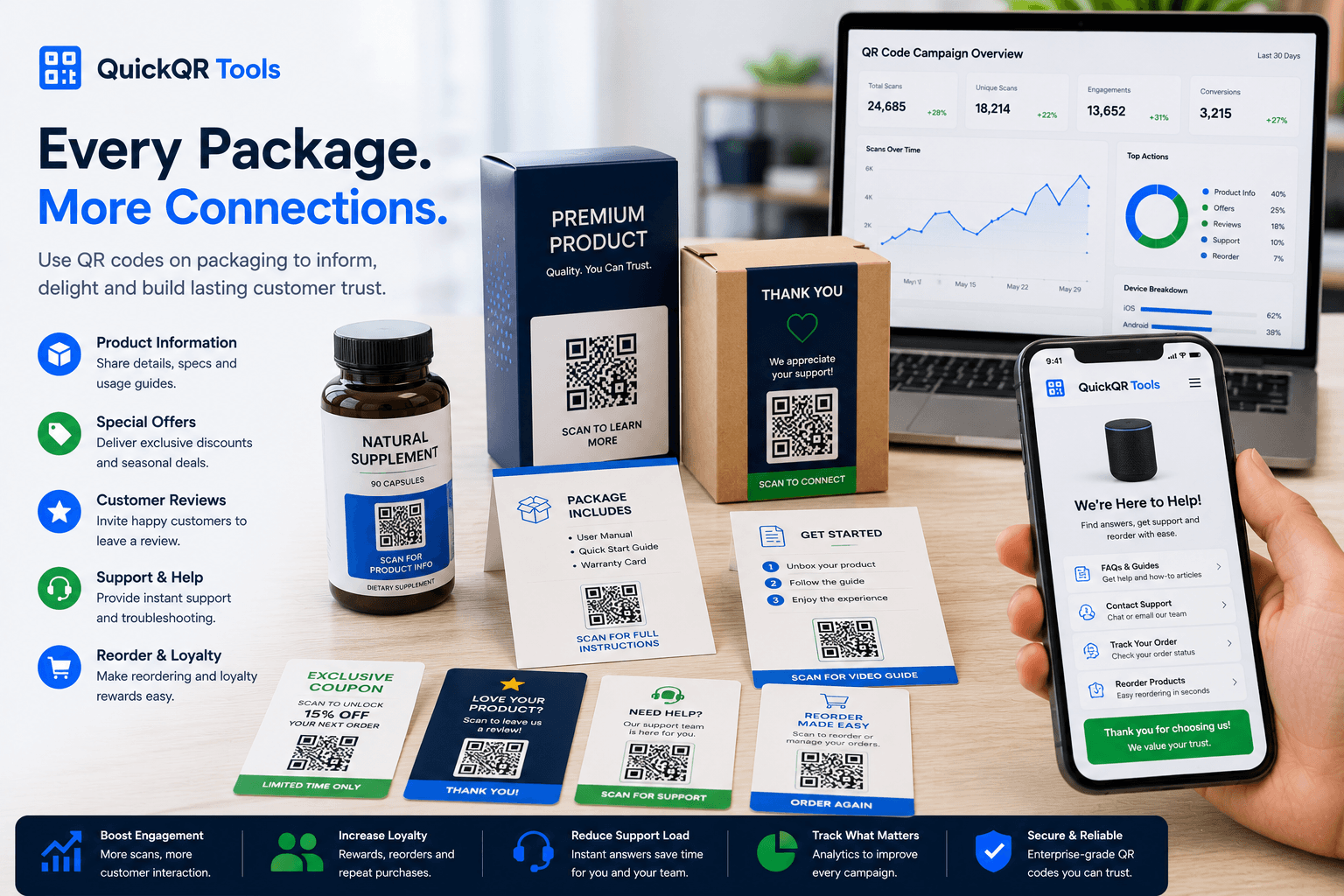
QR codes for product packaging help shoppers open product guides, instructions, videos, coupons, reviews, support pages, warranty forms and reorder links directly from boxes, bags, labels, inserts and printed product materials.
Packaging use cases
Packaging QR codes work best when the scan helps the customer do something useful without searching, typing or guessing.
Send customers to setup steps, care guides, safety details, installation videos or printable instruction sheets.
Open demos, tutorials, recipes, usage examples, assembly videos or product story pages from the package.
Let shoppers claim a discount, join a loyalty flow, open a bundle offer or receive a post-purchase promotion.
Make it easier for customers to leave a review, share feedback or contact support after using the product.
Help repeat customers open a reorder page, subscription page, product collection or retail store location.
Connect packaging inserts to warranty forms, support requests, troubleshooting pages or return instructions.
Planning
Start with the customer moment. A person scanning a product box may need instructions. A person scanning a label may need ingredients, sizing, care details or authenticity information. A person scanning an insert may be ready for a coupon, review page, warranty form or reorder link.
QR codes for product packaging should make the next step obvious. Add a short label near the code, such as scan for setup guide, scan for care instructions, scan for 10% off your next order, scan to watch the demo or scan for support. Clear labels make the scan feel useful instead of decorative.
Packaging creates special scan challenges. Curved surfaces, glossy finishes, small labels, folds, texture and low contrast can make a QR code harder to scan. Test the exact printed size and material before producing a large batch.
Examples
Match each QR code to the customer question the packaging should answer.
| Packaging placement | Best QR destination | Useful QuickQR tool |
|---|---|---|
| Product box | Setup guide, tutorial video, registration page or support page. | QR Code Generator |
| Label or sticker | Ingredients, product details, care guide, sizing or authenticity page. | QR Size Calculator |
| Packaging insert | Coupon, reorder link, loyalty offer or review request. | Coupon QR Code Generator |
| Instruction card | PDF manual, troubleshooting sheet or product document. | PDF QR Code Generator |
| Thank-you card | Google review page, feedback form or customer support page. | Google Review QR Code Generator |
| Retail shelf display | Product video, comparison page, promotion or collection page. | QR Distance Calculator |
| Creator merch | Social profile, video page, link page or community signup. | Social Media QR Code Generator |
| Premium packaging | Warranty form, VIP offer, brand story or post-purchase experience. | QR Scan Tester |
Print quality
QR codes for product packaging may appear on small, glossy, curved or textured surfaces. Testing before production protects the customer experience.
Check scan readiness before printing QR codes on packaging, labels, inserts or product cards.
Test scan readinessChoose a safer size for small labels, product boxes, insert cards and shelf displays.
Calculate sizeCheck QR color contrast before placing the code on branded packaging or colored labels.
Check contrastQuickQR packaging tools
Start with the QR tool that matches the packaging goal, then test the code before using it on printed materials.
Create packaging QR codes for product pages, setup guides, support pages and reorder links.
Create URL QRShare manuals, care sheets, warranty details, return instructions and product documents.
Create PDF QRAdd post-purchase coupons, reorder offers and loyalty promotions to packaging inserts.
Create coupon QRInvite customers to leave a review from thank-you cards, inserts and product packaging.
Create review QRConnect packaging to Instagram, TikTok, YouTube, Facebook, LinkedIn or a social landing page.
Create social QRBrowse the full QuickQR toolkit for packaging, retail, marketing, events, reviews and contact actions.
Explore toolsRelated guides
Use these guides to connect packaging QR codes with retail, marketing and print quality decisions.
Plan retail QR codes for packaging, labels, coupons, receipts, reviews and store displays.
Explore retail use casesPlan QR codes for stickers, bottles, boxes, tags, ingredients, care guides and product details.
Explore label use casesPlan QR codes for thank-you cards, instruction inserts, warranty cards, support cards and reorder offers.
Explore insert use casesUse unboxing insert cards for setup, support, warranty, reviews, product videos and next-order offers.
Explore packaging insert usesAdd review QR codes to inserts, thank-you cards, receipts, packaging and post-purchase materials.
Explore review use casesUse QR codes in flyers, posters, packaging, events, coupons and print-to-digital campaigns.
Explore marketing use casesReview print size, distance, quiet zone, contrast and scan testing before production.
Read printing guidePlan QR campaigns for packaging, flyers, events, retail, coupons and customer journeys.
Read marketing guideUse benchmark thinking to compare scan readiness, print quality and campaign setup.
View benchmarksReview QR trends around mobile scanning, business usage and retail packaging experiences.
Read reportReferences
Use trusted external resources alongside QuickQR tools when planning product information, mobile pages and packaging quality.
Review GS1 Digital Link resources for product identity, product information and connected packaging concepts.
Use performance fundamentals to keep product pages fast for shoppers who scan packaging on mobile devices.
The Business QR Toolkit
Start with a product page, PDF guide, coupon, review page or support link, then test the QR code before printing packaging materials.
FAQ
Short answers for brands, retailers, creators and product teams adding QR codes to packaging.
QR codes for product packaging are scannable codes printed on boxes, labels, bags, inserts or product cards so customers can open instructions, videos, offers, reviews, support pages or product details.
Place packaging QR codes where customers can scan without bending the package too much. Common placements include flat box panels, inserts, hang tags, labels, thank-you cards and instruction cards.
A product packaging QR code can link to a product guide, PDF manual, setup video, warranty form, coupon, reorder page, review page, ingredients, care instructions or support page.
Yes. A review QR code on a thank-you insert or product card can make it easier for customers to leave feedback after they receive and use the product.
Yes. QR codes can open setup guides, care instructions, safety information, recipes, videos, troubleshooting pages and downloadable manuals without adding more printed text to the package.
The right size depends on the package, surface and scan distance. Small labels need careful testing, while boxes and inserts can usually support larger, easier-to-scan QR codes.
You can use brand colors if the QR code still has strong contrast. Avoid low contrast combinations, busy backgrounds, glossy glare and patterns that make the code harder to scan.
Print a real sample, scan it on multiple phones, test it under realistic lighting and check that the destination loads quickly on mobile before producing the final packaging.