
Open setup guides
Send customers to step-by-step instructions, product manuals, onboarding pages or getting-started checklists.
QR Codes For Product Inserts
QR codes for product inserts help customers open setup guides, warranty registration, product videos, support pages, review links, reorder pages and special offers from cards placed inside packaging.
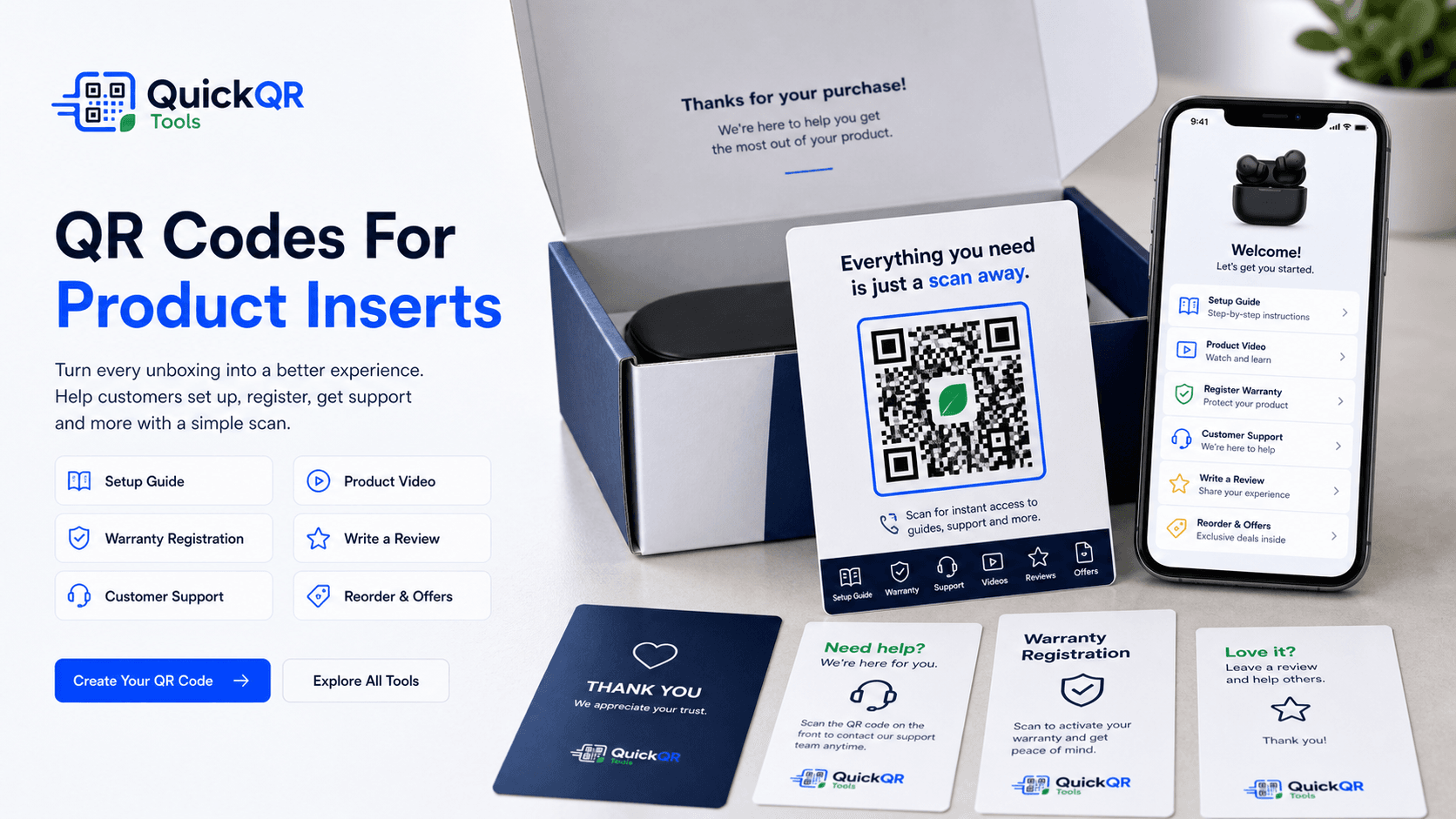
Insert use cases
A product insert reaches the customer at a high-intent moment. A useful QR code can reduce confusion, improve setup and make post-purchase actions easier.
Send customers to step-by-step instructions, product manuals, onboarding pages or getting-started checklists.
Make it easier to activate warranty coverage, register a product or save proof of purchase details.
Open demos, installation videos, usage examples, cleaning instructions or troubleshooting walkthroughs.
Connect inserts to help centers, contact forms, WhatsApp support, email support or troubleshooting pages.
Invite satisfied buyers to open a review page after they have used the product and understand its value.
Use inserts for reorder links, refill subscriptions, loyalty rewards, discount codes or related products.
Post-purchase experience
QR codes for product inserts work best when the customer immediately understands why scanning helps. A card inside the box can guide setup, register warranty, open support, explain product care, share a video or offer a simple next step.
Avoid sending every scan to a generic homepage. If the insert promises setup help, send the customer to a setup guide. If it promises warranty registration, send the customer directly to that form. The scan should feel like a shortcut, not another search task.
Keep the printed insert simple. Use one QR code, one clear headline and one short scan instruction. If you need several actions, link to a mobile page that organizes setup, support, warranty, reviews and reorder options in one place.
Examples
Match the insert QR code to the moment after purchase: setup, confidence, support, feedback or repeat purchase.
| Insert goal | Best QR destination | Useful QuickQR tool |
|---|---|---|
| Setup guide | Step-by-step page, PDF manual, installation instructions or quick start guide. | QR Code Generator |
| Warranty registration | Registration form, product account page or warranty activation page. | QR Code Generator |
| Product video | Tutorial, demonstration, setup video, care video or usage walkthrough. | YouTube QR Code Generator |
| Customer support | Support page, WhatsApp chat, email support, help center or troubleshooting article. | WhatsApp QR Code Generator |
| PDF instructions | Manual, safety sheet, care card, compliance document or product brochure. | PDF QR Code Generator |
| Customer reviews | Google review page, product review page or feedback form. | Google Review QR Code Generator |
| Reorder link | Product refill page, accessories page, subscription page or related product collection. | QR Code Generator |
| Special offer | Coupon, loyalty reward, thank-you discount or next-order promotion. | Coupon QR Code Generator |
| Social community | Instagram, TikTok, YouTube, Facebook group, creator page or social landing page. | Social Media QR Code Generator |
Print readiness
Insert cards are often printed in bulk. Check size, contrast and scan reliability before packaging products.
Use a practical checklist to test product insert QR codes before printing and packing orders.
Test scan readinessChoose a safer QR size for inserts, thank-you cards, warranty cards and packaging cards.
Calculate sizeCheck whether card colors and branded backgrounds keep enough contrast for scanning.
Check contrastRelated tools
Create QR codes for setup pages, warranty forms, reorder pages and support destinations.
Create URL QRShare product manuals, care sheets, warranty PDFs, safety notes and instruction guides.
Create PDF QRInvite happy customers to leave a review after they receive and use the product.
Create review QRAdd a thank-you offer, reorder discount, loyalty code or next-purchase incentive.
Create coupon QRLet customers ask support questions from inside the box without searching for contact details.
Create WhatsApp QRBrowse QR tools for product inserts, packaging, labels, reviews, support, files and offers.
Explore toolsRelated guides
Use QR codes on boxes, labels and inserts for guides, videos, coupons, reviews and support.
Explore packaging usesPlan unboxing QR cards for setup, warranty, support, reviews, product videos and reorder offers.
Explore packaging insert usesPlan QR codes for product labels, stickers, tags, bottles, ingredients and care details.
Explore label usesConnect store materials, packaging, product displays and post-purchase cards to useful actions.
Explore retail usesUse inserts and thank-you cards to request reviews at a natural post-purchase moment.
Explore review usesUse product inserts alongside contact, review, offer, document and customer support workflows.
Explore small business usesReview print size, quiet zone, contrast and scan testing before producing insert cards.
Read printing guideReferences
Helpful for brands thinking about warranty communication and customer-facing warranty information.
Helpful when product insert QR codes open mobile guides, support pages, videos or warranty forms.
Create a clean QR code for setup guides, warranty registration, support, reviews, reorders or special offers, then test it before printing insert cards.
FAQ
QR codes for product inserts are scannable codes printed on cards placed inside packaging so customers can open setup guides, warranty registration, support pages, review links, videos, reorder pages or special offers.
A product insert QR code should link to the most useful next step after purchase, such as setup instructions, warranty registration, customer support, a product video, review page or reorder offer.
Yes. A thank-you card can include a QR code for setup help, review requests, loyalty offers, social links, support options or reorder pages.
Yes. A QR code can send customers directly to a warranty registration form or product registration page.
One QR code is usually clearer. If you need several actions, use one mobile landing page with sections for setup, warranty, support, reviews and offers.
Yes. A clear QR code can send customers to setup guides, videos and troubleshooting pages before they contact support.
Print a sample insert, scan it with multiple phones, check the destination on mobile and confirm that the QR code remains readable at the final card size.
Static QR codes usually do not expire as long as the destination stays online. If the page is deleted or changed, the printed QR code may stop being useful.