
Quick answer: what size should a printed QR code be?
For close-range scanning, a printed QR code should usually be at least 2 x 2 cm, or about 0.8 x 0.8 inches. That is a practical minimum for business cards, small flyers, handouts and labels where the visitor can hold the phone close to the code.
For flyers, brochures, menus and table signs, 2.5 to 3.5 cm is often safer. For posters, wall signs, window signs and event displays, 5 cm or larger is usually better. For outdoor signs, banners and anything scanned from several feet away, the code may need to be 10 cm, 15 cm or even larger depending on distance and visibility.
The best QR code size for print is not a single universal number. It is the size that lets a normal phone scan the code quickly from the real distance, angle and lighting where people will use it. That means a correct size decision includes testing, not only design judgment.
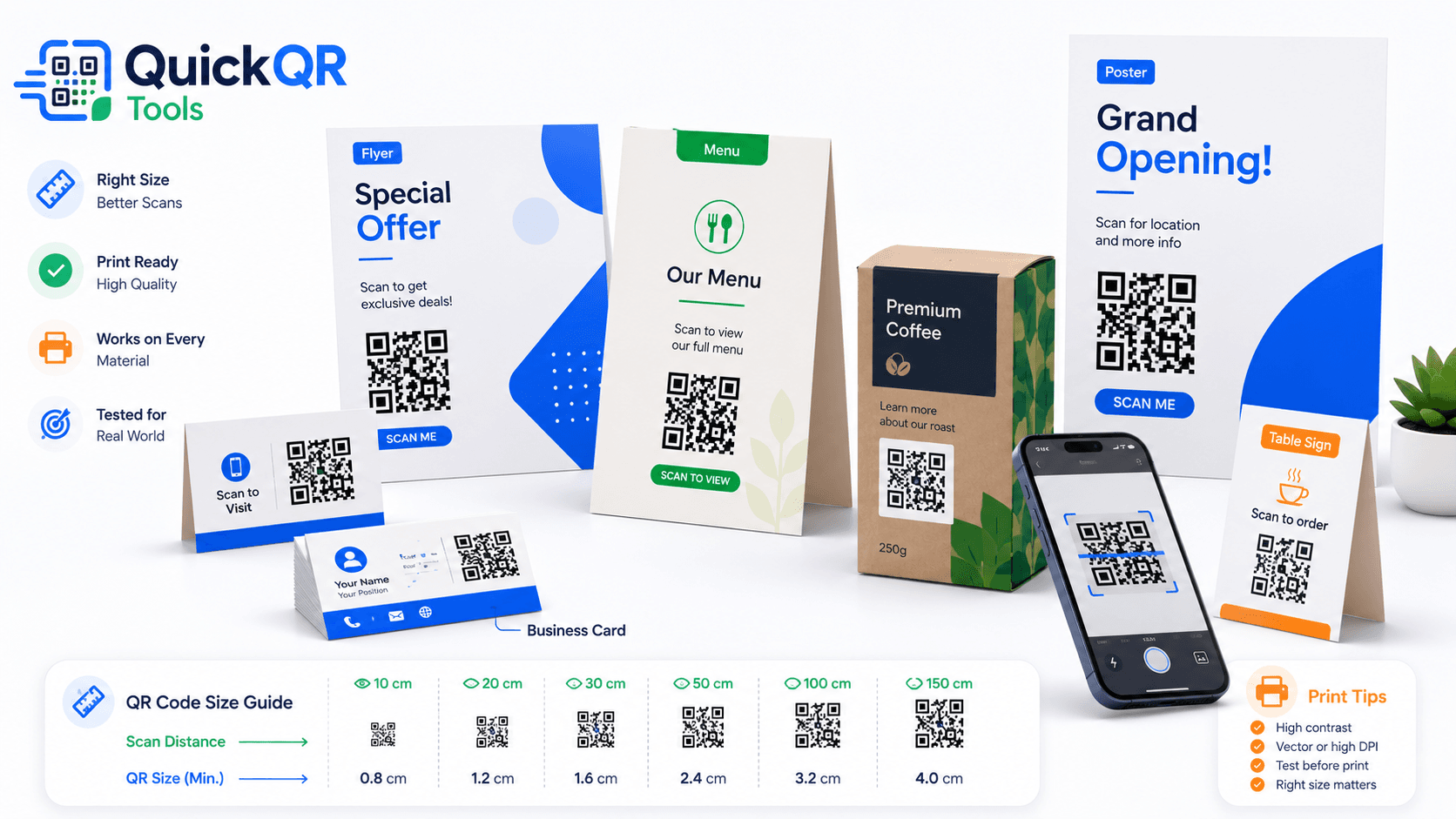
Best QR code size for print by material
The table below gives practical starting points. Use these sizes as minimums, then adjust for distance, lighting, surface quality and how complex the QR pattern looks. If the code contains a very long URL, has custom styling or will be scanned quickly by people walking past, increase the size. The best QR code size for print is always the size that works in the real place where people will scan it.
| Print material | Recommended minimum size | Typical use |
|---|---|---|
| Business card | 2 x 2 cm / 0.8 x 0.8 in | Websites, portfolios, contact pages, booking pages and vCard QR codes. |
| Flyer or brochure | 2.5 x 2.5 cm / 1 x 1 in | Campaign landing pages, offers, restaurant links, service pages and events. |
| Restaurant menu or table sign | 3 x 3 cm / 1.2 x 1.2 in | Digital menus, ordering pages, WiFi access and specials. |
| Product packaging | 2.5 to 4 cm / 1 to 1.6 in | Instructions, product videos, warranty pages, manuals and reorder pages. |
| Poster or wall sign | 5 x 5 cm / 2 x 2 in or larger | Scanning from a few feet away in stores, offices, clinics, schools and venues. |
| Window sign | 7.5 x 7.5 cm / 3 x 3 in or larger | Menus, booking links, maps, promotions and review pages. |
| Outdoor sign or banner | 10 x 10 cm / 4 x 4 in or larger | Scanning from farther away or in changing light conditions. |
How scanning distance affects QR code size
The farther someone stands from the QR code, the larger it needs to be. A code on a business card is usually scanned from a few inches away. A poster may be scanned from several feet away. A banner may need to be readable from even farther back. This is why the best QR code size for print changes from one material to another.
A simple way to think about size is this: every increase in distance needs more printed area. Small QR codes can work beautifully at close range, but the same size can fail on a wall because the phone camera cannot capture enough detail. The code may still look sharp to the eye, but the camera needs a clear pattern.
Distance is not the only variable. Angle matters too. A QR code on a counter card is usually scanned straight on. A code on a window may be scanned from the side. A code on a package may be scanned while someone holds it in one hand. If people are likely to scan at an angle, increase the size and keep the design simple.
Lighting also changes the result. A QR code that scans instantly in a bright office may struggle in a dim restaurant, near a reflective window or under colored event lights. When the environment is unpredictable, choose a larger QR code with stronger contrast.
Print quality rules that matter
A printed QR code is a technical object inside a visual design. The design can be modern and branded, but the code still needs clean edges, high contrast and a quiet zone. If the design makes the code harder to detect, simplify the design around the code. The best QR code size for print will not help if the surrounding design blocks the camera from reading the pattern.
The quiet zone is especially important. It is the empty margin around the QR code. Without it, nearby text, borders, photos or decorative shapes can confuse scanning. Keep the margin clean even if you are trying to save space on a small label or card. Even the best QR code size for print can fail if the quiet zone is removed.
Best QR code size for business cards
Business cards are close-range materials, so they can use smaller QR codes than posters or signs. A practical minimum is 2 x 2 cm, but slightly larger is safer if the card has enough space. If the code links to a portfolio, booking page, contact page or vCard guide, visitors usually scan while holding the card close to the phone. For cards, the best QR code size for print is usually the smallest size that still scans instantly after trimming.
Do not place the QR code too close to the card edge. Printing can shift slightly during cutting, and the code needs margin around it. Keep enough space so the full quiet zone remains visible after trimming.
If the card uses a dark background, place the QR code inside a white or very light square. A reversed QR code can work in some cases, but it is riskier. For business cards, reliability is more important than a clever visual treatment. The best QR code size for print on a card still needs a simple background.
Also consider the call to action. “Scan to save my contact,” “Scan to book,” or “Scan for portfolio” gives the person a reason to scan. A QR code with no context can feel decorative rather than useful.
Best QR code size for flyers and brochures
Flyers and brochures are often scanned from hand distance, but they may be read quickly. Start with at least 2.5 x 2.5 cm, then increase the size if the flyer is busy, the QR code contains a long URL or the scan action is important to the campaign. For a flyer, the best QR code size for print should leave enough room for both the code and a clear call to action.
Place the code near the offer or next action. If the flyer promotes a discount, the code should sit near the discount message. If it promotes an event, place the code near the date and registration details. This helps the visitor connect the scan with a clear purpose.
For flyers, use a direct destination. A code that opens a general homepage may lose visitors if they have to search for the offer. If the flyer is about a specific campaign, link to the specific landing page. You can create that link with the QR Code Generator. The best QR code size for print works best when the destination is just as clear as the code.
When printing brochures, watch for folds. Do not place the code where the paper bends, creases or overlaps. A fold through the code can break scanning even if the size is technically large enough.
Best QR code size for menus and table signs
Restaurant menus, table tents and counter signs need a QR code that scans quickly in imperfect conditions. Guests may scan under warm lighting, at an angle, while sitting down or while other design elements compete for attention. A 3 x 3 cm code is a good starting point, and larger is better for shared table signs. In restaurants, the best QR code size for print should favor speed because guests expect the menu to open without effort.
If the QR code opens a menu, make the action obvious. Use text like “Scan for menu” or “Scan to order.” If the same material also offers WiFi, payment, reviews or coupons, avoid crowding several QR codes together. Too many codes in one small area can confuse visitors.
For digital menus, use the Menu QR Code Generator. For guest internet access, use the WiFi QR Code Generator. Each tool creates a more focused experience than forcing every action through one generic page.
Cleanability matters in restaurants. Laminated cards, glossy table tents and plastic stands can reflect light. Test the printed QR code after lamination or inside the final holder, not only on plain paper. The best QR code size for print in a restaurant should survive the final material, not only the first paper proof.
Best QR code size for posters, windows and signs
Posters and signs require larger QR codes because visitors may scan from farther away. Start around 5 x 5 cm for indoor posters where people stand close. For window signs or displays where people may stand outside, 7.5 x 7.5 cm or larger is often safer. For outdoor banners, the size may need to be much larger. For signs, the best QR code size for print is usually bigger than the designer first expects.
Do not assume that a large poster automatically makes the QR code large enough. Designers sometimes keep the QR code small to preserve the layout. That can make the poster look clean but weaken the scan experience. If the QR code is important, it deserves visible space.
For wall signs, test from the farthest realistic scan position. If the code is near a checkout counter, test from where customers stand. If it is on a window, test from outside and from the side. If it is on an event sign, test in the actual lighting if possible. For date-based signs, the Event QR Code Generator can keep the scan action focused on the event details.
Window signs need special care because of glare, reflections and tinting. Place the code where reflection is lower, use strong contrast and avoid tiny text around it. The visitor should not need to move around awkwardly to scan. For windows, the best QR code size for print should be tested from outside, not only from inside the store.
Best QR code size for packaging and labels
Packaging is tricky because space is limited and surfaces can be curved, glossy, textured or folded. A small code on a flat box may scan well, while the same size on a bottle or pouch may fail. Start with 2.5 to 4 cm when space allows, then test on the real material. For packaging, the best QR code size for print depends heavily on surface shape and finish.
If the code links to instructions, warranty details, product videos or care guides, the destination should load fast on mobile. Packaging QR codes are often scanned after purchase, when the customer wants a quick answer. Do not send them to a broad homepage if a useful support page exists.
Curved containers need extra attention. A QR code that wraps around a cylinder can distort. If possible, place the code on the flattest available area. If the package is small, increase the quiet zone and avoid decorative borders too close to the code.
For downloadable manuals, a PDF QR Code Generator can be useful. For coupons or loyalty offers, the Coupon QR Code Generator creates a more targeted action.
Which file format should you use for print?
PNG
PNG works well for simple print jobs, small materials and digital use. It is easy to upload, share and place in basic designs. The limitation is scaling: if you enlarge a low-resolution PNG too much, edges can become soft or pixelated.
SVG
SVG is ideal when you need a scalable QR code that stays sharp at different sizes. Designers often prefer vector formats because they can resize the code without losing edge quality.
PDF is practical for sending a print-ready QR code to a designer, printer or team member. It is also useful when you want the file to remain consistent across devices and workflows.
If you are preparing professional print materials, ask your printer which format they prefer. Printers may also specify color mode, bleed, resolution and layout requirements. The PRINTING United Alliance publishes printing industry resources that can help teams understand print production terms.
How the QR destination affects print size
The page or data behind the QR code can affect how dense the QR pattern becomes. A short website URL usually creates a cleaner pattern. A very long URL, a tracking-heavy link, a long text QR code or complex encoded data can create a denser QR code with more small modules. Dense QR codes often need more printed size to scan reliably. When the pattern is dense, the best QR code size for print should be increased before you send files to production.
If you want the best QR code size for print, start by keeping the destination as clean as possible. Use the final public URL, avoid unnecessary tracking clutter when it is not needed and prefer a stable landing page on your own domain. A clear URL also makes the printed material easier to manage later.
Different QR code types have different print needs. A simple website QR code may be easy to scan at a smaller size. A WiFi QR code can include network name, encryption type and password, which can make the pattern denser. A vCard QR code can include several fields, such as name, phone, email, company and website. A PDF link may be simple if it points to a clean URL, but the page behind it should load fast on mobile.
For this reason, do not use one print size rule for every tool. A QR code for a small business card may work at 2 x 2 cm when it links to a short URL, but the same physical size may be less reliable if the pattern is very dense. When the QR code looks visually complex, increase the size and test more carefully.
If your printed code sends people to a website, the website QR code guide explains how to choose the right destination page. If the QR code sends people to WiFi, the WiFi QR code guide gives more context for guest access and placement.
How to place a QR code inside a print design
QR code placement is just as important as QR code size. A large code can still fail if it is hidden in a low-contrast corner, placed on a fold, crowded by text or surrounded by busy graphics. The visitor should notice the code, understand why to scan it and have enough room to aim the phone camera. The best QR code size for print works together with placement, not separately from it.
Place the QR code near the action it supports. On a flyer, put it near the offer or event details. On a menu, put it near the menu instruction or ordering message. On packaging, put it near product information or support text. On a business card, put it near the contact details or call to action. This creates a natural connection between the printed message and the digital destination.
Keep the call to action short. Good examples include “Scan for menu,” “Scan to book,” “Scan for product details,” “Scan to save contact,” and “Scan to claim offer.” Avoid vague text like “Scan me” when a more specific promise would help. People are more likely to scan when they know what they will receive.
Do not place the QR code too close to the edge of the printed piece. Trimming can remove part of the quiet zone. If the material has bleed or cut lines, keep the QR code safely inside the final trim area. For folded brochures, avoid placing the code over a crease because the fold can distort the pattern.
For premium print layouts, give the QR code its own clean area. A small white panel with enough padding can preserve scan reliability while still fitting into a modern brand design. This is often better than forcing the code directly onto a photo or colored background.
Choosing QR code size for real business use cases
A retail shop may use QR codes on window signs, shelf talkers, receipts and product packaging. Each placement needs a different size. A receipt code can be small because it is held close. A window sign needs to be much larger because people scan through glass and from a greater distance. In retail, the best QR code size for print should be chosen separately for each customer touchpoint.
A restaurant may use QR codes on table tents, printed menus, takeaway flyers and front-door signs. The table tent can use a medium code, but a front-door sign should be larger and easier to scan while standing. If the same restaurant uses QR codes for WiFi, menu and reviews, each code should have a specific label so guests do not guess which code to scan.
A professional service business may use QR codes on business cards, appointment cards, posters and brochures. A business card QR code can link to a contact page or vCard. A poster may link to booking. A brochure may link to a service page. The best size depends on how the material is held and how quickly the visitor needs to act.
An event organizer may use QR codes on badges, schedules, entry signs, maps and sponsor booths. Badges need close-range codes. Entry signs need larger codes because people may scan while moving in a line. Sponsor booths may need codes large enough to scan without blocking foot traffic. If the printed code needs to open a venue map or meeting point, a Location QR Code Generator gives visitors a clearer destination.
These examples show why the best QR code size for print should be chosen by context. The question is not only “How large is the code?” It is also “Where will people stand, what will they expect, how fast should the scan happen and what page opens next?”
When to make the QR code larger than the minimum
Minimum sizes are useful, but they are not always the best choice. If the scan is important to sales, bookings, menu access, support or customer reviews, give the QR code more space. A slightly larger code is often a better tradeoff than a cleaner layout that people struggle to use. The best QR code size for print is often a little larger than the minimum when the scan matters to business results.
Make the QR code larger when the material will be scanned quickly, from a distance, at an angle, in low light, through glass, on a glossy surface or on a textured background. Also increase the size when the QR pattern is dense, when the code is surrounded by other design elements or when the audience may include people who are less comfortable with scanning.
Large does not mean careless. The QR code still needs clean contrast and a quiet zone. A large code with poor contrast can scan worse than a smaller code with a clean black-on-white layout. Size, contrast, file quality and placement work together.
If you are unsure, print two test versions: one at the minimum size and one larger. Put them in the real setting and ask someone else to scan them. The version that scans faster and feels easier should win, even if it uses more space in the design. That test is often the simplest way to choose the best QR code size for print with confidence.
Common QR code printing mistakes
- Printing the QR code too small. A code that works on screen may be too small on a flyer, menu or poster.
- Removing the quiet zone. Cropping too close to the QR pattern can make scanning harder.
- Using low contrast colors. Pale colors, reversed designs and busy backgrounds can reduce readability.
- Testing only on one phone. Scan with more than one device when the material is important.
- Testing before lamination but not after. Gloss, plastic sleeves and glass can change the result.
- Placing the code on a fold or curve. Distortion can break the scannable pattern.
- Linking to a slow page. A good scan still feels poor if the destination page is heavy or confusing.
- Skipping the call to action. Tell people what they get when they scan.
Print testing checklist before ordering
Before you order a full print run, test a sample at real size. Do not rely only on the design preview. A preview can make the QR code look clear because it is displayed on a bright screen at a comfortable size. Print is different. Testing is the only reliable way to confirm the best QR code size for print before you spend money on production.
- Print one sample at the exact final size.
- Check that the quiet zone remains visible after trimming or folding.
- Scan with at least one iPhone and one Android phone if possible.
- Test from the real viewing distance and angle.
- Test under the lighting where the material will be used.
- Open the destination page and confirm it matches the call to action.
- Ask one person who did not design the material to scan it without instructions.
This last step is valuable. If someone who has never seen the design can scan the code and understand the next action, the printed QR code is much more likely to work for real visitors.
FAQ
What is the minimum QR code size for print?
For close-range scanning, a QR code should usually be at least 2 x 2 cm, or about 0.8 x 0.8 inches. Larger formats such as posters, signs and banners need larger QR codes because people scan from farther away.
Can a QR code be too small?
Yes. If a QR code is too small, printed with low quality or scanned from too far away, phones may struggle to read it. Increase the size when the scan distance, glare or surface complexity increases.
Should I use PNG or SVG for printed QR codes?
Use PNG for simple print jobs and digital sharing. Use SVG or PDF when the QR code needs to stay sharp in professional layouts, large signs, posters or files that may be resized.
Do QR codes need white space around them?
Yes. QR codes need a quiet zone around the edges so phone cameras can separate the code from nearby text, borders, photos and design elements.
What is the best QR code size for a flyer?
A good starting point for flyers is 2.5 x 2.5 cm, or about 1 x 1 inch. Increase the size if the flyer is busy, the code is important to the campaign or people may scan quickly.
What is the best QR code size for a poster?
For indoor posters, start around 5 x 5 cm, or about 2 x 2 inches, then test from the real scan distance. Larger posters, window signs and outdoor signs often need bigger QR codes.