
Restaurant QR Code Guide For Menus, WiFi And Reviews
A restaurant QR code can help guests view menus, connect to WiFi, leave Google reviews, claim offers and reach useful pages from tables, receipts, windows and takeaway packaging. This guide shows restaurants how to use QR codes in a professional, guest-friendly way.
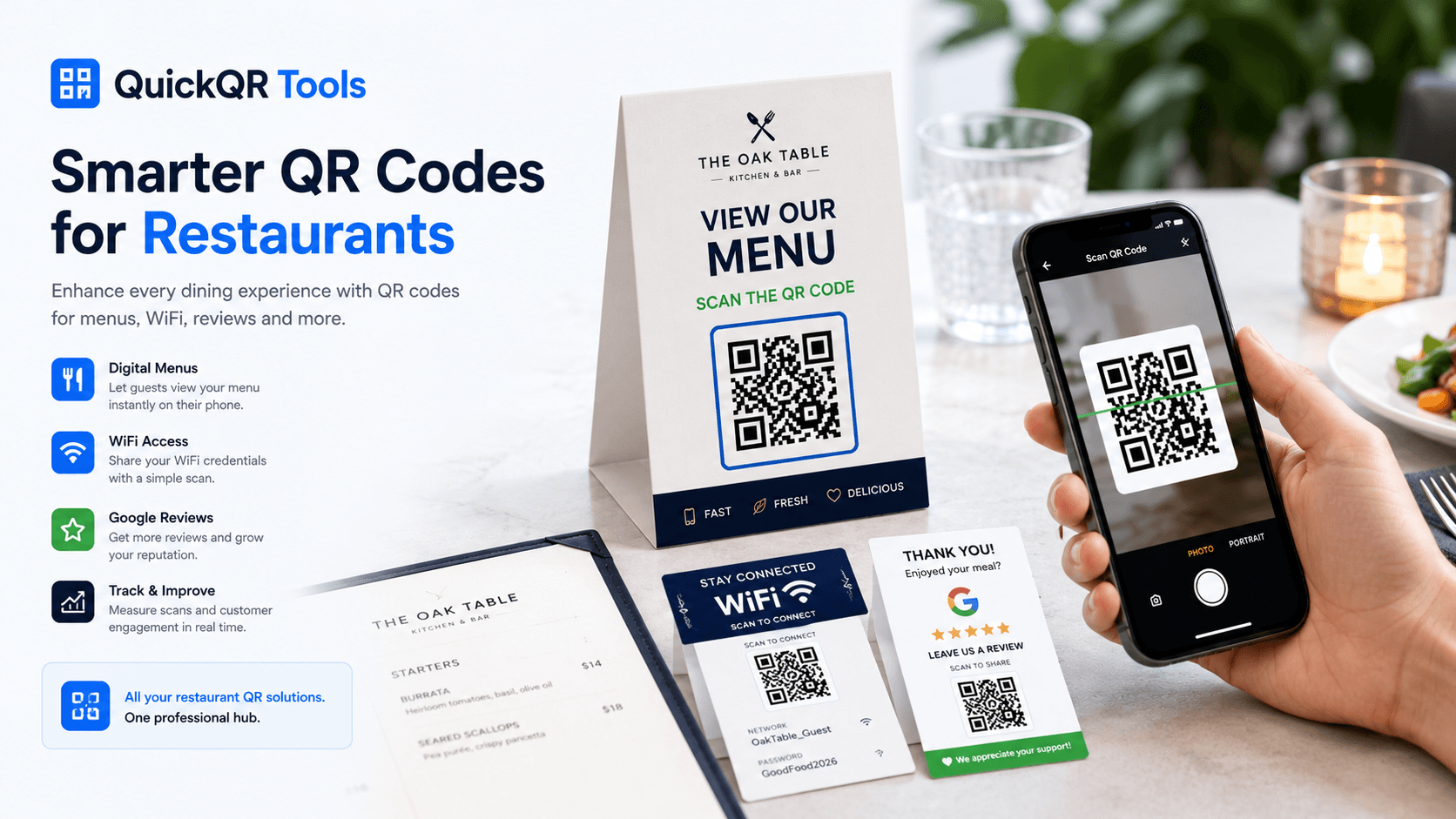
What This Restaurant QR Code Guide Covers
A restaurant QR code is most useful when it solves a real guest problem. It can open a menu faster, share WiFi without spelling a password, guide happy customers to a review page or promote a limited-time offer. The value is not the code itself. The value is the smoother guest experience behind the scan.
This restaurant QR code guide covers the main use cases, where to place codes, how to design and print them, when to use static or dynamic QR codes and which QuickQR Tools generators support a modern restaurant workflow.
Use this restaurant QR code guide before creating table cards, counter signs, receipt inserts, takeout packaging, window posters or staff-facing guest service materials.
Give guests fast access to updated food, drink, dessert, brunch or seasonal menus.
Let visitors connect without typing long network names or passwords.
Make it easier for satisfied guests to open your Google review page.
What Is A Restaurant QR Code?
A restaurant QR code is a scannable code used in a restaurant, cafe, bar, hotel, food truck or hospitality space to open a digital action on a phone. It can point to a menu, WiFi login, review page, reservation page, ordering page, coupon, social profile or event page.
The most common restaurant QR code is a menu QR code placed on tables or printed signs. But restaurants can use several QR codes for different moments: a WiFi QR code near seating areas, a review QR code on receipts, a coupon QR code on takeaway bags and a social QR code on posters or loyalty cards.
A strong restaurant QR code should be clear before the scan. The guest should know exactly what will happen: scan to view menu, scan to join WiFi, scan to leave a review or scan to claim an offer. That clarity improves trust and increases scans.
Why Restaurants Use QR Codes
Restaurants use QR codes because dining moments are naturally mobile. Guests are sitting at tables, waiting at counters, picking up takeout, checking receipts or looking at window displays. A QR code can turn each of those physical moments into a useful digital action.
Menus are a major reason. Digital menus can be updated faster than printed menus, and they can include photos, allergen notes, seasonal changes or separate drink lists. WiFi QR codes reduce staff interruptions. Google review QR codes make feedback easier. Coupon QR codes support promotions without requiring a complex app.
Benefits for restaurants
- Guests can access menus without waiting for staff.
- Teams can update digital pages faster than printed materials.
- WiFi access becomes easier for customers and staff.
- Review requests become more direct and timely.
- Promotions can connect receipts, windows, flyers and packaging to offers.
- Restaurants can support guests in multiple locations with consistent materials.
This restaurant QR code guide focuses on practical workflows, not gimmicks. The goal is to make the restaurant experience easier for guests and more efficient for the business.
Restaurant QR Code Use Cases
The best restaurant QR code strategy uses different QR types for different guest moments. A table QR code should not always do the same job as a receipt QR code. A window QR code may promote reservations, while a takeaway bag QR code may promote reviews, coupons or reorder links.
| Use Case | Best QR Type | Guest Action |
|---|---|---|
| Table menus | Menu QR | Open food, drinks, brunch, dessert or seasonal menus. |
| Guest WiFi | WiFi QR | Connect to the restaurant network without typing credentials. |
| Receipts | Google Review QR | Leave feedback after a meal or service experience. |
| Takeout bags | Coupon QR or Website QR | Claim an offer, reorder or follow the restaurant online. |
| Event nights | Event QR | Open event details, reservation pages or special schedules. |
| Social growth | Social Media QR | Follow Instagram, Facebook, YouTube or TikTok profiles. |
For a complete list of options, use the All QR Code Tools hub. It helps match each restaurant goal with the right generator. For a focused restaurant workflow, explore QR codes for restaurants. For broader examples beyond restaurants, explore QR code use cases across local business, retail, events, creators and real estate.
QR Code Menus For Restaurants
A menu QR code is one of the most practical restaurant QR code use cases. It lets guests open a menu from a table card, counter sign, window poster, hotel room card or takeaway insert. For restaurants that update prices, specials or availability often, a digital menu can be easier to maintain than printed menus alone.
The destination should be simple. Guests do not want to search through a general website to find food. Send them directly to the menu page, ordering page or PDF menu. Make sure the menu loads quickly on mobile, is readable without zooming and includes the information guests need to decide.
Use the Menu QR Code Generator to create a scannable menu code. For step-by-step instructions, read how to create a menu QR code.
Menu QR best practices
- Add a clear CTA such as “Scan to view menu.”
- Keep the menu page mobile-friendly.
- Test the code from table distance.
- Use separate codes only when separate menus are truly useful.
- Keep printed table cards clean and easy to wipe.
WiFi QR Codes For Restaurants
A WiFi restaurant QR code can improve the guest experience and reduce repetitive staff questions. Instead of printing a password on a wall or asking staff to repeat it, guests scan a WiFi QR code and connect from their phone.
WiFi QR codes are useful in cafes, casual restaurants, hotel restaurants, coworking cafes and bars where guests stay longer. Place the code near seating areas, on table cards or in a guest information area. Keep the CTA simple: “Scan to join WiFi.”
Use the WiFi QR Code Generator to create the code. For deeper guidance, read how to create a WiFi QR code for guests.
Google Review QR Codes For Restaurants
Reviews can shape how new customers choose a restaurant. A Google review QR code helps guests reach the review page quickly while the experience is fresh. It works well on receipts, thank-you cards, counter signs, takeaway bags and table cards after service.
The message should be polite and simple. “Enjoyed your visit? Scan to leave a review” is clearer than a bare QR code. The goal is to reduce friction for customers who already want to share feedback, not to pressure people into reviewing.
Use the Google Review QR Code Generator to create a direct review path. For instructions, read how to create a Google Review QR code.
Good review QR placements
- Printed receipts and bill folders.
- Takeout bags and packaging inserts.
- Counter signs near checkout.
- Thank-you cards for catering or private dining.
- Email or SMS follow-up materials if appropriate.
Restaurant QR Codes For Promotions And Coupons
Restaurant QR codes can also support promotions. A coupon QR code can open a limited-time offer, lunch special, loyalty signup, happy hour page, birthday discount or seasonal campaign. This works especially well on flyers, receipts, window signs and takeaway packaging.
Promotion QR codes should be specific. “Scan for 10% off your next order” is stronger than “Scan for more.” The offer should be easy to redeem and the destination should explain the terms clearly. If the promotion has an end date, make sure the page is updated when the campaign ends.
Use the Coupon QR Code Generator for discount and promo code campaigns. For general destination links, use the free QR code generator.
Where To Place Restaurant QR Codes
Placement determines whether guests notice and scan a restaurant QR code. The best placement depends on the action. Menu QR codes belong near tables or ordering points. Review QR codes work better after the meal. WiFi QR codes belong where guests settle in. Reservation QR codes work well on windows, posters and business cards.
Best for menu, WiFi, ordering, specials and table-specific guest actions.
Best for reviews, loyalty signup, coupons and post-visit feedback.
Best for reservations, menus, opening hours, events and seasonal offers.
Best for reorders, reviews, coupons, social follows and product information.
Best for WiFi, pickup instructions, reviews and loyalty enrollment.
Best for private dining, live music, tasting menus and special reservations.
Do not use too many QR codes in the same small area. If every surface has a different code, guests may ignore them all. Use one clear QR code per moment whenever possible.
Restaurant QR Code Design And Printing
A restaurant QR code has to survive the real environment: table lighting, fingerprints, laminated cards, outdoor windows, curved takeaway packaging and quick scans from different angles. The design must stay clean, sharp and high contrast.
Use enough size for the scan distance. A table card can use a smaller code than a window poster. Keep a quiet zone around the QR code, avoid busy backgrounds and use a short CTA near the code. If the design uses brand colors, make sure the contrast remains strong.
Before printing a large batch, print one sample and test it from the real distance where guests will scan. Review the guide on the best QR code size for print materials before finalizing menus, table tents or posters.
Print checklist
- Strong contrast between QR code and background.
- Enough white space around the code.
- Clear CTA close to the QR code.
- Durable material for table use.
- Tested on multiple phones before printing.
How To Create A Restaurant QR Code System
A restaurant QR code system is more than one menu QR. It is a simple set of QR codes that support the guest journey from discovery to dining to follow-up. The system should be easy for staff to understand and easy for guests to use.
Decide whether the priority is menu access, WiFi, reviews, reservations, offers, ordering or social growth.
Use menu, WiFi, Google review, coupon, event or website QR codes based on the guest action.
Build simple pages that match each QR code promise and work well on phones.
Create each code and pair it with a clear CTA such as “Scan to view menu.”
Put codes where guests naturally need them and test the printed materials.
Make sure the team knows what each QR code does and how to help guests.
Operational Tips For Restaurant Teams
QR codes work better when the whole team understands the purpose of each code. A host should know which table cards open the menu. Servers should know how to help guests who cannot scan. Managers should know where the review cards are placed and which promotions are active. The technology is simple, but the service experience still depends on people.
Start with a small internal map of your QR placements. List the table menu, WiFi card, review receipt, takeout insert, coupon flyer and window sign. For each item, write the destination, the message printed beside the code and the person responsible for checking it. This keeps the system organized as campaigns change.
For multi-location restaurants, consistency matters even more. A brand with three or ten locations should avoid a random mix of designs, links and messages. Use the same visual style, the same naming conventions and the same guest-friendly language across locations. Location-specific menus or offers can still be different, but the guest experience should feel familiar.
Maintenance is also important. Set a monthly reminder to scan every printed code. Check that the menu opens, WiFi details are still correct, review links work, offers are current and landing pages load quickly. A broken QR destination can quietly damage trust because guests may assume the restaurant is careless, not that a link changed.
It also helps to keep a simple folder with the latest QR images, print files and destination links. When a table card is damaged or a promotion changes, the team can replace the correct file instead of recreating everything from memory. This small habit keeps restaurant operations cleaner as the number of QR touchpoints grows.
For seasonal restaurants, this is especially useful because brunch menus, patio offers, holiday events and catering promotions often change faster than printed materials and staff routines.
Make sure team members know what each code opens and how to help guests.
Keep design, wording and placement consistent across restaurants or service areas.
Scan every printed code regularly to catch broken pages, outdated offers or slow destinations.
Restaurant QR Code Mistakes To Avoid
Most restaurant QR code problems are preventable. A code can scan correctly and still create a poor guest experience if the destination is slow, confusing or unrelated to the printed message.
- No CTA: guests should know what the scan opens.
- Non-mobile menu: a menu that requires zooming frustrates guests.
- Code too small: table, window and poster codes need different sizes.
- Wrong placement: a review QR code belongs after service, not before guests order.
- Broken link: test every code after website updates.
- Too many codes: simplify the choice for guests.
- No staff awareness: staff should know what each QR code does.
Use the QR Code Marketing Guide when planning broader campaigns for flyers, packaging, events and promotions.
Static vs Dynamic Restaurant QR Codes
Static restaurant QR codes work well when the destination is stable. A static menu QR code can point to a menu page that your restaurant keeps updated. A static WiFi QR code can work as long as the network name and password stay the same. A static review QR code can work if the review link remains valid.
Dynamic QR codes are useful when restaurants need more flexibility. If you print expensive table cards or window signs, dynamic QR codes can allow the destination to change later. They can also support analytics, campaign tracking and managed restaurant groups with multiple locations.
For many restaurants, free static QR codes are enough to start. For larger campaigns, multi-location brands or changing promotions, dynamic QR workflows may become valuable. Read static vs dynamic QR codes for a deeper comparison.
Restaurant QR Code Examples
Examples help turn strategy into action. A restaurant QR code should match the guest moment, not just the business objective. The clearer the context, the more likely guests are to scan.
| Restaurant Moment | QR Code | CTA |
|---|---|---|
| Cafe table | Menu QR | Scan to view today’s menu |
| Bar counter | Drinks menu QR | Scan for cocktail list |
| Food truck window | Website or menu QR | Scan to order ahead |
| Receipt | Google Review QR | Scan to leave a review |
| Takeout bag | Coupon QR | Scan for your next-order offer |
| Hotel breakfast card | Menu QR | Scan for breakfast options |
| Window poster | Reservation QR | Scan to reserve a table |
If you want a broader foundation for QR strategy, read the Ultimate QR Code Guide.
Accessible Restaurant QR Experiences
QR codes should improve access, not replace every other option. Some guests may prefer printed menus, may have difficulty scanning, may have low battery or may not want to use a phone at the table. A professional restaurant QR code system keeps the QR experience helpful while preserving hospitality.
Make digital menus readable, use clear typography, avoid tiny text and keep important information easy to find. When possible, offer printed menus on request. Accessibility is part of good service, and QR codes should support it rather than create a barrier.
For general principles, review the W3C introduction to an accessible digital experience. Restaurant QR codes work best when the digital destination is easy for more guests to use.
Accessibility also applies to the physical placement. Do not place the only menu code in a corner that is hard to reach, behind glare or too low on a window. If the code is part of a table tent, keep it facing the guest and make sure the CTA is large enough to read in restaurant lighting.
The best hospitality experience gives guests options. QR codes can be the fastest path for many people, but staff should still be ready with help, printed information or an alternative route when needed.
Restaurant QR Code FAQ
What is a restaurant QR code?
A restaurant QR code is a scannable code used by restaurants, cafes, bars or hospitality businesses to open menus, WiFi access, review pages, reservation pages, promotions, ordering pages or social profiles.
How do restaurants use QR codes?
Restaurants use QR codes on tables, menus, receipts, windows, counters and takeaway packaging to help guests view menus, connect to WiFi, leave reviews, claim offers, reserve tables or follow social profiles.
Can I create a QR code menu for free?
Yes. You can create a static menu QR code for free with QuickQR Tools if your menu destination is stable, such as a menu page or PDF link.
Do restaurant QR codes expire?
Static restaurant QR codes do not expire by themselves. They keep working as long as the linked destination, WiFi details or encoded information remains valid.
Can I use a QR code for restaurant WiFi?
Yes. A WiFi QR code can let restaurant guests connect to a guest network without typing the network name and password manually.
Can QR codes help restaurants get more reviews?
Yes. A Google review QR code can reduce friction and help satisfied guests reach your review page immediately after a visit or order.
Where should restaurants place QR codes?
Good placements include table tents, menus, receipts, counters, windows, takeaway bags, packaging inserts, loyalty cards and event materials.
What size should a restaurant QR code be?
The size depends on scan distance. Table QR codes can be smaller than window posters, but every code should be large enough, high contrast and tested from the real viewing distance.
Should restaurant QR codes be static or dynamic?
Static QR codes are enough for many stable restaurant uses. Dynamic QR codes are better when you need editable destinations, analytics or campaign tracking.
Can QR codes be used for takeout and delivery?
Yes. Restaurants can place QR codes on bags, boxes, labels and inserts to promote reorders, coupons, reviews, social profiles or product information.
Do customers like QR code menus?
Many guests appreciate QR code menus when they are fast and easy to read. Restaurants should still consider printed options for guests who prefer them or need accessibility support.
What should a restaurant QR code link to?
It should link to the exact action promised by the CTA: menu, WiFi, review page, reservation page, coupon, ordering page, event details, social profile or loyalty signup.
Ready to create restaurant QR codes?
Use QuickQR Tools to create menu QR codes, WiFi QR codes, Google review QR codes, coupons and restaurant-ready QR codes for tables, receipts, windows and takeaway packaging.